


 JourneyAssist
|
Support Portal
JourneyAssist
|
Support Portal
 Getting Started


 Technical Documentation


 Security & Compliance


 Support & Resources


Manage Users and Roles
JourneyAssist offers fine-grained role-based access controls. Admins can onboard users, assign roles, and manage feature-level permissions through the Admin Console.
Role Creation Steps:
- Navigate to User Management in the Admin Console
- Click “Add Role”, and enter the role name and description
- Assign the required built-in permissions (e.g., campaign launch, dashboard access)
- Save and assign the role to appropriate users
Assigning Roles:
- Roles can be assigned during user onboarding
- Roles can also be mapped via SSO from identity providers
- Users may have multiple roles depending on their responsibilities
Built-in Roles
| Role Name | Permissions Summary |
|---|---|
| Admin | Full access to all platform modules including user provisioning and audit logs |
| Campaign Manager | Create, activate, and manage campaign workflows |
| Content Manager | Review knowledge base content and configure Q&A responses |
| Viewer | Read-only access to dashboards and campaign metrics |
Built-in Permissions
| Permission Key | Description |
|---|---|
| publish_campaigns | Launch or schedule campaigns |
| manage_users | Add, modify, or remove user accounts |
| access_audit_logs | View audit history of admin and assistant actions |
| update_consent_config | Edit consent prompt settings and retention policies |
| change_displaymode | Switch between Chat-only and Hybrid UI modes |
| configure_llm_connection | Add or modify LLM providers and fail-over setups |
| update_appearance | Edit widget styling, branding, and visual configuration |
| add_interest_keywords | Update keywords for content intelligence monitoring |
| add_tags | Tag content or segments in Content Intelligence Center |
| view_analytics_reports | View and export analytics dashboards |
| edit_team_access | Assign or modify user permissions |
| configure_intent_patterns | Adjust URL-based intent detection rules |
| manage_integrations | Add/remove or configure third-party integrations |
| view_system_logs | Access telemetry, error, and system performance logs |
| manage_feature_flags | Control feature toggles and beta flags |
| manage_api_keys | Manage credentials for connectors and providers |
| manage_content_reviews | Approve, reject or manage KB version updates |
| manage_notifications | Set up alert channels, thresholds, and webhook subscriptions |
| configure_security_settings | Modify TLS, redaction, RBAC, and other security settings |
Overview
This section provides a comprehensive look into the architecture of JourneyAssist, focusing on its modular components, real-time data flow, AI/ML integrations, deployment flexibility, scalability enablers, and robust security mechanisms.
Purpose
To provide technical teams, solution architects, and infrastructure leads with a full understanding of JourneyAssist's system design—how it:
- Handles real-time AI workflows
- Integrates with enterprise systems
- Scales horizontally for high load
- Enforces security, privacy, and compliance standards
High-Level Architecture
Core Components
| Component | Description |
|---|---|
| Frontend Widget (JS/SDK) | Embedded on websites or apps; forms the user-facing interaction layer for chat or floating assistance. |
| Flow Orchestrator | Executes journey logic and orchestrates interactions across Q&A, Discovery, Campaigns, and APIs. |
| Behavioral Intelligence Engine | Analyzes real-time user behavior to discover journey stages, predict conversion likelihood, detect friction, and determine intervention timing. |
| Adaptive Learning Engine | Continuously improves predictions and intervention strategies using feedback from user interactions and outcomes. |
| LLM Gateway | Manage prompt routing and failover between Public LLMs via API, Self-Hosted / Private LLMs, and Custom / Proprietary LLMs (BYOL) |
| Q&A Engine | Powers retrieval-augmented Q&A using embedded support content and FAQs. |
| Product Discovery Module | Provides product/service suggestions using keyword and filter-based logic combined with user preferences. |
| Campaign Engine | Triggers rule-based promotional messages based on engagement milestones. |
| Admin Console | Web interface for configuring campaigns, ingesting content, monitoring metrics, managing access, and analyzing intent. |
| Analytics Layer | Tracks user events, response latency, drop-offs, and feedback for optimization and reporting. |
| Input Pre-Processor | Performs language detection, query cleanup, PII masking, and validation before routing the input. |
| LLM Prompt Constructor | Middleware that assembles grounded prompts with embedded knowledge, session memory, and metadata before calling LLM. |
| LLM Router | Dynamically selects the best-fit LLM model based on task type, fallback confidence, or latency constraints. |
| Fallback Response Manager | Ensures graceful failure by returning static or cached responses when all engines fail or go down. |
| Context Memory Store | Maintains short-term (session-level) and long-term (user-level) interaction memory for better personalization, continuity, and flow handover. |
Data Flow Overview
User Interaction Lifecycle
- User Initiation: User initiates interaction via the JourneyAssist widget embedded on a website or mobile app.
- Input Pre-processing: The raw input is processed to:
- Detect language
- Mask PII (Personally Identifiable Information)
- Validate query structure
- Forward the input through pre-processing pipelines
- Contextual Orchestration: The Flow Orchestrator evaluates:
- Current session state
- User history
- Route context
- Routing Engine Selection: Based on the analysis, the request is routed to one of the following engines:
- Q&A Engine: For retrieval-based factual answers grounded in documents and FAQs.
- Product Discovery Module: For product-related queries using catalog filters and user preferences.
- LLM Gateway: For open-ended prompts, routed through prompt-construction middleware with grounding context and passed to the selected LLM based on logic.
- Fallback Handling: If no engine yields a valid response, a graceful fallback is triggered such as:
- Static pre-defined responses
- Escalation to a human agent or ticketing system
- Response Delivery: The generated response is displayed in the widget interface.
- Logging and Analytics: Interaction data is logged for:
- Auditing
- Performance metrics (latency, user engagement)
- Sentiment analysis
- Context Update: Session and user context are updated to:
- Maintain continuity across interactions
- Highlight high-impact content changes within the chatbot interface
Architecture Diagram
LLM Deployment & Integration Models
JourneyAssist offers maximum flexibility in how Large Language Models (LLMs) are deployed and integrated to meet diverse enterprise needs — whether for speed, control, compliance, or customization.
LLM Integration Options
| Category | Description |
|---|---|
| Public LLMs via API | Instantly connect with any popular third-party LLMs for out-of-the-box capabilities. |
| Self-Hosted / Private LLMs | Bring your own LLM infrastructure and run them in secured environments. Ideal for enterprises that require higher control and compliance. |
| Custom / Proprietary LLMs (BYOL) | Deploy any proprietary or fine-tuned LLM models via JourneyAssist's BYOL (Bring Your Own License) framework. Allows total flexibility for domain-specific intelligence and advanced AI governance. |

JourneyAssist supports seamless orchestration and switching between these LLM types based on use-case, data sensitivity, and cost-performance preferences.
Security & Compliance
JourneyAssist is architected for enterprise-grade security, ensuring trust and compliance by design.
Security Controls
- Encryption: Secures all data in transit.
- Data Tokenization: Obfuscates sensitive information.
- Role-Based Access Control (RBAC): Enforces granular permission levels.
- Audit Trails: Maintains immutable logs for system activities and admin changes.
Compliance Features
- SSO & IAM Support: Compatible with standard protocols for enterprise authentication.
- PII Handling: Includes redaction modules and supports configurable zero-retention.
- Audit Logging: Tracks every user and system action.
- Data Residency: Customizable per tenant or region to meet localization mandates.
Scalability & Reliability
| Feature | Description |
|---|---|
| Microservice Architecture | Modular microservices deployed via containerization and orchestration platforms for independent scaling and isolation |
| Stateless Services | Stateless API services enable autoscaling, rapid failover, and horizontal elasticity |
| Caching Layer | Memory-based caching to speed up repeated queries and reduce LLM load |
| Async Event Processing | Message queuing used for decoupled communication and retry mechanisms across journeys, campaigns, etc. |
Technology Stack
| Layer | Technologies Used |
|---|---|
| Frontend | JavaScript SDK, Modern Web Framework, CSS Framework (for embeddable widgets & portals) |
| Backend | High-performance API framework, Runtime environment, Caching and session management |
| Messaging | Webhooks, Event streaming platform (event-driven architecture for async processing & retries) |
| Search / Q&A | Database with vector capabilities, Hybrid retrieval algorithms, RAG pipeline framework |
| Authentication | SSO protocols, Token-based session security |
| CI/CD & Ops | Containerization, Automation platform, Deployment orchestration |
| Observability | Centralized logging stack, Monitoring and alerting platform |
Integration Patterns
JourneyAssist offers multiple integration modes to suit diverse enterprise ecosystems:
- Event-Based Integration: React to user behaviors (e.g., scroll, clicks, form submissions)
- REST APIs: Connect seamlessly with CRMs, CMSs, analytics tools, or third-party apps
- SDKs: Plug-and-play SDKs for both web and mobile environments
- Content Ingestion: Pull structured/unstructured content from CMS platforms or public web pages
Observability & Monitoring
| Capability | Implementation |
|---|---|
| Centralized Logging | Integrated via enterprise logging stack for unified log aggregation |
| Real-Time Metrics | Tracks LLM/API usage, latency, widget activity, engagement metrics |
| Uptime Monitoring | Implemented for Widget SDK, APIs, and LLM endpoints using monitoring platform |
| Error Tracking | Captures client- and server-side errors via error tracking solutions |
| Custom Dashboards | Built with visualization platform for campaign performance, query volume, fallback triggers, etc. |
| Alerts & Notifications | Configurable through monitoring platform or integrated SIEM tools |
Overview
This section outlines comprehensive instructions for configuring JourneyAssist to be production-ready. It helps administrators and technical stakeholders:
- Fine-tune core platform behaviors
- Manage user roles and access control
- Define branding and UI standards
- Set operational parameters at the environment level
- Configure content intelligence and AI capabilities

JourneyAssist configurations ensure security, customization, and governance in line with enterprise operational and compliance needs.
General Configuration Guidelines
- All configurations support an enable/disable toggle for JourneyAssist visibility to end-users.
- A Developer Preview mode allows testing JourneyAssist without public exposure.
- Only users with roles "Platform Admin" or "Configuration Manager" can modify global settings.
- All configuration changes are audited and logged for compliance and traceability.
Core Configuration Areas
1. Content Intelligence Management
High Impact Updates
Configure automated content updates and intelligence gathering:
- Your Individual Updates: Monitor and manage content changes with severity levels
- Content Classification: Organize updates by impact level (High, Medium, Low)
- Status Tracking: Real-time status monitoring with visual indicators
- Bulk Operations: Mass approve or reject content updates
- Change History: Complete audit trail of all content modifications
Interested Fragments (AI Fragments)
Manage AI-driven content recommendations:
- Fragment Analysis: AI identifies and suggests relevant content pieces
- Relevance Scoring: Automated scoring based on user interaction patterns
- Content Optimization: Continuous improvement of content effectiveness
- Performance Metrics: Track fragment engagement and conversion rates
2. Realtime Intent Recognition
Configure advanced AI-powered intent detection:
- Intent Recognition Patterns: Define URL patterns for intent detection
- Default Fallback Configuration: Set fallback behavior for unmatched intents
- Pattern Matching: Regular expressions and wildcard support
- Time-based Updates: Schedule pattern updates and refreshes
- Performance Monitoring: Track intent recognition accuracy
3. Team Access Management
Add/Edit Team Member
- Full Name: Complete user identification
- Email Address: Primary contact and login credential
- Access Role: Predefined role assignment with specific permissions
- Status Management: Active/Inactive user control
Define and restrict user capabilities based on role:
| Role Name | Capabilities |
|---|---|
| Super Admin | Full system access, user management, configuration changes |
| Admin | Module access, content management, user oversight |
| Content Approver | Content review, approval workflows, quality control |
| Analyst | Analytics access, report generation, data insights |
| Reviewer | Read-only access with commenting capabilities |
Roles can be mapped via Identity Providers or manually assigned during onboarding.
4. Feature Flags & Toggle Management
Feature toggles provide dynamic control over platform features without code changes:
| Feature Toggle | Description | Status | Notes |
|---|---|---|---|
| EnableCampaigns | Enables campaign workflows and trigger rules | ON | Required for marketing |
| MultiLangFallback | Activates fallback language support on failure | OFF | Beta feature |
| ContentIntelligence | AI-powered content recommendations | ON | Production ready |
| RealtimeIntents | Dynamic intent recognition | ON | Core feature |
5. Environment Variables & System Settings
Configure system-level parameters:
- API timeout durations: Set connection timeouts for external services
- Logging verbosity levels: Control diagnostic information detail
- Telemetry collection modes: Configure data collection preferences
- Cache settings: Optimize performance with intelligent caching
- Rate limiting: Prevent system overload with request throttling
6. Branding & Widget Appearance
Comprehensive UI/UX configuration for brand consistency:
Theme Configuration
- Color Palette: Primary, secondary, and accent colors
- Typography: Font selection and sizing
- Logo Integration: Custom brand logo upload and positioning
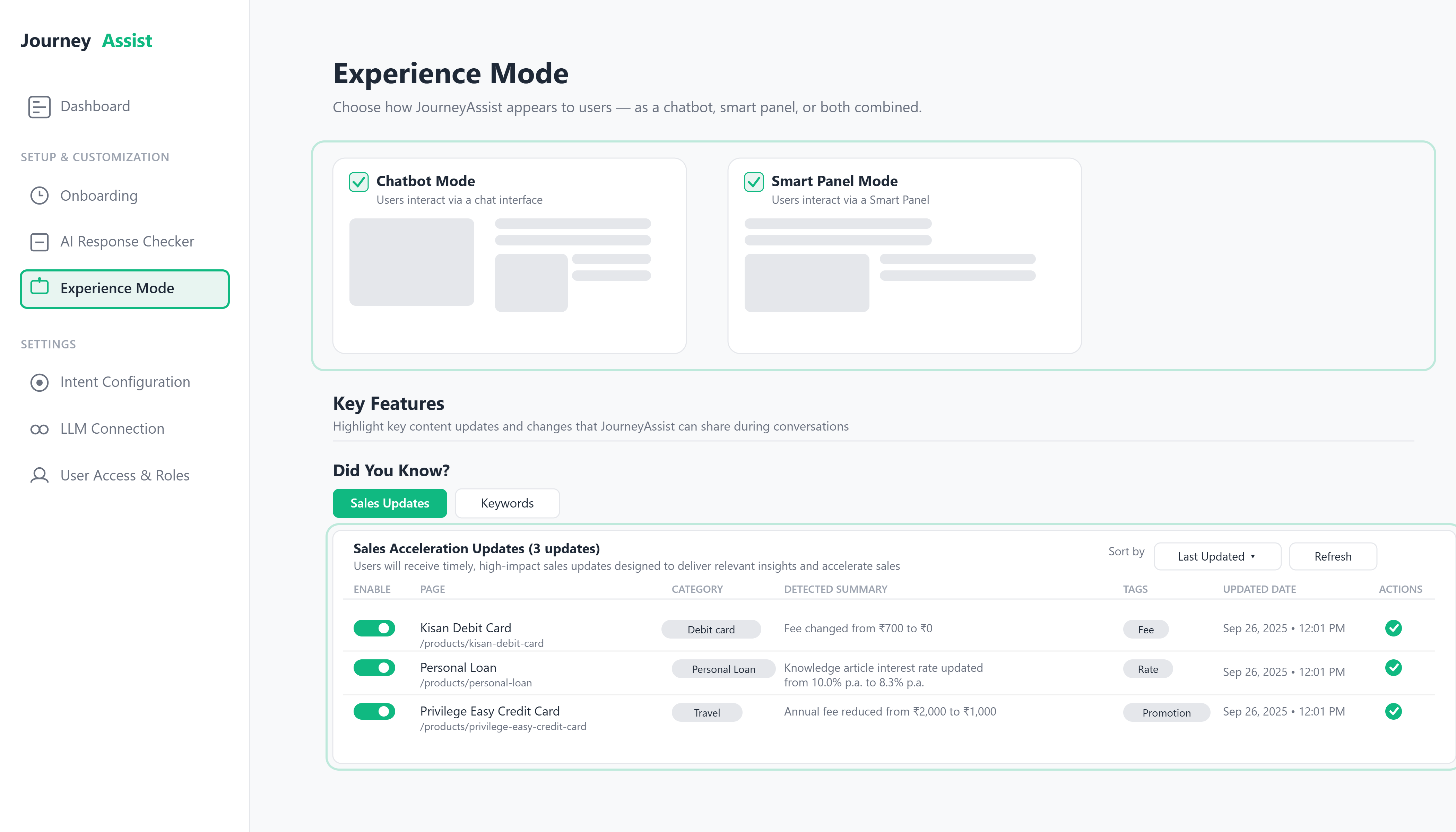
After choosing the Chatbot Mode or the Smart Panel mode experience, the brand styling settings for the selected one will open up. Here you can either extract the website's theme to match it or cutomize on your own by defining the colors, fonts and appearance. You can also confirm it in the adjacent panel with the help of the live preview.
Enhanced Monitoring Capabilities
Widget Appearance
- Widget Size: Adjustable dimensions and responsive behavior
- Animation Settings: Enable/disable transitions and effects
- Position Controls: Precise placement options (Bottom-left or Bottom-right)
- Custom Messaging: Personalized greetings and system messages
8. Content Source Configuration
Configure how JourneyAssist ingests and updates knowledge content:
Ingestion Sources
- Public web content: Automated scraping of specified websites
- Internal CMS platforms: Direct integration with content management systems
- Private APIs: Custom API endpoints for proprietary content
- Document uploads: Manual file uploads with automatic processing
Scheduled Content Refresh
- Manual: On-demand content updates
- Hourly: Continuous content synchronization
- Daily: Regular batch processing
- Custom schedules: Flexible timing based on business needs
9. AI Model Configuration
Advanced AI and machine learning settings:
LLM Provider Management
- Model Selection: Choose from multiple AI providers (OpenAI, Claude, etc.)
- API Configuration: Secure credential management
- Performance Tuning: Temperature, max tokens, and response parameters
- Fallback Providers: Redundancy for high availability
- Usage Monitoring: Track API calls and costs
10. Notification & Alerting Settings
Ensure prompt awareness of system events and issues:
Alert Configuration
- Email alerts: LLM errors, API failures, security incidents
- Slack/Webhook integrations: DevOps tool integration
- User session timeouts: Engagement optimization warnings
- Performance thresholds: System health monitoring
Notification Types
- System Status: Uptime and availability alerts
- Content Updates: High-impact content change notifications
- User Activity: Engagement and interaction insights
- Security Events: Authentication and access monitoring
11. Consent & Compliance Configuration
Manage user consent and regulatory compliance:
Consent Management
- Consent prompt customization: Personalized privacy notices
- Event-level consent: Granular tracking permissions
- Data retention rules: Compliance with regional regulations
- Audit trails: Complete user consent history
Compliance Features
- GDPR compliance: European data protection requirements
- CCPA support: California privacy act compliance
- Custom regulations: Flexible compliance framework
- Data export: User data portability options
Prerequisites
- Required Roles: Platform Admin or Configuration Manager
- System Access: Administrative dashboard privileges
- Technical Knowledge: Basic understanding of web technologies and AI concepts
- Security Clearance: Appropriate organizational permissions
Best Practices
- Test configurations in Developer Preview mode before production deployment
- Document all changes for audit and rollback purposes
- Monitor performance impacts after configuration updates
- Regular backup of configuration settings
- Staged rollouts for major configuration changes
Troubleshooting
- Configuration not saving: Check user permissions and session validity
- AI features not working: Verify API credentials and model availability
- Content not updating: Review ingestion schedules and source accessibility
- Performance issues: Monitor system resources and adjust rate limits
This comprehensive configuration guide ensures JourneyAssist operates optimally while maintaining security, compliance, and user experience standards.
JourneyAssist integrates enterprise-grade data governance practices to ensure that data is collected, stored, and processed with integrity, traceability, and accountability. Governance is enforced across the entire data lifecycle—from ingestion to export—with controls for classification, access, auditing, and sharing.
Data Classification Guidelines
JourneyAssist applies consistent classification rules to label data based on sensitivity, usage permissions, and retention policies.
Classification Tiers
| Tier | Description |
|---|---|
| Public | Non-sensitive data (e.g., anonymized usage statistics) |
| Internal | Operational metadata not exposed to end users |
| Confidential | User session data, identity fields, model-generated responses |
| Restricted | Personally Identifiable Information (PII), consent logs, regulatory-sensitive records |
Labeling Mechanism
Each field in JourneyAssist’s event schema and storage is tagged with a classification label that determines:
- Encryption & masking behavior
- Visibility in reports
- Export and API access restrictions
Data Handling by Classification
- PII fields are encrypted in transit and at rest using AES-256 and TLS 1.2+
- Restricted data is access-controlled and excluded from non-admin exports
- Internal metadata is visible only to whitelisted support or compliance users
These rules ensure sensitive data is never mishandled, even during debugging or analytics activities.
Access Auditing & Logging
To ensure transparency and compliance, all data access—by users or systems—is logged with contextual metadata.
Logged Activities
- User logins, role changes, flow executions
- Session data access, record updates
- Each log includes: IP, timestamp, role, and action type
Audit Reports & Alerts
- Reports filterable by classification level, user role, or record ID
- Suspicious activity (e.g., mass exports, rapid deletions) triggers real-time alerts
- Supports audit trails for compliance with GDPR and SOC 2
Third-Party & API Access Controls
JourneyAssist enforces strict access boundaries for external systems:
- Tokenized API keys with scoped permissions and rate limits
- Sandboxed integrations reviewed periodically
- Access expiration and activity-based revocation policies
Data Sharing Controls
Export Restrictions
- Exports can be filtered by classification or specific tags
- Export operations may require multi-factor authentication (MFA)
- Admins can enable approval workflows for sensitive data extractions
Partner Data Filters
When integrating with third-party systems (e.g., CRMs, support tools):
- Only pre-approved fields are shared
- Restricted or PII fields are masked or excluded
Anonymization Options
Analytics exports can be auto-tokenized to remove or scramble personal identifiers without losing trend insights.
Governance at Scale
JourneyAssist’s data governance architecture is designed to:
- Scale with your enterprise deployment
- Meet global compliance standards (GDPR, etc.)
- Provide clear auditability and fine-grained access control
- Keep stakeholders accountable with traceable, transparent data flows
Overview
This section is designed to help new users, administrators, and implementation teams onboard and begin using JourneyAssist efficiently. It includes:
- How to access the JourneyAssist Admin Console
- Prerequisites for initial setup
- A walkthrough of key configurations and platform usage patterns
JourneyAssist blends guided flows, AI-driven assistance, and campaign orchestration to deliver real-time value across digital journeys.
It offers a comprehensive entry point tailored for multiple roles, ensuring:
- Foundational setup is streamlined
- Users are quickly familiarized with key modules
- The platform is scalable across industries and user volumes
Prerequisites
System Requirements
- A modern web browser: Chrome, Firefox, or Edge
- Stable internet connection with JavaScript enabled
Access Credentials
- Enterprise login via SSO or OIDC
- Admin privileges for full configuration access

Important: Ensure you have admin privileges and enterprise credentials before starting the setup process.
Step-by-Step Instructions
1. Logging into JourneyAssist
- Navigate to the Admin Console URL (provided during deployment)
- Authenticate using enterprise credentials (SSO/OIDC supported)
- Post-login, you’ll land on the Dashboard, displaying:
- Usage metrics
- Quick access modules
- System health indicators
2. Navigating the Interface
Main Sidebar Modules
| Module | Description |
|---|---|
| Dashboard | Displays KPIs, usage analytics, LLM consumption, and operational insights across JourneyAssist modules. |
| Onboarding Sites | Allows users to add new websites, verify domains, and configure initial setup for JourneyAssist deployment. |
| Interaction Mode (UI) | Enables selection of deployment type – Floater, Chatbot, or Embedded widget – as per platform needs. |
| LLM Connection | Connects with Public LLMs via APIs (e.g., OpenAI), Self-hosted / Private LLMs, or Custom Proprietary LLMs (BYOL). |
| Look & Feel | Enables customization of widget/chatbot appearance – brand color, logo, text color, border radius, and advanced CSS overrides. |
| Content Intelligence Center | Central module to configure prompts, map user intents to backend actions, and enrich responses with contextual data. |
| Discovery (Intent Recognition) | Detects and classifies user intents from queries using NLP and maps them to the correct backend workflows or knowledge sources. |
| Behavioral Intelligence Controls | View automatically discovered journey stages, behavioral archetypes, friction patterns, and conversion signals generated by the system. |
| Adaptive Learning Monitor | Track how intervention outcomes feed back into the system to improve prediction accuracy and intervention effectiveness over time. |
| Audit Logs | Tracks user and admin activities across the platform, including query handling, API errors, and configuration updates. |
| Reports | Provides usage metrics, LLM response stats, success/failure rates, and exportable data for internal analysis. |
| Team Access | Manages users, roles, and access levels for admins, editors, and viewers, with fine-grained permission control. |
| Configuration |
|
| Integrations |
|
Section 1: Onboarding Workflow
The onboarding process involves four key steps to enable JourneyAssist on your website.

Note: JourneyAssist begins learning user behavior immediately after deployment. Content ingestion enhances response grounding, but journey discovery, friction detection, and predictive intelligence operate automatically without requiring manual configuration.
Step 1: Connect Content API
Purpose: Enable JourneyAssist to access and learn from your existing website content via your CMS or structured content APIs.
- Supported formats: REST, GraphQL, Headless CMS APIs
- Typical content types: Product pages, FAQs, terms & conditions, help docs
- Frequency: Supports scheduled or real-time sync
- Output: Structured, searchable content in JourneyAssist's Indexing Engine
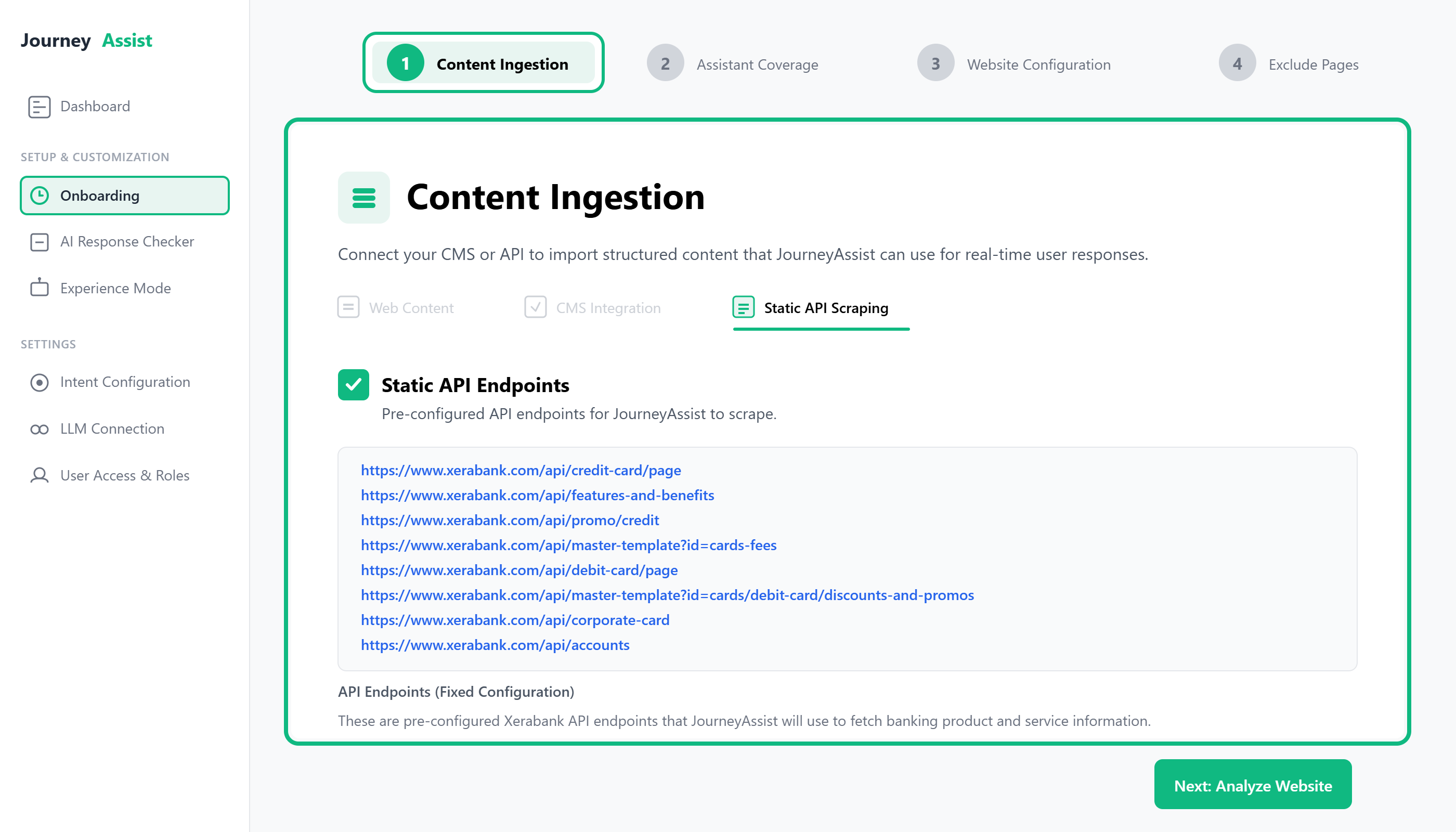
Path: Onboarding > Content Ingestion > API Connector
Note: Scraping is optional and used only in non-API environments.
Step 2: Define Assistant Coverage
Purpose: Classify the ingested content into segments relevant to user journeys and JourneyAssist's response model.
Common segments include:
- Product Information
- Pricing & Eligibility
- Application Workflows
- Support & FAQs
- Legal Disclosures
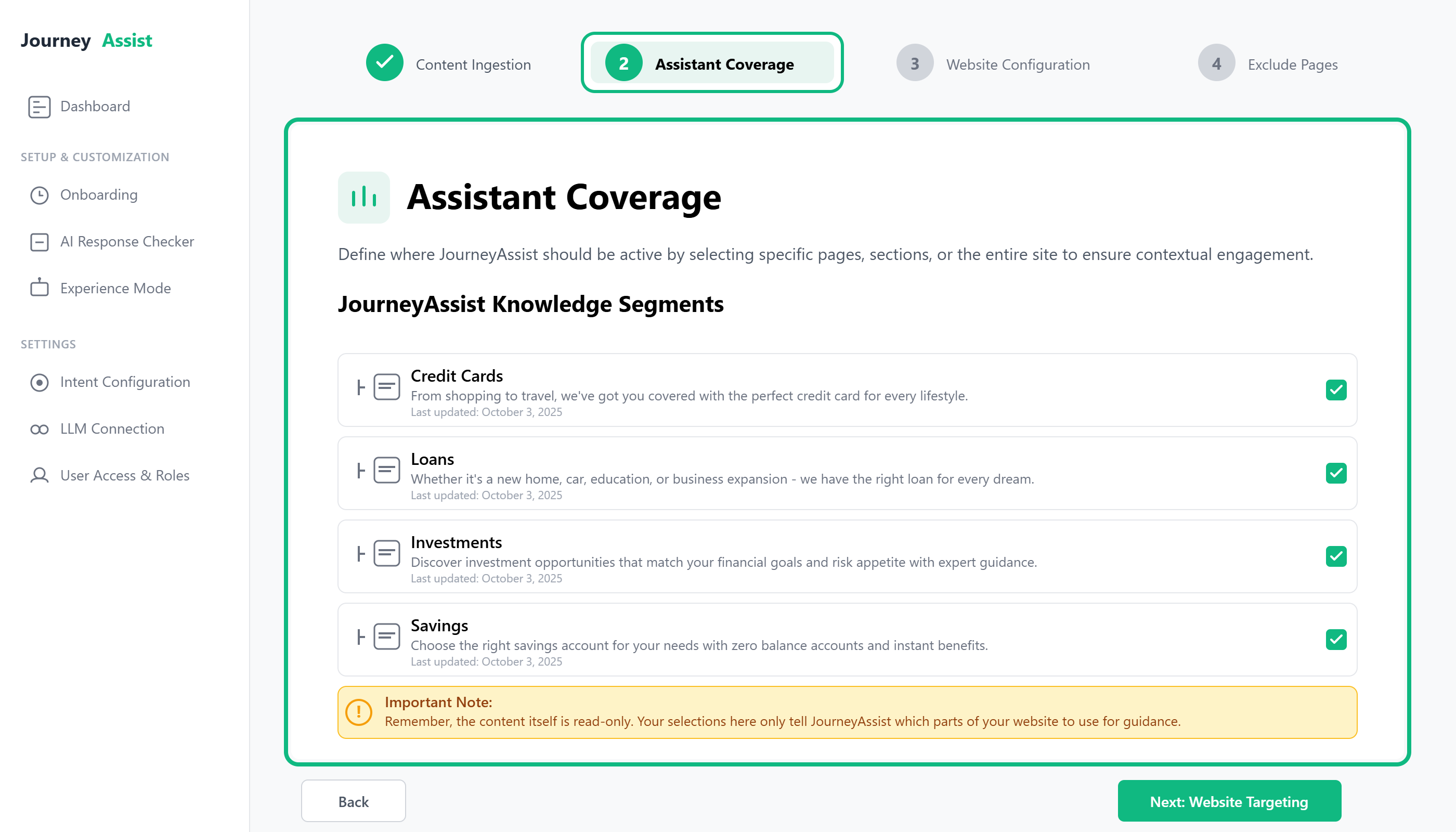
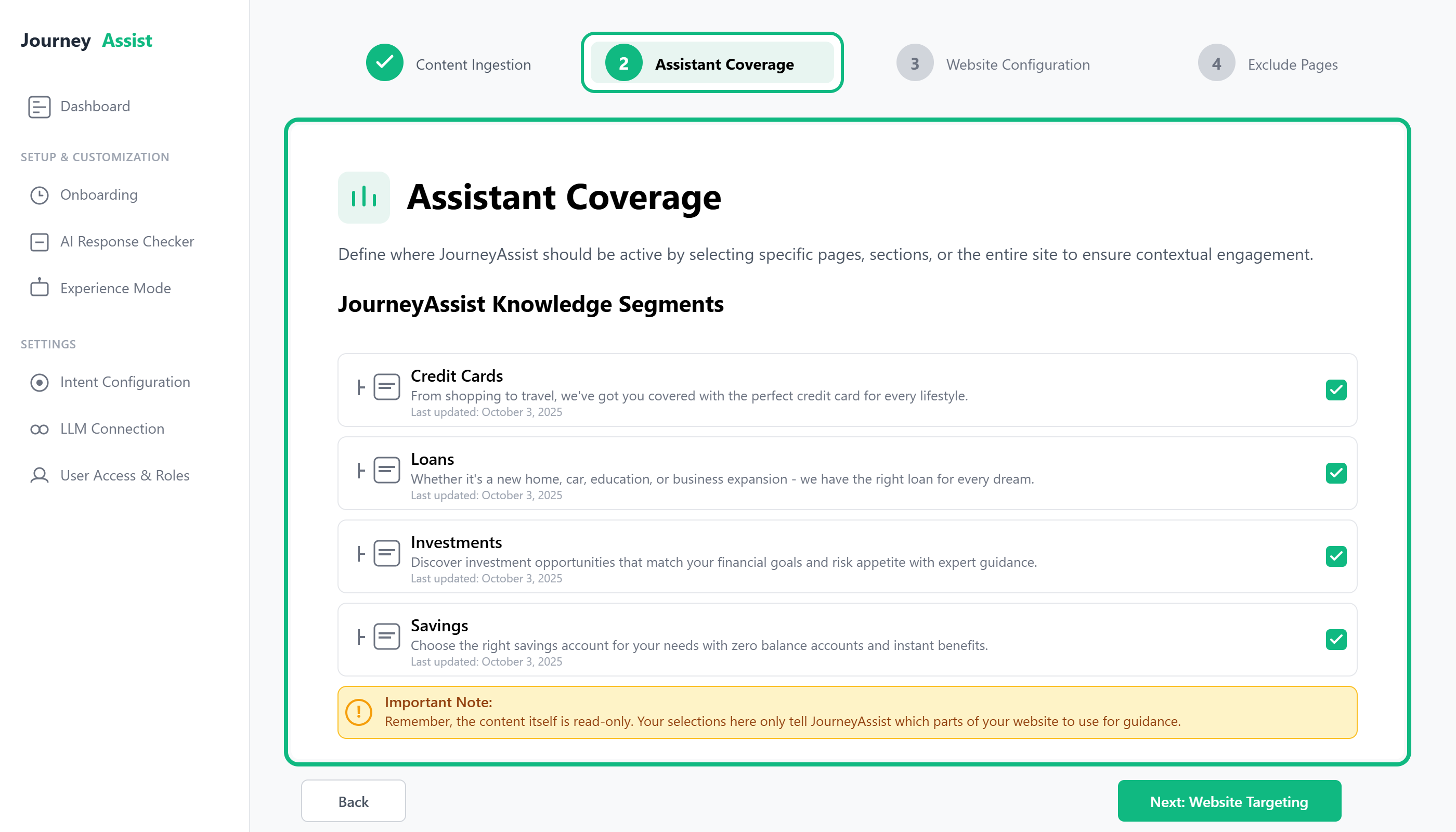
Path: Onboarding > Assistant Coverage
Step 3: Configure Website Targeting
Purpose: Define where, when, and how JourneyAssist should activate across your website.
Target by:
- URL rules (e.g., contains /apply, equals /home)
- Page types (home, product, checkout, support)
- User behavior (scroll %, time on page, inactivity, exit intent)
Customize:
- Widget position (bottom left or right)
- Activation triggers (automatic, on-click, time delay)
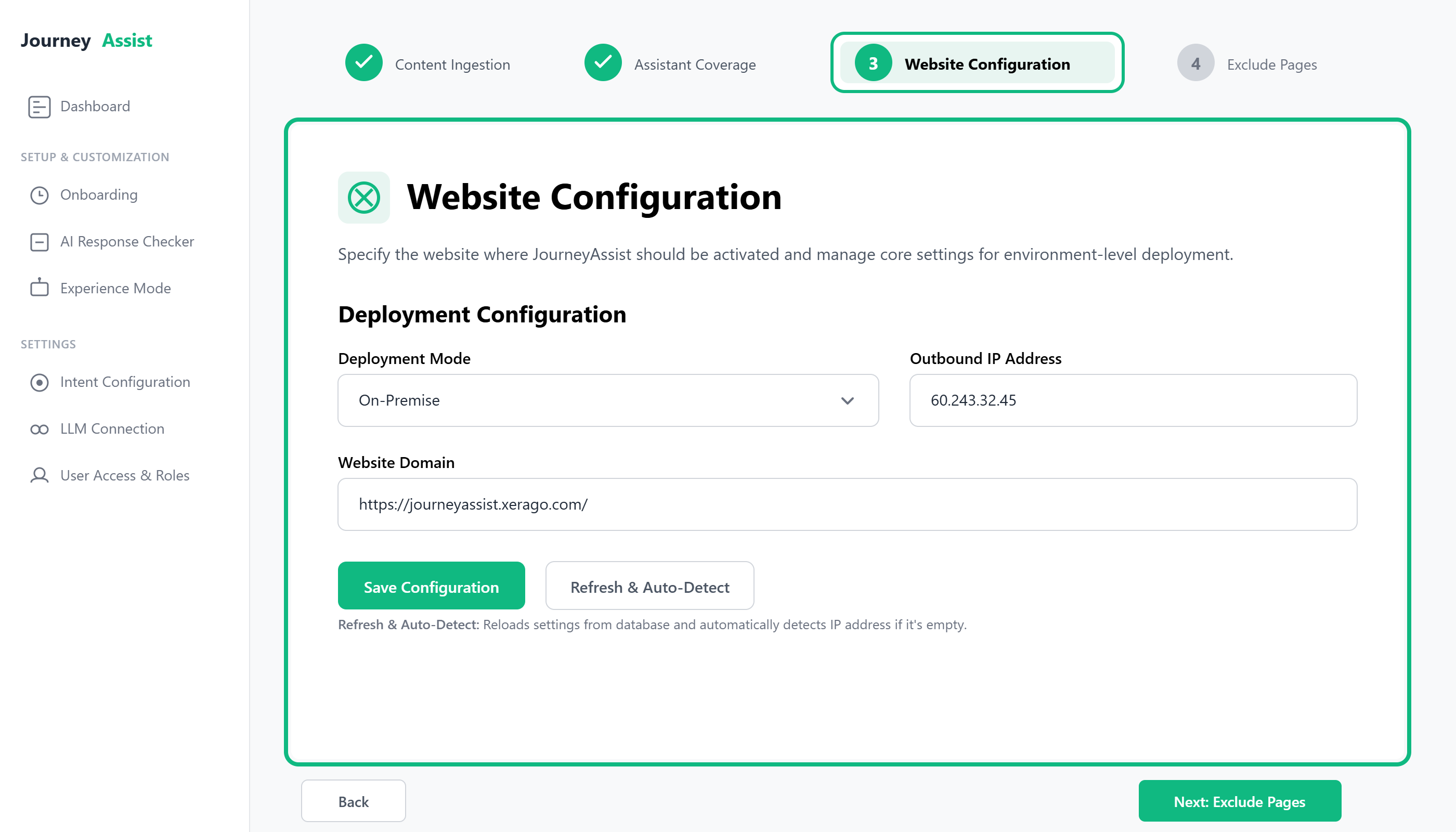
Path: Onboarding > Website Configuration
Step 4: Exclude Pages
Purpose: Enter specific pages where JourneyAssist should be turned off - such as temporary campaigns, landing pages, or promotional flows where it may not be relevant.
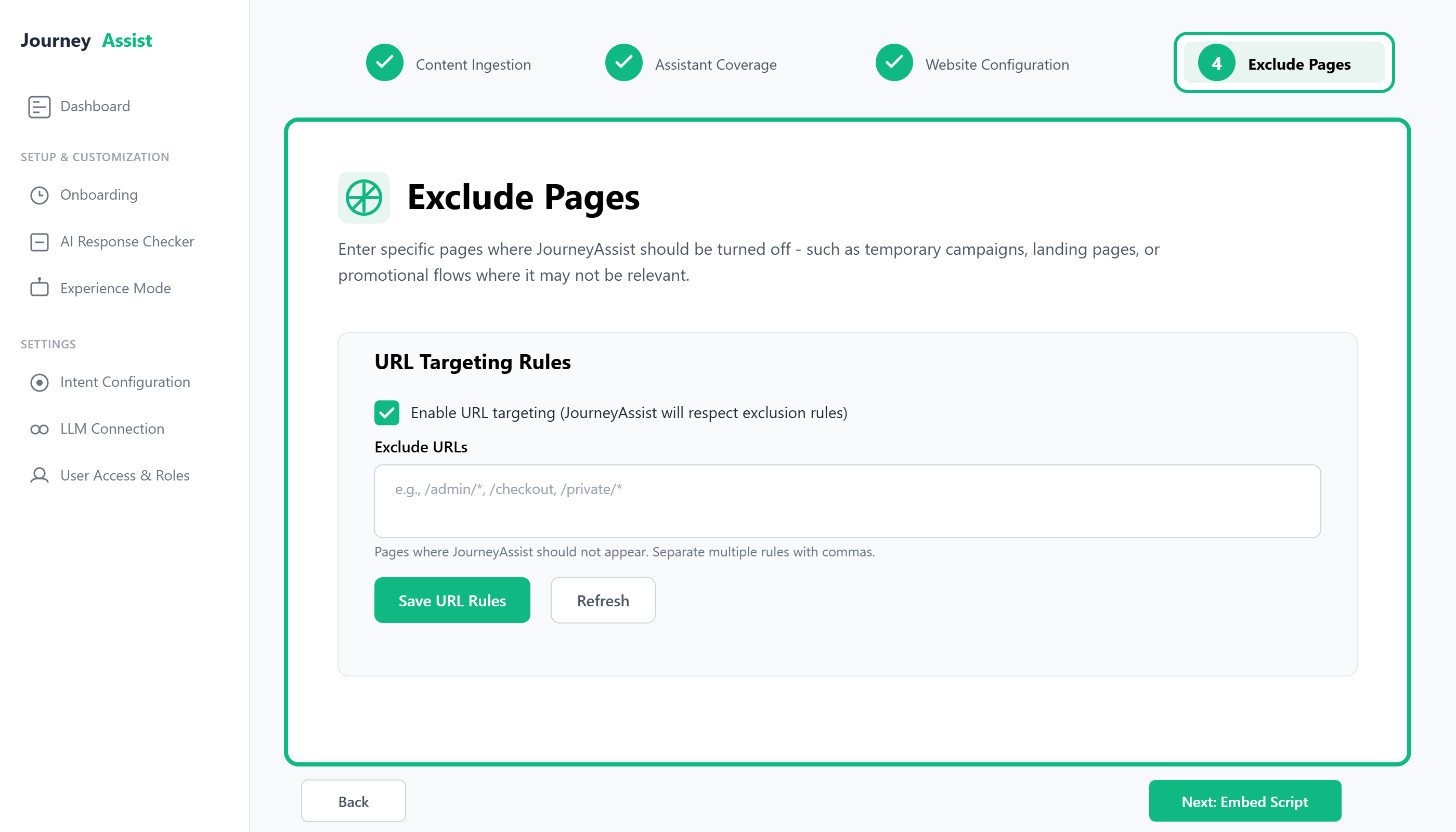
Step 5: Embed JourneyAssist Script
Purpose: Deploy JourneyAssist on your live website by embedding a lightweight JavaScript snippet.
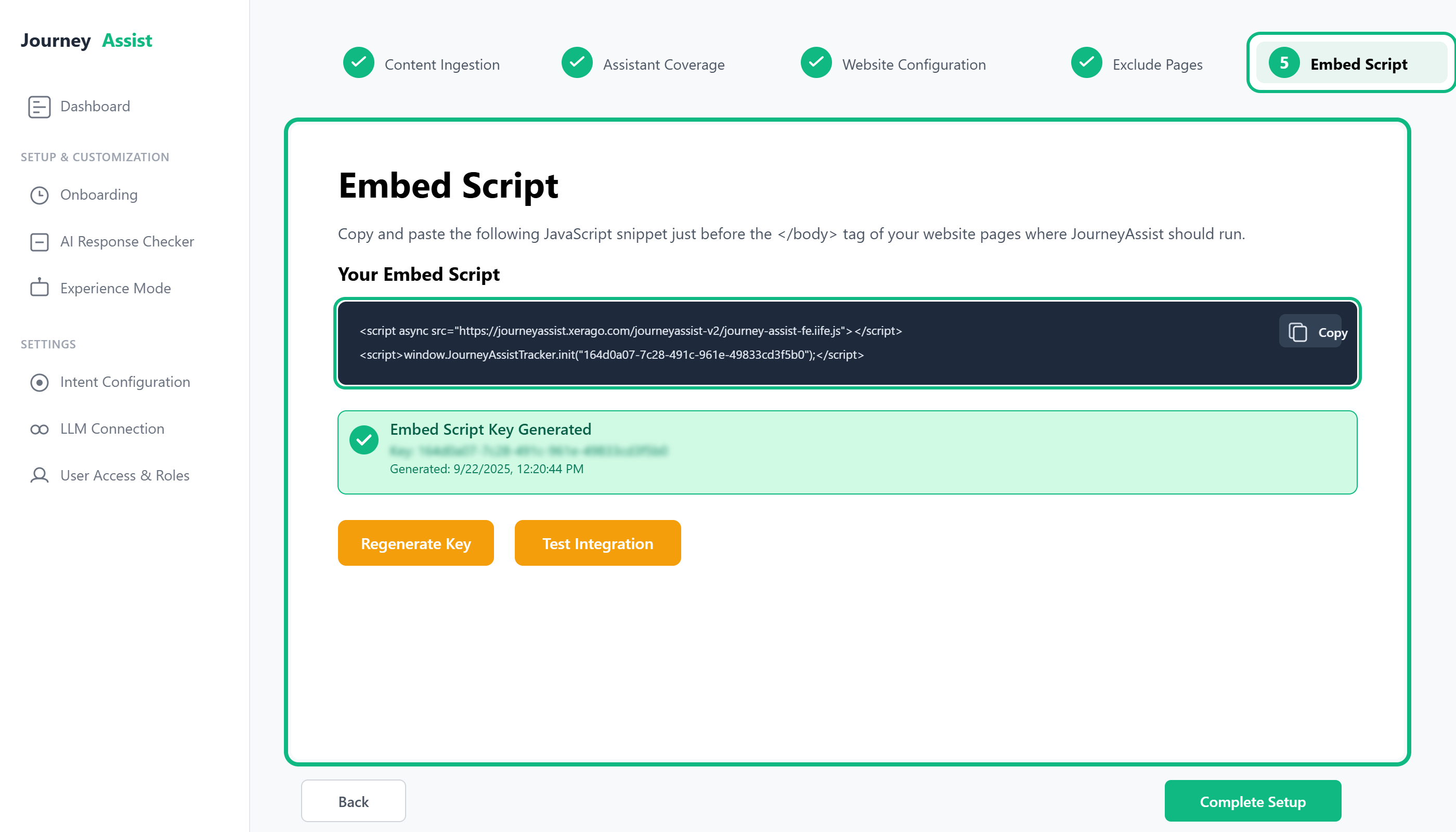
After completing targeting and content setup, you will receive a script like:
<script src="https://cdn.journeyassist.ai/init.js" data-token="your-site-token"></script>
Paste the script into your site’s <head> section or deploy via a tag manager (e.g., GTM, Tealium).
Path: Onboarding > Installation > Generate Embed Script
Section 2: Post-Onboarding Configuration
Once onboarding is complete, configure the following elements to fully enable JourneyAssist functionality.
UI Mode Setup
Choose your preferred assistant interface:
- Chatbot Mode – Full conversational experience
- Floater Mode – Lightweight contextual prompts
- Voice Mode (optional) – Enables voice interaction on supported devices
Customize branding, icons, positioning, and interaction rules via the Admin Console.
LLM Integration
JourneyAssist supports a range of large language model (LLM) connections:
- Public Cloud LLMs – Connect via API to providers like OpenAI, Claude, Perplexity
- Self-Hosted / Private LLMs – Deploy models such as Mistral, Qwen, LLaMA2 within your infrastructure
- Custom LLMs – Plug in proprietary, fine-tuned models via the LLM Router
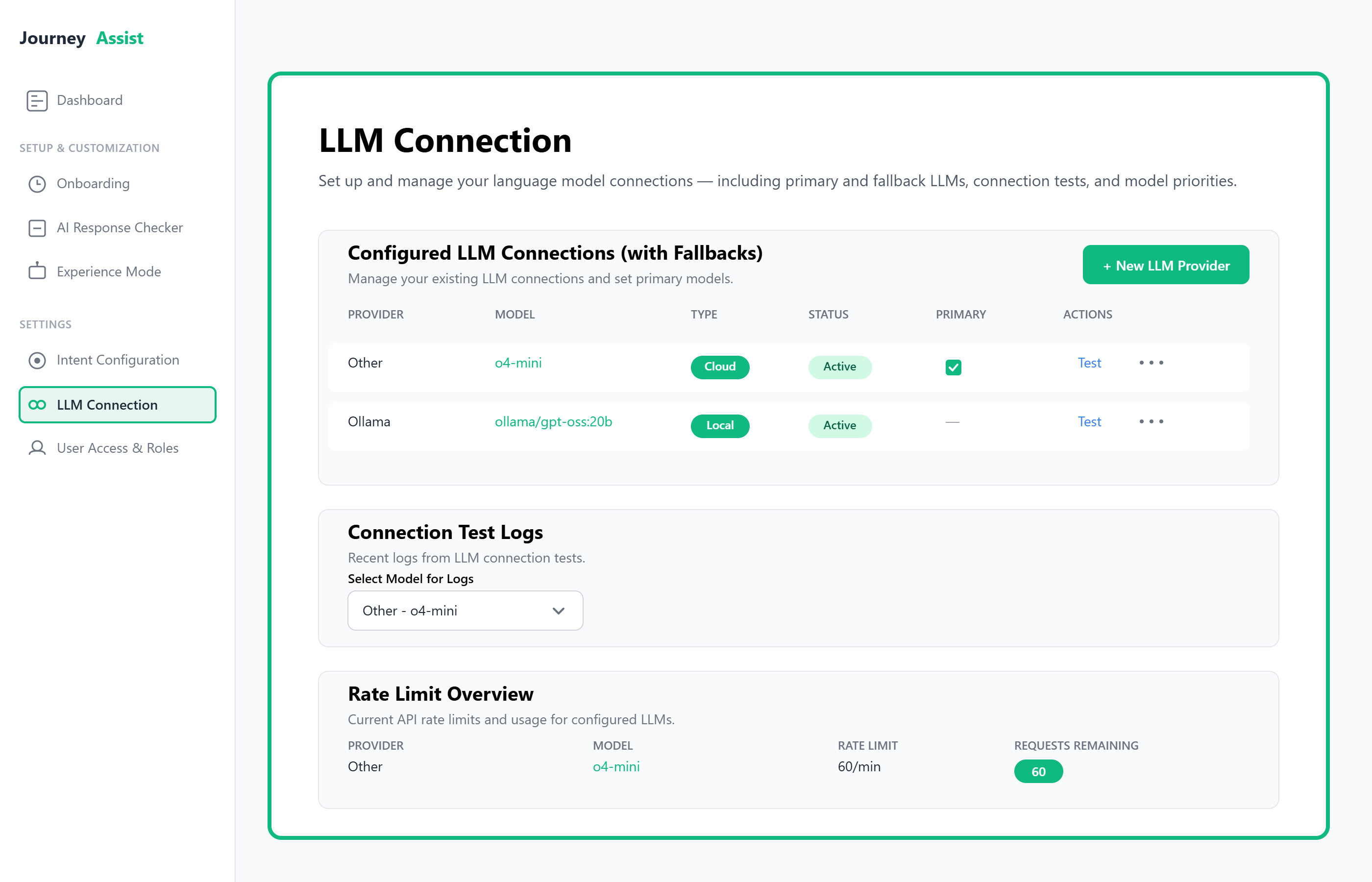
Path: LLM Router > Add Connection
Content Intelligence Center
Manage all ingested content:
- Validate segments
- Configure update schedules
- Apply content filtering rules
Accessible via: Content Intelligence > Manage Content
Team Access
Define user roles and permissions:
| Role | Capabilities |
|---|---|
| Admin | Full control over configuration and connections |
| Editor | Manage content, UI, and campaigns |
| Viewer | View analytics and reports only |
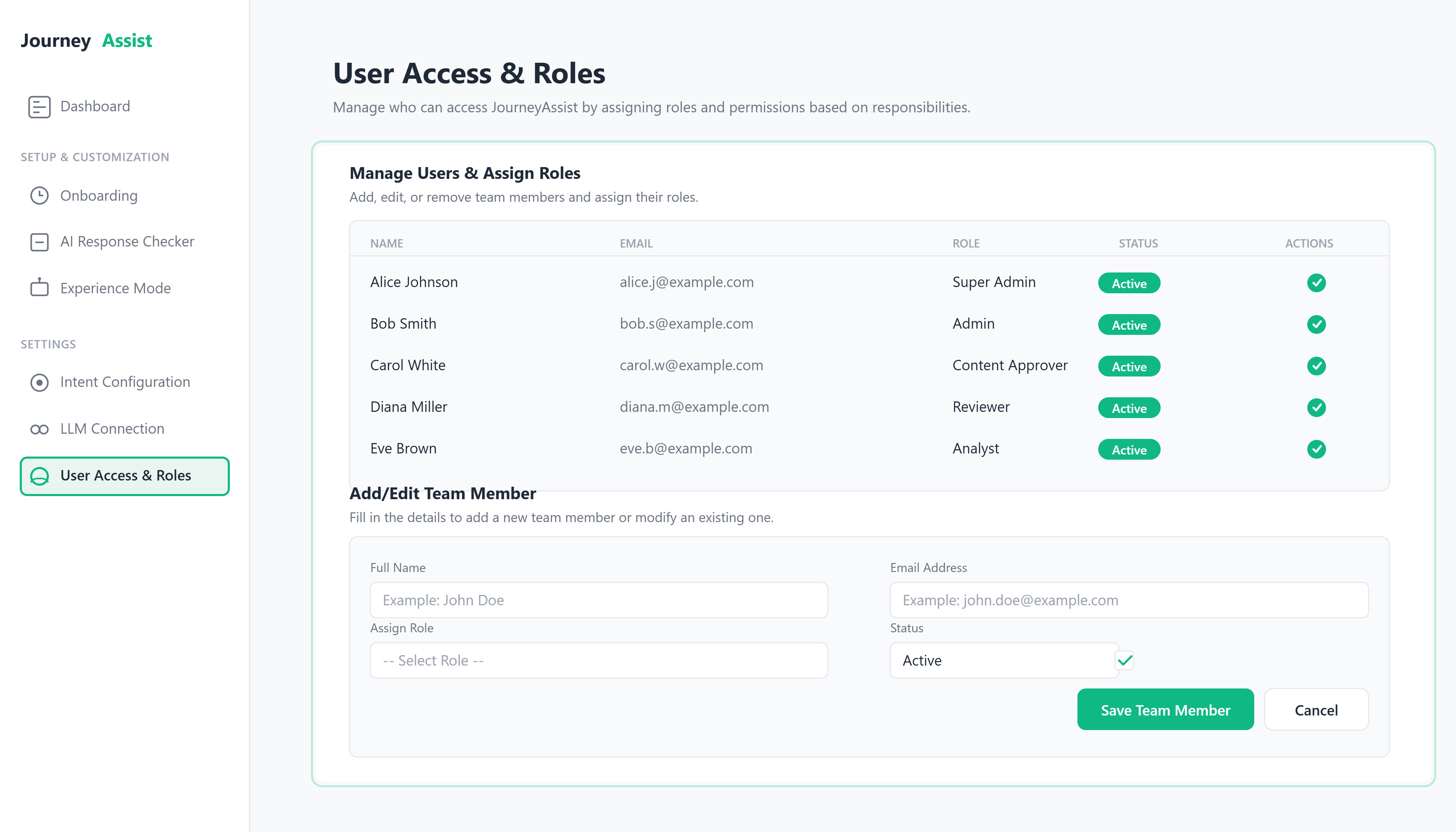
Path: Admin Console > Team Access
Real-Time Intent Recognition
Enable JourneyAssist to interpret user behavior and respond intelligently:
- Configure session tracking
- Map behavioral signals to defined intents
- Define actions: FAQs, smart nudges, escalation, product recommendations
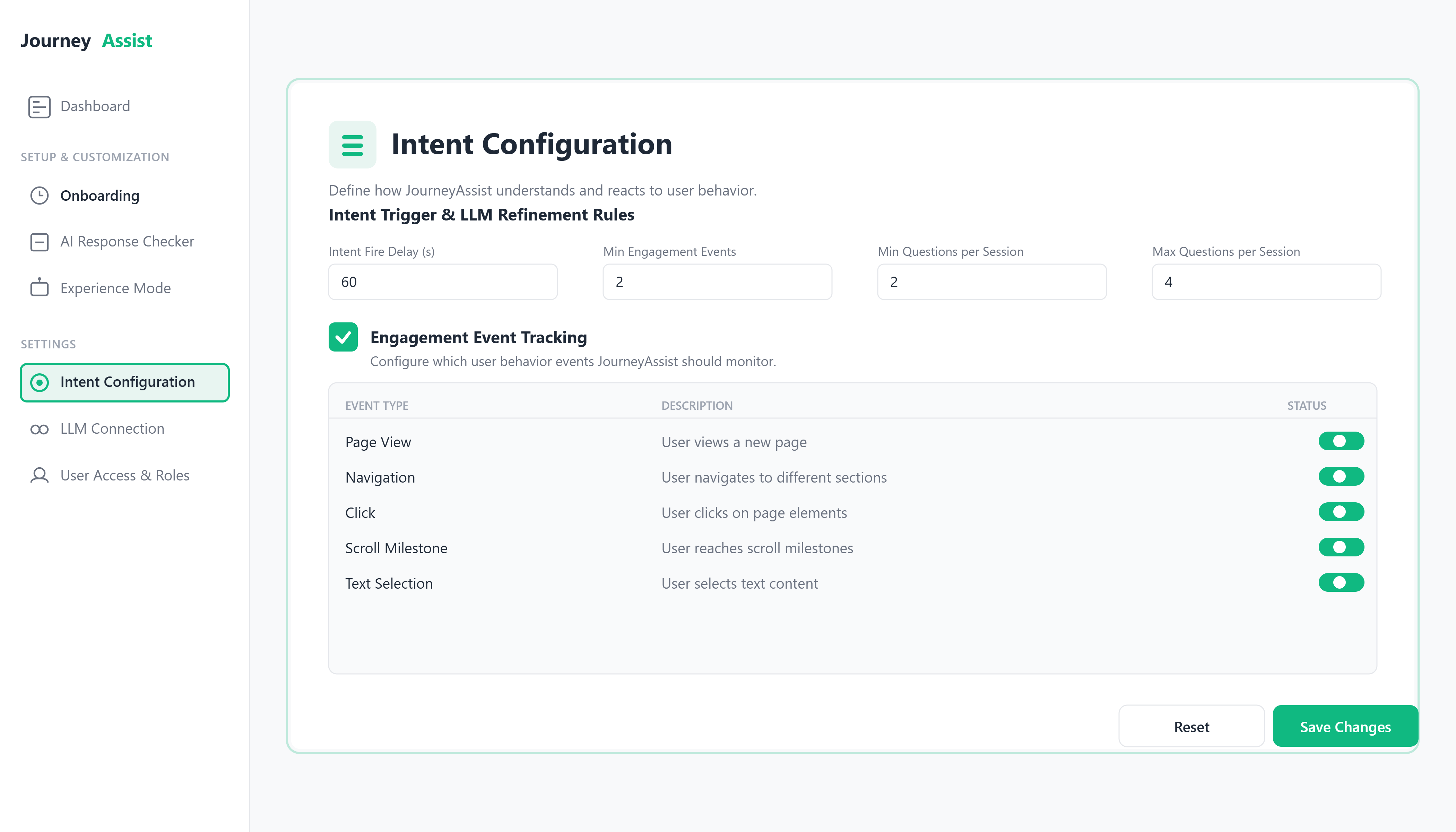
Path: JourneyAssist Realtime > Intent Engine
Use Cases Enabled
| Use Case | Description |
|---|---|
| Product Discovery Chatbot | Helps users explore services or product catalogs through guided queries and dynamic filters. |
| Support Q&A Assistant | Surfaces help content instantly using LLM/NLU-powered resolution across FAQs, documents, and support tickets. |
| Journey-Based Onboarding | Automates contextual user onboarding flows for first-time users, existing customers, or based on roles/goals. |
| Trigger-Based Campaigns | Launches real-time nudges, banners, or CTAs based on event-driven user behavior or specific page conditions. |
| Transactional Query Handling | Supports real-time response to user queries tied to transactions (e.g., order status, policy details, ticket ID). |
| Search Result Optimization | Enhances in-site search by re-ranking or auto-resolving queries using LLM-based semantic understanding. |
| Multi-Site LLM Management | Enables admins to configure, monitor, and route LLM responses differently across multiple web properties/domains. |
| Role-Based Experience Customization | Dynamically changes prompt flows, UI components, and allowed actions based on user role/type. |
| Smart Suggest & Auto-fill | Predicts and pre-fills responses, filters, or forms based on previous inputs and user history. |
| Intent Routing to APIs | Detects user intent and dynamically routes it to internal APIs, backend services, or external systems for execution. |
| Fallback to Human Agent | Provides controlled escalation paths to live support agents or ticketing systems when confidence is low. |
Remember: These use cases can be combined or customized further depending on your business goals and integration strategy.
Release notes
Admin Console v1 for centralized platform control
Support for local LLM integrations
Role-Based Access Control (RBAC) for secure user management
Platform-wide audit logging for activity tracking
Strengthened backend control and security guardrails to scale with enterprise environments
Real-time Intent Detection powered by LLMs
First Banking Use Case deployment for enterprise workflows
Support for industry-agnostic scenarios to enable cross-sector scaling
“Did You Know?” high-impact informational prompts for proactive engagement
Minimum Viable Product (MVP) — core platform foundation released
Overview
Implementing JourneyAssist involves coordinated integration across websites, mobile apps, and backend systems. This guide outlines the step-by-step instructions to deploy JourneyAssist seamlessly across your digital ecosystem — ensuring real-time engagement and intelligent assistance across all user touchpoints.
Implementation Methods
JourneyAssist supports three primary integration methods:
- Data Layer Integration
- Web SDK Integration
- Mobile SDK Integration
Note: Each method can be implemented independently or combined, based on your platform's architecture and business needs.
For faster go-live, start with Web SDK and expand to API/Mobile SDK later.
Step-by-Step Instructions
Step 1: Admin Portal Access
Action
- Log in to the JourneyAssist Admin Console using the provided admin credentials.
- On login, the Dashboard shows live health (interactions, latency, LLM status, confidence). Use this to confirm the environment is healthy before any changes.
- If you are in a Demo/Staging environment, a banner indicates limited features—safe for configuration and UAT.
Step 2: CMS Integration (Data Ingestion)
Prerequisites
| Requirement | Description |
|---|---|
| CMS Access | Full access to your CMS console |
| Compatibility Check | JourneyAssist supports Drupal 8+ and select others |
Configuration Steps
- Navigate to CMS Integration in the Admin Console.
- Provide the following:
- CMS API Endpoint
- API Key or Auth Token
- Content directory paths
- Confirm successful connection test via Admin Console.
- Initiate content ingestion.
Validation Checkpoints
- Integration status shows “Connected”
- No ingestion errors in Admin Console logs
Note: For headless CMS setups, use API-based ingestion instead of scraping.
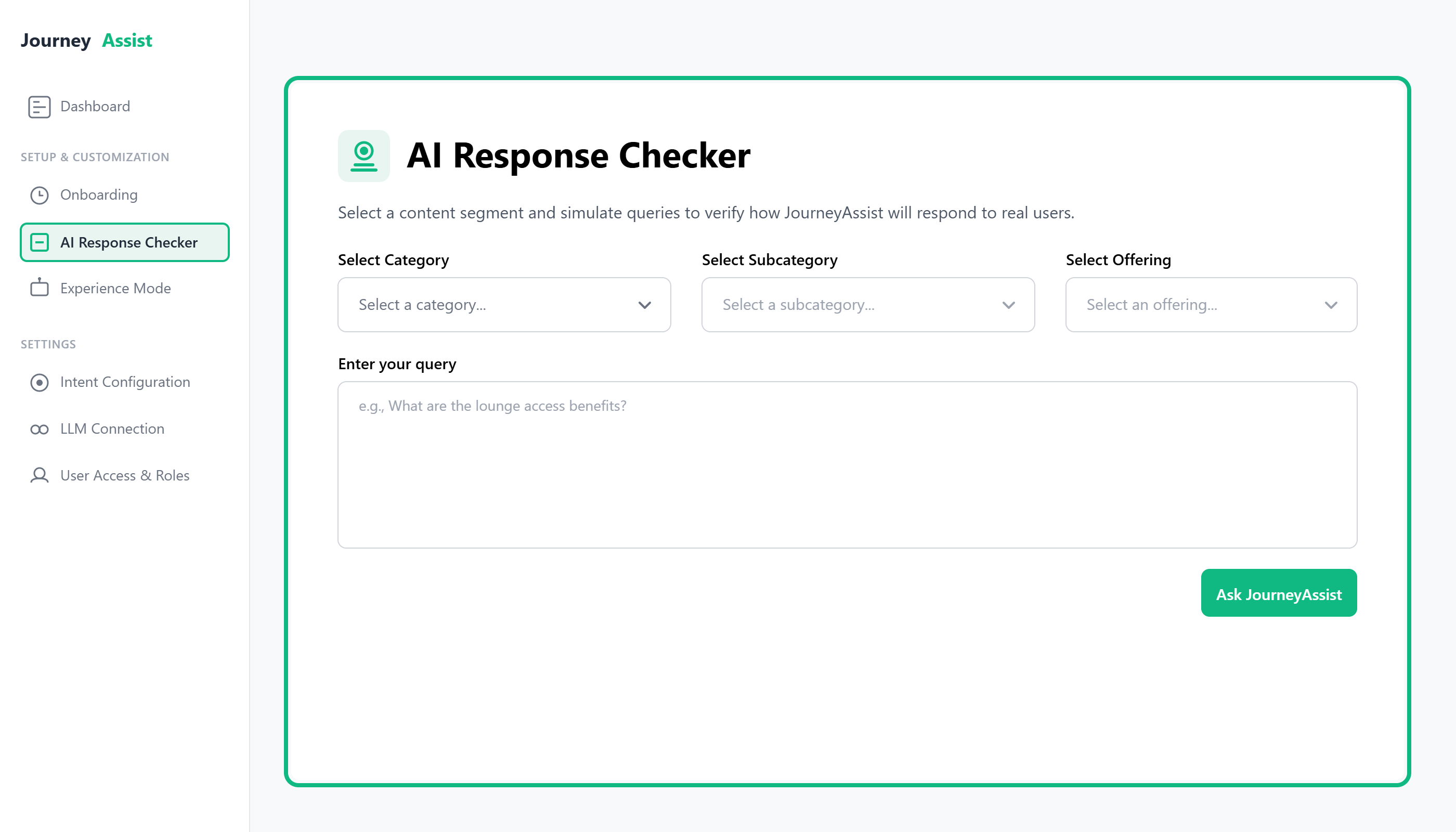
- After ingestion, open AI Response Checker and pick a content segment (e.g., “Products” or “Services”) to preview answers; this validates that content is correctly mapped and answerable.
- Use Content Segments (e.g., Product/Service Information, Pricing & Plans, Purchase/Signup Workflows, FAQs, Policies) to organize content for better precision in answers.
Step 3: Website Scraping (Alternate Content Ingestion)
Prerequisites
| Requirement | Description |
|---|---|
| Public Access | Website must be publicly accessible (including images, PDFs, etc.) |
| Firewall Whitelisting | Whitelist JourneyAssist scraper IPs from Admin Console |
| WAF Configuration | Modify WAF policies to bypass rate limits and suppress false positives |
Configuration Steps
- In the Admin Console, choose Website Scraping under Content Ingestion.
- Enter URLs or URL patterns
- Start ingestion.
Validation Checkpoints
- Admin Console logs show no scraping errors
- Ingested content reflects in the preview panel
Use Preview in AI Response Checker to verify scraped pages answer typical user questions before enabling on live pages.
Step 4: Web SDK Integration
Prerequisites
| Requirement | Description |
|---|---|
| Admin Console Access | Ability to copy installation script |
| Website Access | Permission to edit target web pages |
Configuration Steps
- In the Admin Console, go to the Installation Guide.
- Copy the JavaScript snippet.
- Paste it just before the closing tag on all relevant website pages.
Validation Checkpoints
- Widget appears on the site
- Admin Console shows active user sessions
- In Onboarding → Assistant Coverage, define where the widget is active (e.g., key conversion pages like /products, /plans, /pricing, /bookings, /services)..
- In Exclude Pages, block sensitive paths (e.g., /checkout, /admin) so the assistant only appears where it adds value.
- Under Experience Mode, choose Chatbot, Smart Panel, or Both and match branding (colors, fonts, logo) so it blends with your site.
- Use Intent Configuration to set triggers (scroll %, dwell time, idle, exit intent) and refinement question count to keep prompts short and helpful.
Step 5: Mobile SDK Integration
Prerequisites
| Requirement | Description |
|---|---|
| Mobile App Repository Access | Access to source code of iOS/Android application |
| SDK Token | Retrieved from Admin Console |
Configuration Steps
For iOS
- Install SDK via CocoaPods
- Add initialization code in AppDelegate
- Define custom event triggers (e.g., on login or on help button)
For Android
- Install SDK via Gradle
- Add initialization script in MainActivity or Application class
- Configure user attributes and session settings
Validation Checkpoints
- Widget launches from expected UI (e.g., help button)
- Session data visible in analytics
- User journeys are logged accurately
- Mirror Coverage/Exclusions and Intent Triggers from web to mobile for a consistent journey (e.g., show Smart Panel only on product detail screens).
- Reuse branding tokens (color/typography) from the console so web and mobile share a consistent look.
Summary
| Integration Method | Best For | Deployment Time | Dependencies |
|---|---|---|---|
| CMS Integration | Structured content ingestion | Low | CMS access, API keys |
| Web SDK | Website user interactions | Very Low | Web page edit access |
| Mobile SDK | App-based interaction journeys | Moderate | App dev team collaboration |
- For LLM setup, connect your preferred models under LLM Connection and set fallback order (drag-and-drop). If one model is down, JourneyAssist fails over automatically.
- Use the Dashboard post-enablement to monitor latency, confidence, interactions, and quickly spot issues.
Post-Integration Configuration
- Experience Modes & Branding: Align widget look & feel with brand; enable Chatbot, Smart Panel, or Hybrid.
- Intent Configuration:
- Set when to engage (scroll %, dwell time, exit intent).
- Limit refinement to 2–3 quick questions to reduce friction.
- Coverage & Exclusions: Target relevant pages; exclude sensitive or low-value paths.
- AI Response Checker: Validate sample questions per product, service, or use case category; tune wording pre-launch.
- LLM Connection & Fallbacks: Choose primary model and failovers; test with “Test Connection.”
- Roles & Governance: Assign Admin/Reviewer/Analyst; enable SSO/LDAP if required.
- Monitoring: Confirm Dashboard signals (interactions, latency, model health) are stable.
Go-Live Checklist
- Admin Console is accessible; Dashboard shows healthy status
- Content ingestion (CMS/API/Scrape) complete; Response Checker answers are accurate
- Coverage set; Exclusions applied for sensitive paths
- Web/Mobile SDKs installed; widget visible in target surfaces
- Branding and Experience Mode configured
- Intent triggers tuned; refinement limited to 2–3 questions
- LLM primary + fallbacks connected and tested
- Roles assigned; SSO/LDAP (if used) configured
- UAT scenarios passed in staging; promote to production
Operations & Support (after going live)
- Monitor: Watch latency, confidence, fallback rates daily in the Dashboard.
- Improve: Review top failed queries weekly; refine content segments or intents.
- Guardrails: Keep exclusions updated; verify consent/privacy banners, if applicable.
- Cadence: Bi-weekly tune-ups for the first month; monthly thereafter.
JourneyAssist provides robust built-in monitoring and alerting tools that empower administrators to:
- Maintain platform uptime
- Ensure optimal system health
- Detect and respond to anomalies proactively
- Monitor AI model performance and content intelligence
Monitoring is available across services, journeys, consent events, and SDK-level interactions—all accessible via the Admin Console > Monitoring section.
Monitoring Tools
| Tool Name | Metrics Tracked |
|---|---|
| System Dashboard | CPU & memory usage, request throughput, active sessions, latency |
| Journey Monitor | Real-time journey validation (Journey Started, Drop-offs, Conversions) |
| Consent Tracker | Consent banner loads, acceptance rates, opt-out trends |
| Audit View | Admin activity logs, login events, permission changes |
| SDK Insights | SDK initialization success/failure, session counts, engagement duration |
| Content Intelligence Monitor | Fragment performance, AI recommendation accuracy, content update status |
| Intent Recognition Tracker | Intent matching rates, fallback triggers, pattern effectiveness |
| LLM Performance Monitor | API response times, token usage, model availability, cost tracking |
| Team Activity Dashboard | User login patterns, role-based access usage, configuration changes |
Alert Setup
Threshold-Based Alerts
- High latency: >15s average over 5-minute windows
- Journey drop rate: Sudden spikes in user drop-offs
- CPU/Memory usage: Sustained usage >85%
- Content update failures: >10% failure rate in content ingestion
- AI model response time: >5s average response time
- Intent recognition degradation: <80% accuracy rate
Event-Based Alerts
- API outages or spikes in 5xx response codes
- Consent anomalies: Sudden spike in opt-outs or banner failures
- LLM provider failures: API timeouts or authentication errors
- Content intelligence issues: AI fragment generation failures
- Security events: Unauthorized configuration changes or suspicious login attempts
- Team access violations: Role permission breaches or unauthorized access attempts
AI-Powered Alerts
- Anomaly Detection: Machine learning algorithms detect unusual patterns in user behavior
- Predictive Alerts: Early warning system for potential performance degradation
- Content Performance Alerts: Notification when AI recommendations underperform baseline metrics
Notification Rules
- Alert Groups: Define who gets notified and for which issues
- Delivery Channels: Email, Slack, Microsoft Teams, or custom webhooks
- Actions: Alerts can be snoozed, acknowledged, escalated, or auto-resolved via webhook feedback
- Escalation Policies: Automatic escalation if alerts aren't acknowledged within defined timeframes
- Alert Correlation: Group related alerts to reduce notification noise
Advanced Notification Features
- Role-based Alert Routing: Different alerts for different team roles (Admin, Content Approver, Analyst)
- Severity-based Escalation: Critical alerts bypass normal channels for immediate attention
- Smart Grouping: Related alerts are bundled to prevent alert fatigue
- Custom Webhook Integration: Send alerts to external monitoring systems
Dashboard Integration
Unified Monitoring Dashboard
- Real-time System Health: Single pane of glass for all monitoring metrics
- Custom Dashboard Creation: Build role-specific monitoring views
- Alert Status Overview: Visual representation of all active and resolved alerts
- Performance Trending: Historical analysis with predictive forecasting
Compliance Monitoring
- Audit Trail Visualization: Visual timeline of all system changes and access events
- Compliance Report Generation: Automated reports for regulatory requirements
- Data Retention Monitoring: Track compliance with data retention policies
- Privacy Impact Assessment: Monitor consent and privacy-related metrics
Scalable & Transparent
JourneyAssist's monitoring stack is designed to scale with your deployment. It offers:
- Real-time observability across all system components
- Rapid root cause identification with AI-assisted diagnostics
- Full transparency into system behavior, user journeys, and security posture
- Intelligent alerting that reduces noise while ensuring critical issues are never missed
- Predictive insights to prevent issues before they impact users
- Comprehensive audit capabilities for compliance and security requirements
Whether you're operating a single site or an enterprise-wide deployment, JourneyAssist keeps your operations resilient and well-informed through intelligent monitoring and proactive alerting.
JourneyAssist is committed to protecting user privacy and ensuring transparency across all our data practices. This Privacy Policy outlines how we collect, use, store, and manage personal data on our platform, with a strong focus on privacy-by-design and compliance with recognized standards such as GDPR, SOC 2 Type II, and NIST SP 800-30.
1. Scope of This Policy
This policy applies to all interactions with JourneyAssist services and platform features.
2. Privacy-by-Design Commitments
We embed privacy at every step of the user journey. Our practices adhere to leading data protection and information security frameworks.
Core privacy goals:
- Ensure data is used only for stated purposes
- Empower users to control their data
- Maintain transparency around collection and use
- Help enterprises remain compliant with evolving global standards
Compliance Frameworks:

JourneyAssist aligns with GDPR, SOC 2 Type II, and NIST SP 800-30. These frameworks guide our data protection impact assessments (DPIAs), risk management, and security governance practices.
We actively track regulatory developments and update our consent models, data handling, and subprocessor management accordingly.
3. Data Collection & Use
Collected Data Types:
- Account details: name, email, organization
- Session data: interaction logs, timestamps, preferences
- Operational data: device/browser metadata, usage logs
- AI interaction history: chat logs, audit trails
Use Purposes:
- Service delivery and personalization
- Troubleshooting and analytics
- Security and fraud detection
- Compliance monitoring
We do not sell personal data under any circumstances.
4. Consent Management
Consent is obtained at key points:
- Widget load (cookie/tracking consent)
- Pre-journey (interaction consent)
- Campaigns (personalization consent)
Opt-Out Mechanisms:
- In-widget controls
- Admin override
- Batch API (e.g., regulatory enforcement)
5. Data Retention & Erasure
- Retention periods are configurable based on enterprise policy and compliance needs.
- Audit logs and anonymized metadata may be retained longer.
- Upon valid Data Subject Request (DSR), identifiable data is securely erased within 7 business days, unless legal exceptions apply.
- Retention, recovery, and continuity are governed by Disaster Recovery (DR) and Business Continuity Plans (BCP) aligned with NIST SP 800-30.
6. Cross-Border Data Transfers
JourneyAssist processes data globally through secure, encrypted channels and audited subprocessors.
All transfers are performed in compliance with GDPR safeguards and meet the data protection principles of SOC 2 Type II and NIST SP 800-30.
All data flows use encrypted channels and verified subprocessors.
7. Automated Decision-Making
JourneyAssist uses AI to:
- Recommend actions
- Trigger campaigns
- Personalize responses
These do not create legal or significant effects without human review. Users may request manual review for any AI-generated decision.
8. Data Subject Rights (DSRs)
JourneyAssist supports all key GDPR-aligned user rights and ensures transparent processing.
Supported Rights:
- Access – Request a copy of your personal data.
- Deletion – Ask for your data to be erased from our systems.
- Correction – Rectify inaccurate or incomplete data.
- Export (Portability) – Obtain your data in a portable, machine-readable format.
Submission Channels:
- Admin Console
- API
All DSRs are processed within 7 business days.
9. Audit Logging
Our immutable audit logs capture:
| Event Type | Tracked Action Examples |
|---|---|
| Consent | Opt-ins, withdrawals |
| Session | Login, logout, duration |
| Campaign | Triggered, completed, failed |
| Admin Activity | Policy edits, config changes |
Logs are:
- Signed and encrypted
- Exportable (CSV, JSON, Syslog)
- Retained per enterprise configuration
10. Security Practices
- TLS 1.2+ encryption in transit, AES-256 at rest
- Role-Based Access Control (RBAC)
- Real-time anomaly detection
- Periodic external security audits
- Compliance with GDPR, SOC 2 Type II, and NIST SP 800-30 standards
This Privacy Policy is reviewed periodically to reflect platform updates, regulatory changes, and enterprise needs. Continued use of JourneyAssist constitutes acceptance of the latest version.
Overview
JourneyAssist is an AI-powered intent engine that transforms traditional websites into intelligent, real-time engagement platforms. By monitoring user behavior, detecting intent, and offering contextual support via chatbots or floating widgets, JourneyAssist helps businesses boost conversions, reduce drop-offs, and deliver guided user experiences across complex digital journeys.

1. What is JourneyAssist?
JourneyAssist is a lightweight, intelligent overlay for your website that:
- Detects user intent in real time
- Engages users with relevant prompts or assistance
- Answers questions using structured knowledge
- Nudges users toward completion of key tasks (e.g., sign up, request quote, book/checkout, schedule demo, submit form, compare options)
- Adapts to behavior changes and content updates automatically
JourneyAssist operates as a zero-configuration behavioral intelligence system.
Unlike rule-based chatbots or manually configured funnels, JourneyAssist continuously observes real user behavior — such as hesitation, scrolling patterns, dwell time, form struggles, and exit signals — to automatically discover user journey stages and predict conversion likelihood in real time.
Using unsupervised machine learning, the platform identifies where users are in their journey (e.g., exploration, comparison, decision) without requiring predefined funnels or manual setup. Based on this intelligence, JourneyAssist proactively decides when and how to assist users using the most suitable interface (Chatbot, Floater, Nudge, or Hybrid mode).
JourneyAssist works across industries such as banking, insurance, e-commerce, telecom, and education.
2. How JourneyAssist Thinks
JourneyAssist continuously analyzes behavioral telemetry collected from user interactions — such as clicks, scroll velocity, dwell time, navigation depth, and inactivity patterns.
These signals are processed in real time to:
- Automatically discover journey stages using unsupervised learning
- Predict conversion probability and friction severity
- Classify users into behavioral archetypes
- Determine the best moment and format for intervention
This intelligence operates silently in the background and does not require predefined funnels, manual tagging, or A/B test configuration.
3. End User Experience (What Users See)
a. Modes of Interaction
- Chatbot Mode: Conversational, guided Q&A and product support
- Floater Mode: Compact, prompt-based suggestion panel
- Hybrid Mode: Seamless switch between chat and floating prompts
b. What JourneyAssist Can Do for Users
- Guide product discovery through MCQs or direct search
- Answer queries based on structured segments (features/specs, eligibility/compatibility, pricing & plans, documentation, policies)
- Show contextual nudges when hesitation or drop-off is detected
- Highlight new offers, price drops, policy/plan updates, back-in-stock alerts, or time-limited promotions via ‘Did You Know?’ content
- Predict user friction and intent before explicit queries are made, enabling proactive assistance during moments of hesitation, confusion, or drop-off risk — even if the user does not type or click anything.
- Resume last session (drop-off recovery or recently viewed recall)
- Offer Micro-Tip Bubbles to explain complex terms like ‘SKU’, ‘SLA’, ‘VAT/GST’, ‘Deductible’, or ‘Data Cap
4. Admin Interface (What Admins Control)
The JourneyAssist Admin Panel is your central command center to configure, manage, and monitor all aspects of JourneyAssist.
a. Admin Panel Overview
The panel is designed for product managers, marketers, and technical teams to:
- Onboard quickly
- Set up and preview user flows
- Track performance
- Customize without coding
b. Onboarding & Setup Steps
| Step | Function | Purpose |
|---|---|---|
| Step 1 | Scrape Website Content | Pull structured data (e.g., product/service specs, pricing/plan tiers, FAQs, policy highlights) from pages or APIs |
| Step 2 | Select Content Segments | Organize scraped content into logical blocks (e.g., Products/Plans, FAQs, Pricing, Policies) |
| Step 3 | Preview Responses | Test how JourneyAssist answers user questions based on content segments |
| Step 4 | Website Targeting | Define domains, IPs, or pages where JourneyAssist should be active |
| Step 5 | Embed Script | Deploy JourneyAssist by adding a single script to your website |
c. Core Admin Features
| Feature | What You Can Control |
|---|---|
| Dashboard | Monitor usage metrics, resolution rates, and system health |
| UI Mode | Choose and configure chatbot, floater, or hybrid modes |
| LLM Connection | Connect to OpenAI, Claude, or on-prem models with fallback control |
| Content Intelligence Center | Auto-detect high-impact content (e.g., price changes, new offers, inventory updates, policy/plan changes) and enable promotion |
| Team Access Management | Assign roles like Admin, Content Reviewer, or Analyst with granular permissions |
| Guardrails & Security Settings | Configure response length, query rate limits, fallback behavior, and PII masking |
| Keyword Education (Micro-Tips) | Manage LLM-suggested glossary terms shown as educational tips in user interface |
5. Use Cases
- Banking: Personal loan eligibility, credit card comparison, KYC guidance
- Insurance: Plan comparison, rider suggestion, document checklist
- E-commerce: Product spec clarification, cart abandonment recovery
- Education: Course recommendation, scholarship assistance, form guidance
- Telecom: Plan suggestion, recharge reminder, data usage tips
- Healthcare: Appointment booking, doctor discovery, insurance assistance
- Hospitality: Room recommendations, booking journey guidance, upsell of amenities
6. KPIs Influenced by JourneyAssist
JourneyAssist positively impacts KPIs related to conversion, customer experience, and engagement. Key metrics influenced include:
- ↑ Conversion Velocity: Helps users progress faster through decision funnels.
- ↓ Drop-offs: Reduces abandonment by offering help when users hesitate.
- ↓ Bounce Rate: Encourages deeper exploration through contextual prompts.
- ↓ Retargeting Costs / Media Waste: Engages users before they leave, reducing the need for paid retargeting.
- ↓ Cognitive Load: Simplifies decision-making with clear, contextual information.
- ↓ UX Friction: Minimizes confusion and accelerates task completion.
- ↑ Experience Continuity: Enables seamless transitions across sessions.
- ↑ Logged-in Engagement Rate: Promotes continued interaction post-login.
- ↓ Self-servicing Drop-offs: Helps users complete actions without needing human support.
Performance Impact: All metrics show measurable improvements after JourneyAssist implementation, with conversion velocity improvements.
Deployment Versatility
JourneyAssist is built for cross-industry adaptability, making it ideal for sectors such as BFSI, Telecom, E-commerce, Automotive, Healthcare, Hospitality and EdTech. It seamlessly integrates with both websites and mobile applications, and is well-suited for multi-brand enterprise setups, offering consistent and intelligent user interactions across touchpoints.
Integration Capabilities
- Works with Public LLMs via API, Self-Hosted / Private LLMs, and Custom / Proprietary LLMs (BYOL)
- Connectors available for CRMs, CDPs, CMSs, internal systems, and custom APIs
- Supports integration with enterprise SSO (OAuth2, SAML, OIDC)
- Embeddable via JavaScript, SDK, or iFrame across web and mobile platforms
- Event-driven API architecture supporting real-time tracking, routing, and response enrichment
- Deployable with chatbot, floater, and assistant widgets across user touchpoints
What’s New & What’s Next: The JourneyAssist Milestone Journey
JourneyAssist is on a mission to evolve digital experiences — from passive interfaces to intelligent, conversion-first journeys. Below is a transparent view of our phased milestones, tracking how the platform is expanding to meet enterprise needs.
JourneyAssist is engineered with enterprise-grade security and compliance frameworks to protect user data, communications, and AI interactions across all layers. Built on zero-trust principles, JourneyAssist incorporates robust encryption, identity governance, real-time monitoring, and AI-aware controls to ensure secure and responsible operations.
1. Data Security & Privacy Controls
Encryption in Transit and at Rest
- Data transmissions secured using TLS 1.2+ with enforced HTTPS and HSTS headers.
- Sensitive data such as chat logs, consent records, and metadata is encrypted using AES-256.
- Encryption keys are securely rotated and managed via centralized Key Management Systems (KMS).
Key Management
- Keys stored in cloud-native vaults with IAM-restricted access for system-level roles only.
Data Classification & Handling
JourneyAssist classifies and handles data with tiered sensitivity controls:
- Public – Anonymized data with no risk.
- Internal – Operational logs and metrics, restricted from end-user access.
- Confidential – Session logs, identity-related fields.
- Restricted – High-sensitivity data including PII; encrypted, access-restricted, and fully audited.
2. PII Handling in Chat Interactions
Enhanced Monitoring Capabilities
JourneyAssist ensures that personally identifiable information (PII) submitted through the chatbot is protected by default:
- Real-Time Redaction: Inputs are scanned instantly, and PII (e.g., names, phone numbers, account IDs) is redacted before reaching LLMs.
- Tokenization: Sensitive data is replaced with secure placeholders, ensuring it is never exposed during AI processing.
- LLM Isolation: No LLM interaction is allowed to persist or learn from user data.
3. Application & Network Security
Application Security
- Secure SDLC with code reviews, static code analysis, and supports runtime threat detection via RASP.
- Strict input validation and sanitization prevent XSS, SQLi, and injection attacks.
- Change Management Policy and Code Review Logs ensure version control and release traceability.
Network Security
- VPC-level isolation, firewall segmentation, and supports DDoS protection.
- Web access routed through CDN → WAF → Load Balancer.
- Microservices and databases segregated within internal subnets.
Identity & Access Management
- SSO integration and RBAC for role-scoped permissions.
- Multi-factor authentication (MFA) required for administrative operations.
- Support Escalation Matrix and User Access Matrix define operational accountability and privileged access control.
4. AI Security & Responsible Use
Responsible AI Principles
JourneyAssist adopts Responsible AI frameworks:
- Transparency – All models are documented with model cards.
- Fairness – Model behavior is tested across diverse data.
- Governance – Pre-deployment checklists for risk, privacy, and ethical considerations.
- Ethical AI Declaration and Explainability Report published to ensure accountability and transparency.
LLM Security Gateway
- Sits between user input and model.
- Applies prompt filtering, PII redaction, and input sanitization.
- Blocks prompt injection and system prompt leakage.
JourneyAssist uses LLMs only to enrich and present responses based on existing enterprise content and real-time behavioral context. All responses are grounded, governed, and constrained by configured knowledge sources and guardrails. LLMs are used only to enhance and display existing content, no new content is created by the LLM.
Model Lifecycle Governance
- Version control for prompts, tokenizer configs, and sanitizers.
- Deployment audits with hash-tracked versions and usage context.
- Supports tools for incident replay and secure simulation testing.
- Source Code Escrow ensures continuity for enterprise clients.
5. Monitoring, Logging & Incident Response
Monitoring & Alerts
- 24/7 real-time monitoring for threats and anomalies.
- Built-in alert triggers for:
- API error spikes (5x)
- High latency (>5s)
- CPU/memory threshold breaches
Logging & Auditing
- Logs include timestamp, IP, role, action, and data object context.
- Full auditability of user data access, configuration changes, and model activity.
- Anomaly alerts for behaviors like mass exports or role escalations.
Incident Response
- Runbooks guide rapid escalation, mitigation, and recovery.
- Supports session replays for investigation with redacted inputs and outputs.
6. Data Sharing & Consent Management
| Capability | Description |
|---|---|
| Consent Logging | Captures and stores user consent metadata at every interaction point for auditing and compliance. |
| Self-Service Privacy Tools | Users can access, download, delete their data, or revoke consent through intuitive interfaces. |
| Data Export Controls | Exports are filtered based on data classification and object tags to avoid unauthorized disclosure. |
| Anonymization & Masking | Personally identifiable data is automatically tokenized or masked before leaving the platform. |
| Retention Governance | Data lifecycle policies aligned with enterprise needs and GDPR requirements. |
7. OWASP Top 10 for LLM & AI Security Readiness
JourneyAssist aligns with the OWASP Top 10 for Large Language Models to defend against AI-specific attack vectors.
| OWASP LLM Risk | JourneyAssist Mitigation |
|---|---|
| Prompt Injection | Input sanitization, prompt filtering, system prompt isolation |
| Insecure Output Handling | Output validation, redaction, and governance policies |
| Training Data Poisoning | Vetted base models only; no open fine-tune endpoints |
| Model DoS | LLM rate limits, throttling, and API shielding |
| Supply Chain Risks | No third-party model uploads; all dependencies security-scanned |
| Sensitive Info Disclosure | Real-time PII redaction and encrypted LLM access |
| Insecure Plugins/Tools | Plugin-level tokenization and strict API scoping |
| Excessive Agency | No autonomous actions permitted; AI output is read-only |
| Over-Reliance on LLMs | Override mechanisms, fallback flows, and observability |
| Model Theft | Model hash tracking and LLM call gating via secure proxy |
8. Deployment Options
| Model | Description |
|---|---|
| Cloud-Native (Multi-Tenant) | Hosted on shared infrastructure with full logical isolation and Role-Based Access Control. |
| Single-Tenant Cloud | Dedicated JourneyAssist instance for an organization, offering enhanced isolation and control. |
| Private Cloud | Deployed on a customer's cloud account (e.g., AWS, Azure) with region-specific data residency. |
| On-Premise | Installed in customer’s data center; ideal for regulated industries such as BFSI and Healthcare. |
9. Compliance Alignment
| Compliance Objective | JourneyAssist Support |
|---|---|
| GDPR | Data access, deletion, consent logs, anonymization |
| SOC 2 Type II | Controls mapped to the Trust Services Criteria |
| NIST SP 800-30 (Methodology Alignment) | Risk assessment and management practices aligned to the NIST SP 800-30 guidance |
| OWASP Mitigation | Full lifecycle secure development and runtime protections |
10. Architecture Diagrams
Application Layer Security
JourneyAssist enforces secure, role-aware access at the application layer through encrypted communication, LLM gateway filtering, and strict API governance.
Deployment & Infrastructure Security
JourneyAssist’s infrastructure is built on zero-trust architecture with VPC isolation, firewall-enforced subnets, supports SIEM-integrated telemetry, and supports secure admin access via bastion hosts.
JourneyAssist is committed to delivering secure, ethical, and compliant AI solutions. With full-stack controls for data privacy, LLM security, infrastructure governance, and compliance alignment with GDPR, SOC 2 Type II, and alignment to the NIST SP 800-30 risk assessment methodology, JourneyAssist provides customers a trustworthy platform to deliver real-time, AI-driven digital experiences, securely and responsibly.
This glossary defines key terms, modules, and governance elements within the JourneyAssist ecosystem. All entries correspond to actual features or controls used in platform architecture and operations.
A
Access Auditing
Tracks and logs all access events, user actions, and data interactions for compliance and traceability.
Anonymization Filters
Automatically removes or masks personally identifiable information (PII) from chat sessions or retrieved content.
Assistant Persona
Pre-defined configuration that defines the assistant’s tone, personality, behavior, and response structure for a specific domain or role.
Assistant Widget
The embeddable JourneyAssist frontend component that enables users to chat with the assistant. Supports dynamic UI features like floaters, nudges, and session handoff.
C
Campaign Orchestrator
Allows teams to design and execute targeted campaigns within the assistant interface, delivering personalized messages, alerts, or updates based on user actions.
Caching Layer
A performance optimization component that stores frequently accessed assistant responses and metadata to reduce latency and API overhead.
Chatbot Framework
Defines the logic, flow, and memory of the assistant including state handling, fallback logic, and UI rendering. Powers multi-turn conversations and dynamic context management.
Consent Capture
Captures and stores user consent explicitly before storing or processing their data, especially during sensitive interactions.
Content Moderation Layer
Filters and blocks inappropriate, biased, or unsafe LLM responses in real time based on moderation rules and language classifiers.
D
Data Classification Tags
Labels applied to content during ingestion that denote sensitivity level (e.g., confidential, public), used for filtering and access control during retrieval.
Data Governance Layer
A policy enforcement engine that governs data ingestion, retrieval, access, redaction, and lineage across the assistant pipeline.
Dynamic Zones
User-defined areas in the assistant interface that change dynamically based on conversation context — such as showcasing widgets, policy snippets, or embedded content.
E
Embedding Layer
Transforms ingested content into vector representations using sentence-transformers or domain-specific models, enabling semantic search and RAG.
Escalation Protocols
Fallback flows that trigger when the assistant cannot resolve a query. Routes the session to a human agent, form, or alternate channel.
Export Controls
Permission-based mechanisms that restrict or allow export of assistant chat logs or retrieved knowledge for auditing or offline access.
F
Fallback Layer
The last-resort logic that catches unresolved user inputs and triggers responses like “Information not available,” re-prompts, or escalation.
Floaters
Interactive assistant triggers that remain persistent (like a speech bubble) on the interface and allow engagement at any point in the user journey.
G
Guardrails
Configurable limits on what the assistant can and cannot do — such as restricting certain data types, sources, or LLM behaviors.
I
Indexing Engine
The backend system responsible for ingesting and organizing enterprise documents, FAQs, and structured files (like Excel, PDFs) into retrievable form.
K
Knowledge Base (KB)
A structured and searchable repository of ingested content that the assistant can pull from during conversations.
L
LLM (Large Language Model)
A deep learning model trained on vast data to generate human-like text. Powers JourneyAssist responses and handles reasoning, summarization, and question answering.
N
Nudges
Proactive assistant actions like pop-ups or prompts that guide users toward specific behaviors, answers, or flows based on intent or inactivity.
P
Persona Switching
Dynamic switching of assistant tone, behavior, or branding based on user profile, organization, or department.
Prompt Templates
Pre-defined system prompts used to guide LLM behavior across use cases (e.g., compliance tone, summarization, or rejection message).
R
RBAC (Role-Based Access Control)
Granular access management system that restricts assistant behavior, responses, or settings based on user roles (e.g., admin, compliance officer, general user).
RAG (Retrieval-Augmented Generation)
A hybrid AI approach where an LLM retrieves and reasons over contextual documents from the Knowledge Base to produce accurate, grounded answers.
Redaction Mode
A privacy-focused feature that hides or masks sensitive outputs (e.g., account numbers, personal details) in assistant responses.
S
Session Evaluator
Analyzes each chat session for quality, completion, satisfaction score, fallback triggers, and time-to-resolution.
Session Timeout / Reconnect Logic
Defines what happens when users drop off mid-session — includes auto-reset, re-engagement, or session persistence based on rules.
T
Third-Party Integration Sandbox
A secure environment that lets developers test JourneyAssist integrations with third-party tools (e.g., CRMs, ticketing systems) before deployment.
V
Vector Database
Stores high-dimensional vector embeddings generated from documents and user queries. Enables fast and accurate semantic search (e.g., Qdrant).
Access comprehensive guides, documentation, and materials to maximize your JourneyAssist implementation
All Resources (0 resources)

Why JourneyAssist Features
A comprehensive overview of JourneyAssist’s features, capabilities, and use cases across industries.
JourneyAssist Security
An overview of JourneyAssist’s approach to safeguarding data and ensuring secure interactions.
This guide outlines effective resolutions for frequently encountered issues by both users and administrators during the deployment, ongoing operation, and scaling of JourneyAssist. It serves as a quick reference to identify root causes and apply corrective actions, ensuring minimal disruption and optimal system performance.
Common Issues:
Possible Cause: Incorrect SDK snippet placement or missing initialization call
Resolution Steps:
- Verify that the
journeyassist.init()function is called correctly. - Ensure SDK snippet is placed before the closing
</body>tag. - Check browser console for any CORS or script load errors.
Possible Cause: Backend latency or API timeout
Resolution Steps:
- Confirm API health in Admin Console > System Status
- Review session timeout and throttling configuration
- Inspect network calls in browser developer tools
Possible Cause: Consent capture failure or caching issues
Resolution Steps:
- Check consent configuration and policy enforcement logs
- Clear browser cache and reload page
- Ensure latest consent version is deployed
Possible Cause: Identity Provider (IdP) misconfiguration
Resolution Steps:
- Validate SSO configuration and IdP metadata
- Check if user’s role has been disabled
- Retry with incognito mode or a different network
Possible Cause: Analytics pipeline delay or widget misbinding.
Resolution Steps:
- Check the report's last updated timestamp.
- Dashboard to the correct campaign instance.
- Contact support if the issue persists for over 2 hours.
Possible Cause: SDK improperly initialized or event mismatch
Resolution Steps:
- Confirm initialization in AppDelegate (iOS) or MainActivity (Android)
- Validate trigger event name and user properties
- Test in staging with full debug logging enabled
Possible Cause:
- Invalid or expired API key
- LLM Manager misconfiguration (incorrect endpoint, model ID, or headers)
- Network connectivity issues or firewall restrictions
- LLM provider-side outage or rate-limiting
Resolution Steps:
- Go to Admin Console > LLM Manager and verify:
- Correct base URL and endpoint path
- Active model ID and access token validity
- Check system logs for specific error codes (e.g., 401 Unauthorized, 429 Too Many Requests)
- Validate API quotas and usage limits in your LLM provider dashboard
- Test LLM connectivity using the “Test Connection” button in LLM Manager
- Ensure enterprise firewall or proxy isn’t blocking outbound calls to the LLM endpoint
- If hosted locally (via Ollama or similar), confirm service is running and port is accessible
Possible Cause:
- Scraper IP blocked by target website due to rate-limiting or bot detection
- DNS resolution failure or intermittent network disruptions
- Invalid or outdated scraping selectors due to target page structure changes
- Missing authentication headers or session cookies for gated content
- Proxy misconfiguration or IP blacklisting
Resolution Steps:
- Verify scraper network connectivity using Admin Console > System Logs > Scraper Activity
- Rotate IP addresses or enable proxy mode in scraper settings to bypass rate-limiting
- If login-based scraping, ensure valid credentials/session cookies are passed correctly
- Use Test Scrape option in Admin Console to simulate the request and review response headers and status codes
- Confirm that target site allows scraping (check robots.txt or TOS compliance)
For persistent or undocumented issues, JourneyAssist Support can be reached via the Admin Console > Help tab or directly through your enterprise support portal.
Roadmap
Stay up to date with the latest features, improvements, and announcements for JourneyAssist.
Version 1.0.0 – Foundation Built
May 24, 2025
JourneyAssist officially launched with core capabilities that form the backbone of intelligent customer engagement across industries.
Version 1.1.0 – Control & Governance
Jul 24, 2025
Strengthened backend control and security to scale with enterprise environments.
Version 1.2.0 – Experience Enhancers
Currently being rolled out to improve user journeys, retention, and visibility into usage metrics.
Version 1.3.0 – Personalization & Expansion
Next set of features focusing on mobile compatibility and tailored customer experiences.
Future Vision – Next-Level Innovation
Forward-looking innovations to push JourneyAssist into a category-leading position.
JourneyAssist officially launched with core capabilities that form the backbone of intelligent customer engagement across industries.
Key Highlights
- Minimum Viable Product (MVP) released
- Real-Time Intent Detection powered by LLMs
- First Banking Use Case deployed
- Support for Industry-Agnostic Scenarios
- "Did You Know?" informational content for proactive engagement
Strengthened backend control and security to scale with enterprise environments.
Key Highlights
- Admin Console v1 released for centralized control
- Support added for local LLM integrations
- Role-Based Access Control (RBAC) implemented
- Security guardrails enforced
- Platform audit logging introduced
Currently being rolled out to improve user journeys, retention, and visibility into usage metrics.
Planned Additions
- Recently Viewed Recall for contextual memory
- Drop-Off Recovery for unfinished journeys
- LLM-powered Micro-Tip Bubbles for UI guidance
- Deep Analytics Integration
- Configurable Metrics Dashboard for performance tracking
Next set of features focusing on mobile compatibility and tailored customer experiences.
Planned Features
- Cross-Sell and Upsell Framework
- Mobile App Integration support
- Journey Personalization Post-Login
Forward-looking innovations to push JourneyAssist into a category-leading position.
On the Roadmap
- Voice-Based Conversational Assistance
- Auto-Summarization of User Journeys
- Built-in A/B Testing Engine for experimentation
- SDK/API Kit for Partner Integration
Note: Features here are in research, design, or early development phases.
Overview
This section outlines the hardware, software, and infrastructure prerequisites required to deploy and operate JourneyAssist.
JourneyAssist is a deployable platform, not a build-from-scratch system. Customers are only required to provision infrastructure and environment prerequisites.
Deployment Models Supported
JourneyAssist supports the following deployment models:
- Single-Tenant Cloud (Customer-managed)
- Private Cloud (VPC-based)
- On-Premise Data Center
- Hybrid deployments (on-prem + cloud services)
Hardware Requirements
Minimum (Small-Scale / Pilot)
- CPU: 4 vCPUs
- RAM: 16 GB
- Storage: 100 GB SSD
- Network: Stable internet connectivity (minimum 50 Mbps recommended)
Recommended (Production)
- CPU: 8–16 vCPUs
- RAM: 32–64 GB
- Storage: 250 GB – 500 GB SSD
- Network: Low-latency connectivity with outbound access to LLM providers (if used)
High-Scale / Enterprise
- CPU: 32+ vCPUs
- RAM: 128 GB+
- Storage: 1 TB SSD (scalable)
- Dedicated Nodes: Recommended for ML processing and vector databases
Software Requirements
Operating System
- Linux (Ubuntu 20.04 LTS or later recommended)
- RHEL-compatible distributions supported
Containerization & Orchestration
- Docker (latest stable)
- Kubernetes (recommended for production deployments)
Databases & Storage
- PostgreSQL (Primary data store)
- Vector Database (for semantic and behavioral indexing)
- In-memory cache for session and performance optimization
Runtime & Services
- Modern web browser for Admin Console (Chrome, Edge, Firefox)
- Secure reverse proxy or gateway
- TLS-enabled networking
AI / LLM Connectivity Requirements
Depending on deployment choice:
- Public LLMs: Outbound HTTPS access to configured providers
- Private / Self-Hosted LLMs: GPU-enabled nodes recommended (optional)
- BYOL Models: Secure API endpoints accessible from JourneyAssist runtime
Security & Network Requirements
- TLS 1.2+ enabled
- Firewall rules allowing:
- Admin Console access
- Widget SDK traffic
- LLM API traffic (if applicable)
- Optional VPN or private networking for internal systems
Scalability Considerations
- Horizontal scaling supported via container orchestration
- Independent scaling for:
- Widget traffic
- ML inference
- Content indexing
- Stateless services enable rapid failover and elasticity
Responsibility Split
| Responsibility | Owner |
|---|---|
| Infrastructure provisioning | Customer |
| Platform deployment | JourneyAssist |
| Configuration & setup | Customer / JourneyAssist |
| Model tuning & learning | Automated by platform |
| Maintenance & upgrades | JourneyAssist |