


 InfraCentral
|
Support Portal
InfraCentral
|
Support Portal
 Getting Started


 Technical Documentation


 Security & Compliance


 Support & Resources


Overview
InfraCentral is a unified infrastructure control platform that helps organizations manage on-premise and cloud infrastructure from a single, consistent dashboard.
It brings together compute, storage, networking, security, monitoring, and governance into one place, allowing teams to provision resources, protect data, monitor health, and stay compliant without switching between multiple tools or vendor consoles.
InfraCentral is designed to reduce operational complexity, prevent errors, and help teams operate infrastructure confidently—whether they manage data centers, cloud services, or both.

1. What is InfraCentral?
InfraCentral is a centralized control panel for your infrastructure that:
- Lets you manage servers, storage, networks, and cloud services from one interface
- Guides users through safe, step-by-step workflows for daily operations
- Keeps infrastructure inventory, health, and access control in one place
- Helps teams stay audit-ready with built-in tracking and reporting
- Supports both cloud platforms and on-premise environments in the same experience

InfraCentral can be used by IT operations, infrastructure, DevOps, and platform teams across enterprises, data centers, and hybrid cloud environments.
2. End User Experience (What Users See)
a. Modes of Interaction
Unified Dashboard
A single view showing infrastructure status, usage, alerts, and recent activity across all connected environments.
Guided Workflows
Step-by-step screens that help users create, update, or manage resources safely without guesswork.
Contextual Views
Each section (Compute, Storage, Network, Security, etc.) shows only what is relevant to the selected provider and user permissions.
b. What InfraCentral Enables for Users
- Create and manage virtual machines across on-premise and cloud platforms
- Manage storage, snapshots, and backups with clear visibility
- View and control networking and DNS configurations
- Monitor infrastructure health and recent activity in one place
- Access console views for virtual machines where applicable
- Resume tasks without losing progress
- See clear confirmations and warnings before high-impact actions

Destructive actions such as deletion or restore operations always require confirmation. Review details carefully before proceeding.
3. Admin Interface (What Admins Control)
The InfraCentral Admin Panel acts as the central command center for configuring the platform, managing access, and overseeing system behavior.
a. Admin Panel Overview
The Admin Panel allows administrators to:
- Set up infrastructure integrations
- Control user access and permissions
- Monitor platform activity and system health
- Configure global settings without manual scripting
It is designed for system administrators, infrastructure managers, and operations leads.
b. Onboarding & Setup Steps
InfraCentral follows a guided onboarding flow to ensure correct and complete setup.
| Step | Function | Purpose |
|---|---|---|
| Step 1 | Welcome & Overview | Understand InfraCentral features and setup flow |
| Step 2 | Virtualization Setup | Connect on-premise virtualization platforms |
| Step 3 | Storage Setup | Configure primary and backup storage systems |
| Step 4 | Cloud Connectors | Add cloud accounts and credentials |
| Step 5 | Network Setup | Connect and validate network devices |
| Step 6 | DNS Setup | Configure DNS providers |
| Step 7 | Monitoring Setup | Enable monitoring and health tracking |
| Step 8 | Security Setup | Configure security and protection tools |
| Step 9 | Review & Complete | Validate configuration and activate platform |

You can skip optional steps for services that are not currently in use and return to them later.
c. Core Admin Features
| Feature | What You Can Control |
|---|---|
| Dashboard | View system status, usage trends, and recent activity. |
| User & Role Management | Create users, assign roles, and control access levels. |
| Provider Access Control | Decide which users can access which platforms. |
| Credential Management | Manage multiple cloud and on-premise credentials securely. |
| Guided Operations | Enable safe workflows for infrastructure actions. |
| Audit & Activity Tracking | Track who did what, when, and where. |
| Security Controls | Configure access rules and visibility boundaries. |
| System Health Monitoring | View connection health and platform status |
Changes to user access or credentials take effect immediately and may impact active users.
4. Use Cases
InfraCentral supports a wide range of operational scenarios:
- Enterprise IT: Centralized management of data center and cloud infrastructure
- Hybrid Cloud Operations: Unified visibility across on-premise and cloud systems
- DevOps Teams: Faster provisioning and safer day-to-day operations
- Managed Service Providers: Controlled access for multiple teams and environments
- Compliance-Driven Environments: Simplified audit tracking and reporting
5. KPIs Influenced by InfraCentral
InfraCentral improves operational efficiency and governance across infrastructure teams.
Key impacts include:
- ↓ Time to Provision Resources
- ↓ Operational Errors
- ↓ Tool Switching and Manual Effort
- ↓ Downtime Due to Misconfiguration
- ↑ Infrastructure Visibility
- ↑ Audit Readiness
- ↑ Operational Consistency Across Teams
- ↑ Controlled Access and Accountability
Performance Impact Teams typically experience faster setup times and reduced operational overhead after adopting InfraCentral.
Deployment Versatility
InfraCentral is designed to work across different environments and organizational setups.
It supports on-premise infrastructure, cloud platforms, and hybrid environments, making it suitable for enterprises, data centers, and distributed teams.
It can be used across multiple environments such as development, staging, and production while maintaining clear separation and control.
Integration Capabilities
InfraCentral integrates with a wide range of infrastructure platforms and enterprise systems, enabling a unified experience across environments.
- Supports both on-premise and cloud platforms
- Works alongside existing identity and access systems
- Allows multiple credentials and environments under one platform
- Provides consistent workflows regardless of provider
- Designed to scale as infrastructure grows
InfraCentral focuses on unifying operations and visibility rather than replacing existing infrastructure investments.
Overview
This section helps administrators and implementation teams set up InfraCentral correctly and begin using it with confidence. It explains:
- How to access the InfraCentral Admin Console
- What is required before onboarding
- How to connect infrastructure platforms in the correct sequence
- How InfraCentral becomes operational after setup
InfraCentral onboarding is designed as a guided, step-by-step wizard to ensure safe configuration of on-premise and cloud environments without requiring deep platform-specific knowledge.
InfraCentral follows a controlled onboarding flow so that infrastructure connections, permissions, and visibility are established in the right order and validated before use.
Prerequisites
System Requirements
- A modern web browser (Chrome, Firefox, or Edge recommended)
- Stable internet connectivity
- Ability to access infrastructure endpoints from the InfraCentral deployment environment
Access Requirements
- Admin or Super Admin login to InfraCentral
- Valid access credentials for the infrastructure platforms you plan to connect
- Permission to test and validate connections during setup
Onboarding cannot be completed with read-only or limited-access roles. Ensure Admin or Super Admin access before starting.
Step-by-Step Instructions
1. Logging into InfraCentral
- Open the InfraCentral Admin Console URL provided during deployment
- Sign in using your assigned enterprise credentials
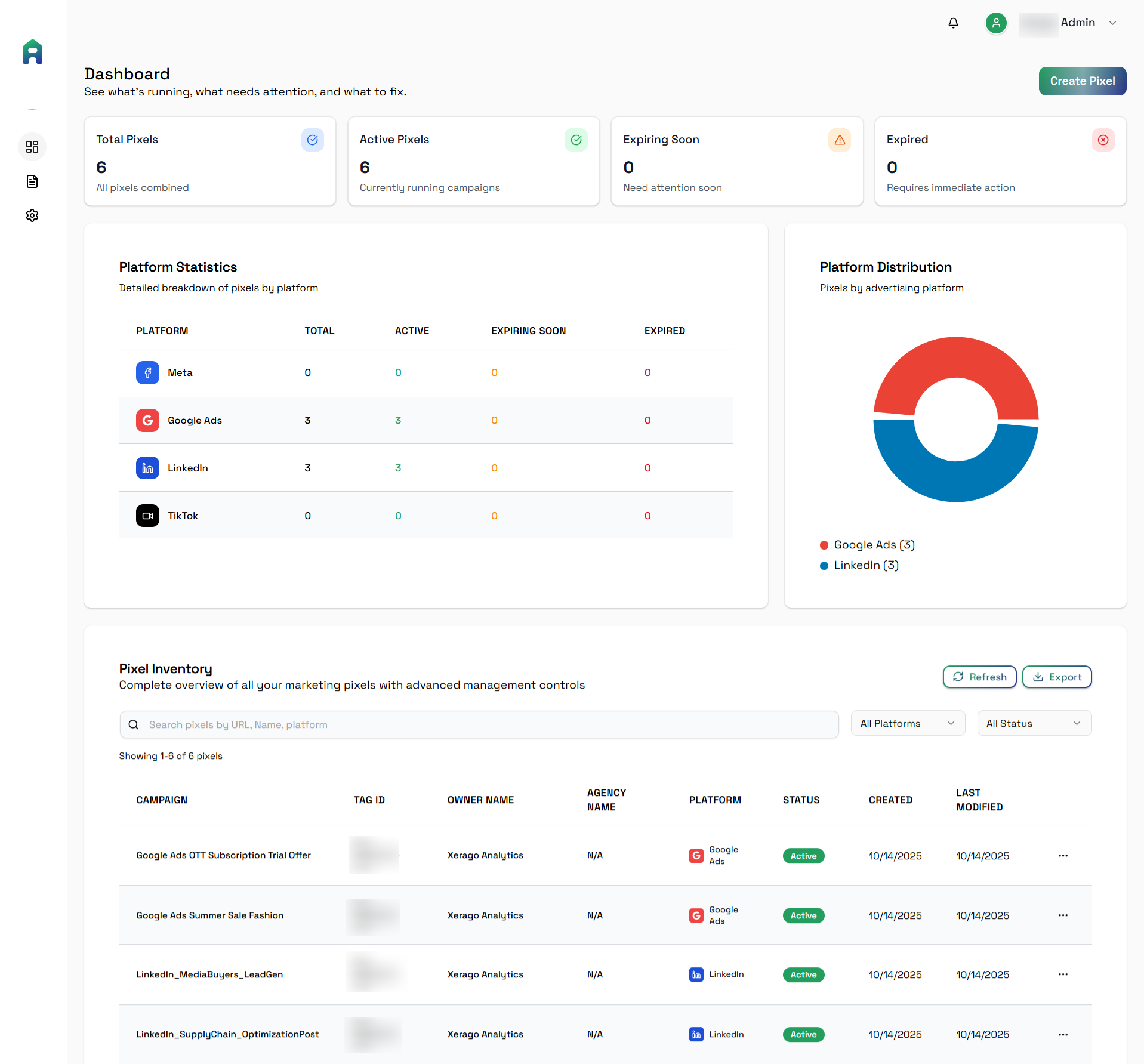
- After login, you will land on the Dashboard, which shows:
- Platform connection status
- Infrastructure summary
- Recent system activity
2. Navigating the Interface
Main Sidebar Modules
| Module | Description |
|---|---|
| Dashboard | High-level view of infrastructure health, inventory, and recent actions |
| Onboarding | Guided setup for connecting platforms and services |
| Compute | Manage virtual machines and compute resources |
| Storage | Manage storage systems, snapshots, and backups |
| Networking | View and manage network and DNS configurations |
| Security | Visibility into security-related activity and signals |
| Compliance | Audit tracking and compliance readiness views |
| Automation | Scheduled and multi-step operational workflows |
| AI Insights | Recommendations, trends, and optimization insights |
| Users & Access | User accounts, roles, and permissions |
| Audit Logs | Record of all actions performed in the platform |
| Reports | Exportable summaries and operational data |
| Settings | System-level configuration and preferences |
Modules and actions are displayed based on the user’s role and assigned access.
Section 1: Onboarding Workflow
InfraCentral onboarding follows a 9-step guided wizard, as defined in the PRD, to ensure infrastructure is connected safely and validated at each stage.
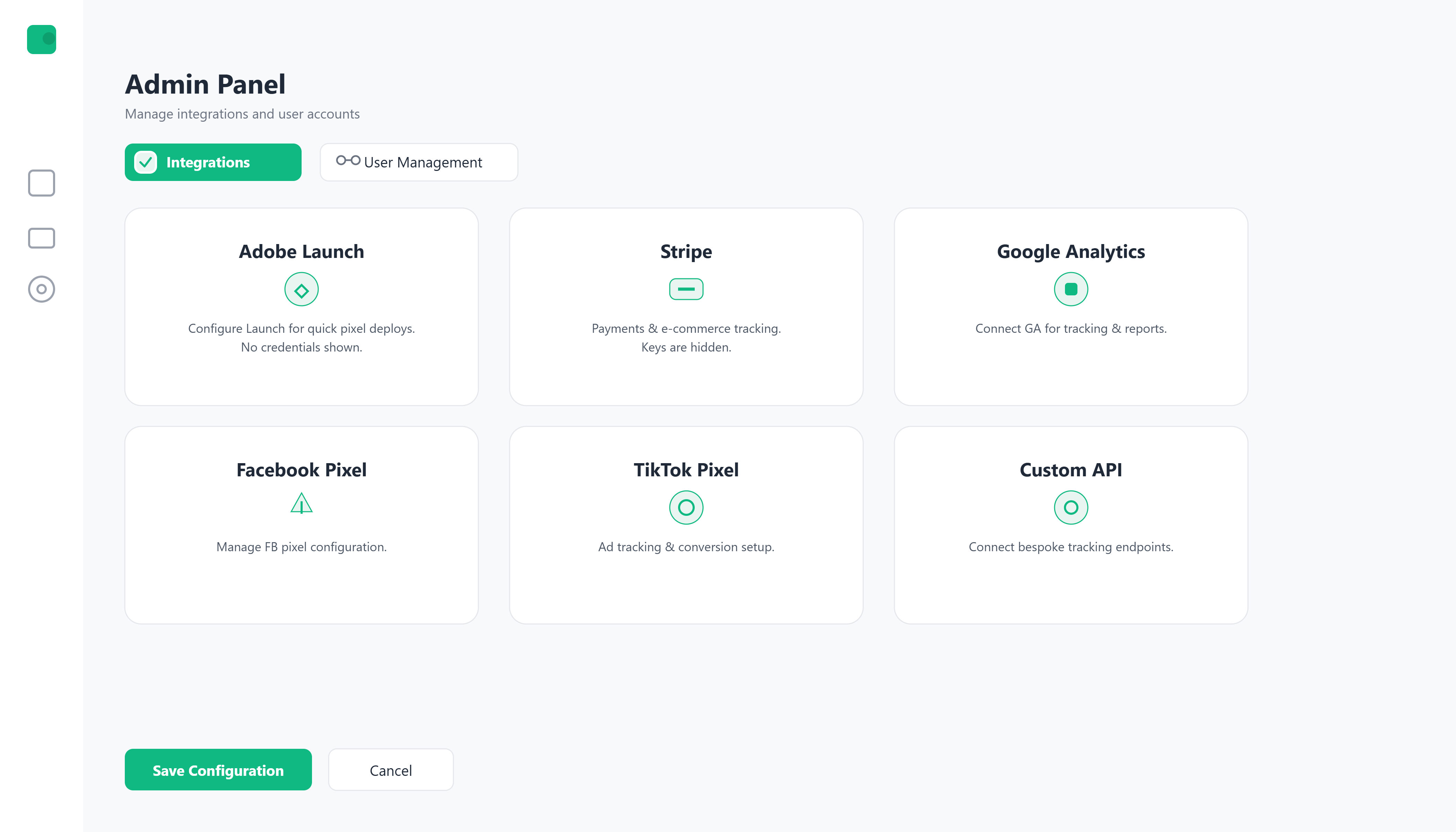
Step 1: Welcome & Overview
Purpose:
Introduce InfraCentral’s capabilities and explain the onboarding journey.
This step helps users understand:
- What InfraCentral manages
- Which setup steps are required vs optional
- How the platform will look after onboarding
Step 2: Virtualization Setup
Purpose:
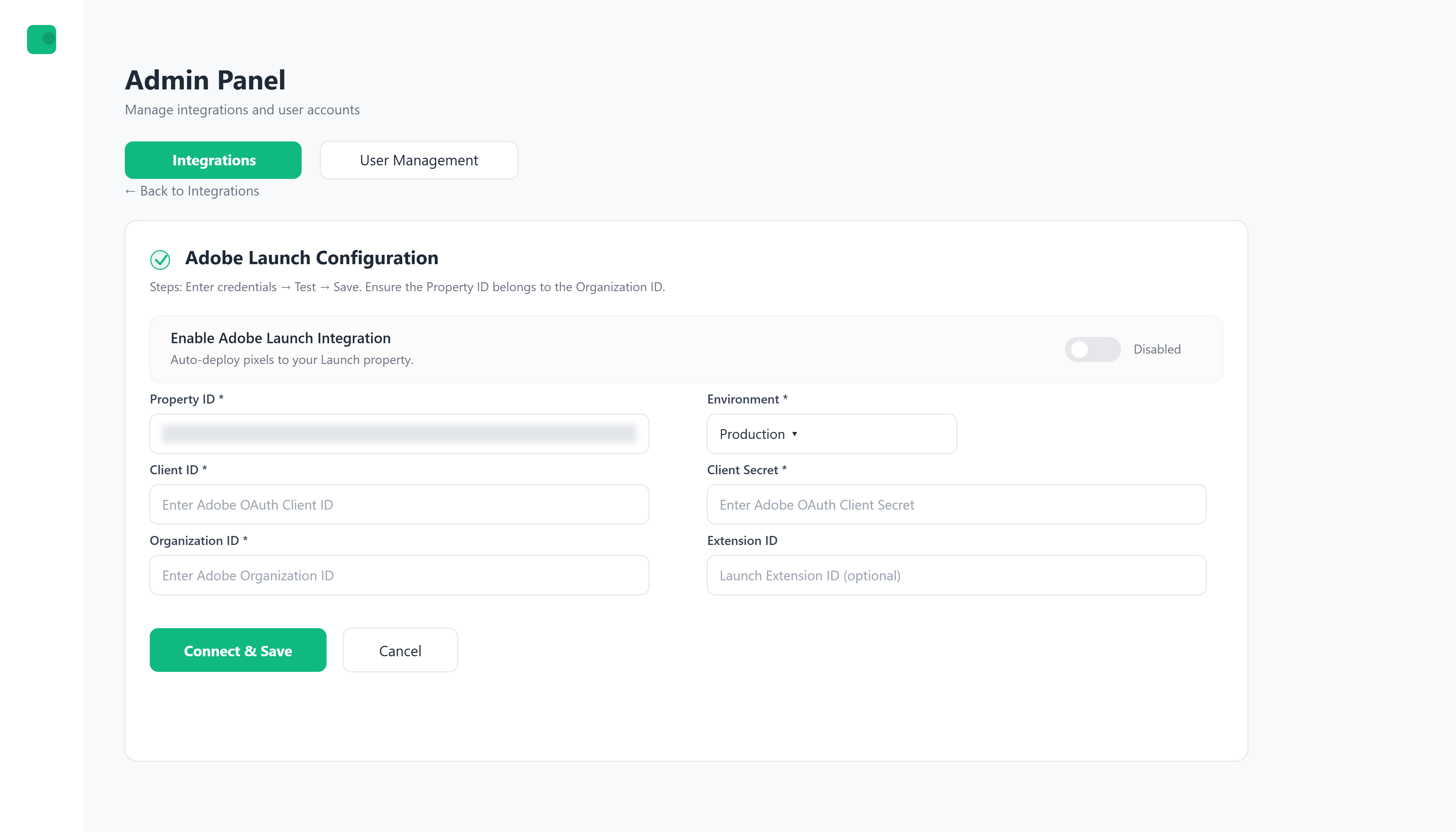
Connect on-premise virtualization platforms so InfraCentral can manage compute resources.
During this step, administrators:
- Select the virtualization platform in use
- Provide connection details
- Test and validate connectivity before saving
Only configure platforms that are currently in use. Additional platforms can be added later without redoing onboarding.
Step 3: Storage Setup
Purpose:
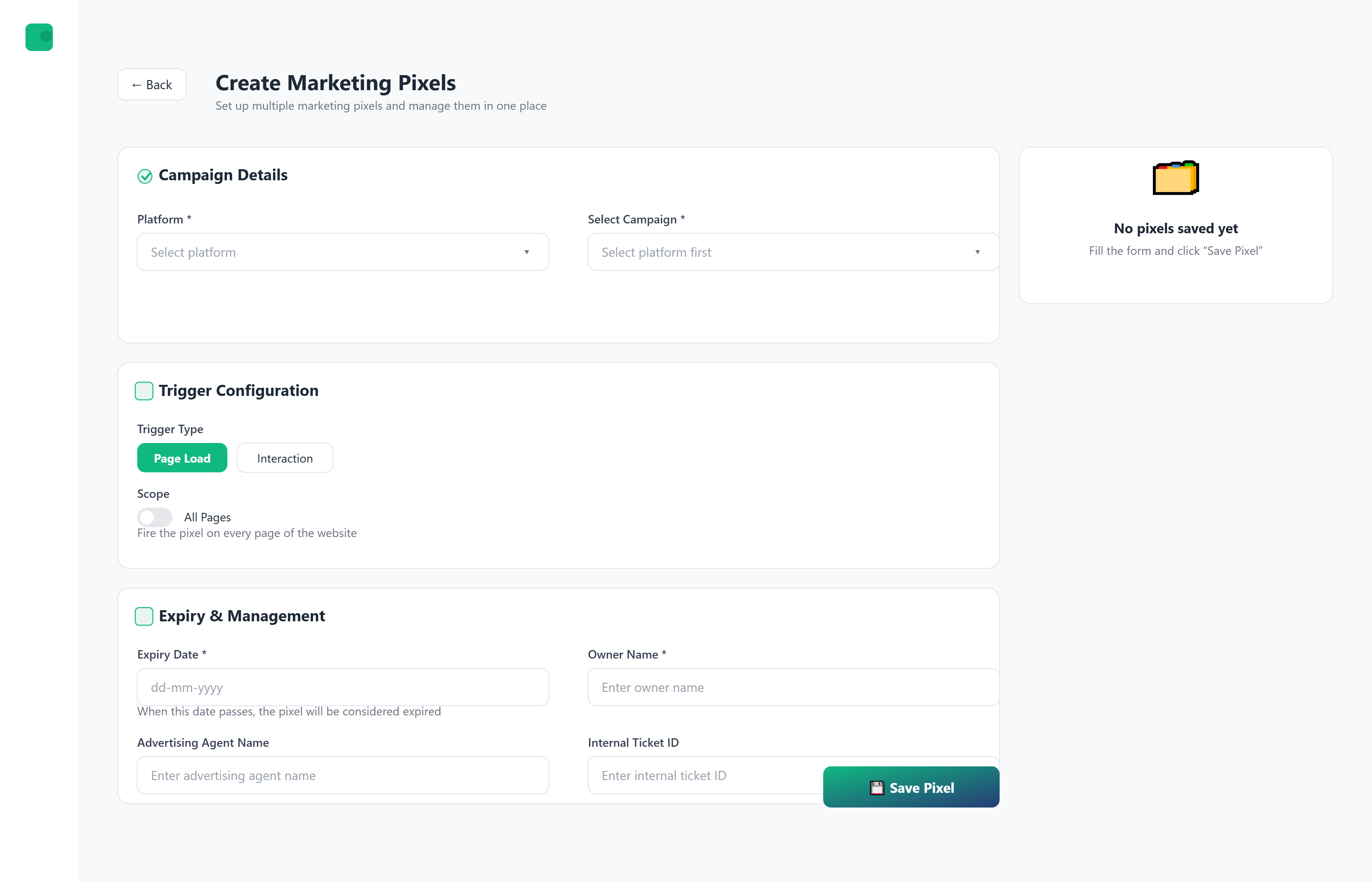
Configure storage systems used for data, snapshots, and backups.
This step allows administrators to:
- Connect primary storage systems
- Configure backup storage where applicable
- Validate access and visibility
Incorrect or incomplete storage permissions may result in failed backups or incomplete snapshot visibility.
Step 4: Cloud Connector Setup
Purpose:
Connect cloud accounts so InfraCentral can manage cloud-based infrastructure.
Administrators can:
- Add one or more cloud accounts
- Assign clear names to credentials for identification
- Test access before activation
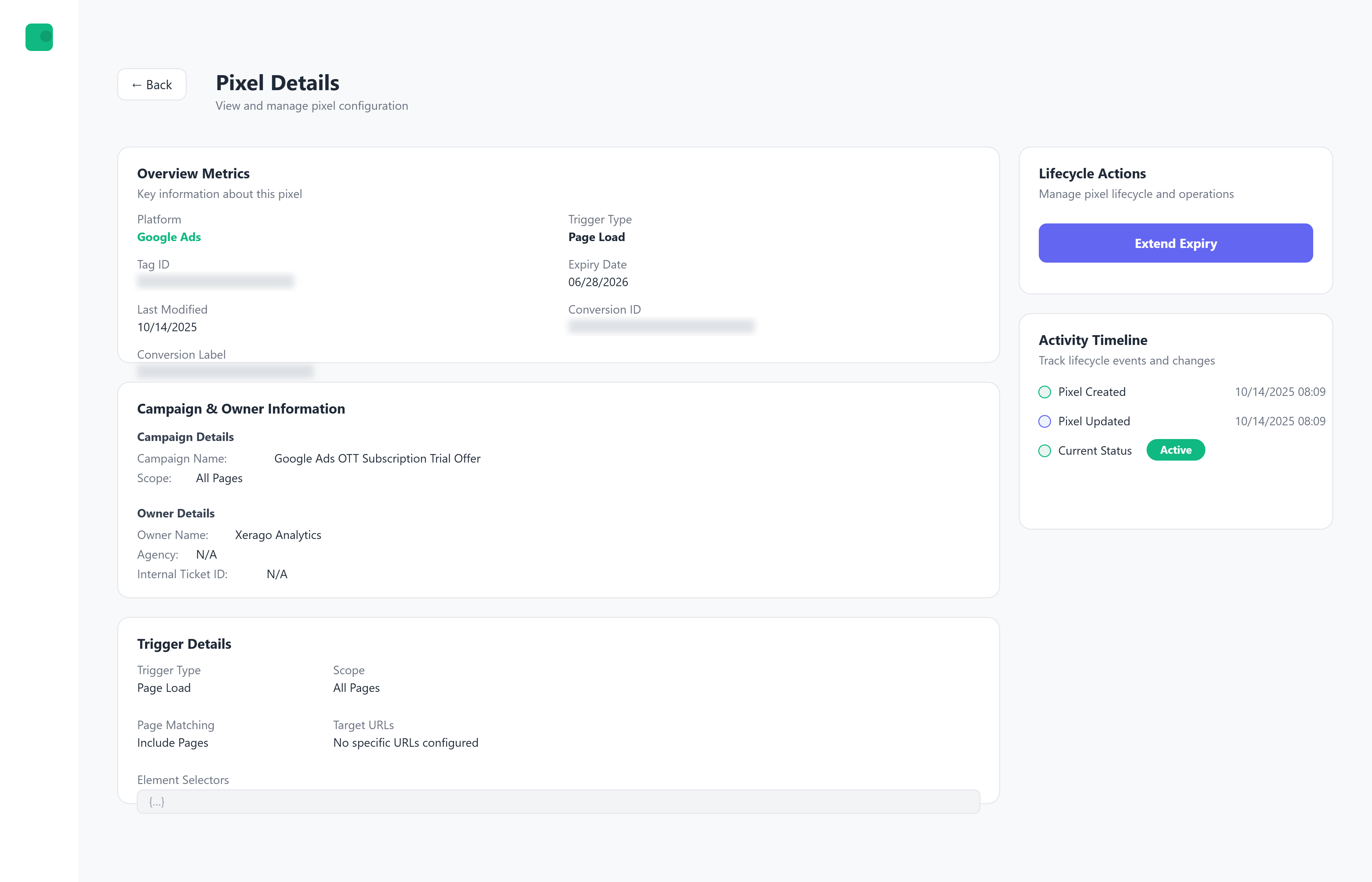
Multiple cloud credentials can be configured and managed independently.
Step 5: Network Setup
Purpose:
Connect network and routing platforms to enable monitoring and configuration visibility.
This step enables:
- Network health checks
- Configuration visibility and backups
- Centralized network awareness
Step 6: DNS Setup
Purpose:
Configure DNS providers for centralized DNS visibility and management.
Administrators can:
- Verify DNS access
- View zones and records
- Monitor DNS-related changes
Step 7: Monitoring Setup
Purpose:
Enable system monitoring and health visibility across connected platforms.
Once configured, InfraCentral can:
- Track platform health
- Detect failures or anomalies
- Populate dashboards and alerts
Step 8: Security Setup
Purpose:
Enable security-related visibility and integrations where applicable.
This step helps:
- Surface security signals
- Support audit and compliance workflows
- Improve operational awareness
Step 9: Review & Complete
Purpose:
Validate all connected platforms and activate InfraCentral.
Before completion, administrators:
- Review all configured integrations
- Confirm successful connection tests
- Finalize onboarding
After completion, onboarding can be revisited to add or modify integrations.
Section 2: Post-Onboarding Configuration
Once onboarding is complete, InfraCentral can be customized to match organizational needs.
User & Role Management
InfraCentral uses role-based access control to ensure safe operations.
| Role | Capabilities |
|---|---|
| Super Admin | Full system access and control |
| Admin | Manage infrastructure and configurations |
| Operator | Perform day-to-day operational tasks |
| Readonly User | View-only access |
Access rules are enforced across the platform and directly affect what actions users can perform.
Credential Management
Administrators can:
- Manage multiple credentials per platform
- Control which users can access specific credentials
- Activate or deactivate credentials without deleting them
Automation Setup
InfraCentral supports automation of routine and multi-step operations.
Administrators can:
- Schedule recurring operational tasks
- Create workflows that span platforms
- Monitor execution status and outcomes
AI Insights Configuration
AI Insights provide advisory recommendations based on system data.
InfraCentral can:
- Highlight unusual patterns
- Suggest optimizations
- Surface potential risks
AI Insights do not take automatic action. All decisions remain user-controlled.
Use Cases Enabled
| Use Case | Description |
|---|---|
| Unified Infrastructure Management | Manage cloud and on-premise infrastructure from one place |
| Guided Operations | Reduce mistakes using step-by-step workflows |
| Backup & Data Protection | Centralized snapshot and backup visibility |
| Access-Controlled Operations | Ensure users act only within assigned permissions |
| Audit & Compliance Readiness | Maintain clear action history and reports |
| Operational Visibility | Monitor infrastructure health and activity |
| Automation of Repetitive Tasks | Reduce manual operational overhead |
InfraCentral workflows and access rules can be adjusted as your infrastructure and teams grow.
JourneyAssist integrates enterprise-grade data governance practices to ensure that data is collected, stored, and processed with integrity, traceability, and accountability. Governance is enforced across the entire data lifecycle—from ingestion to export—with controls for classification, access, auditing, and sharing.
Data Classification Guidelines
JourneyAssist applies consistent classification rules to label data based on sensitivity, usage permissions, and retention policies.
Classification Tiers
| Tier | Description |
|---|---|
| Public | Non-sensitive data (e.g., anonymized usage statistics) |
| Internal | Operational metadata not exposed to end users |
| Confidential | User session data, identity fields, model-generated responses |
| Restricted | Personally Identifiable Information (PII), consent logs, regulatory-sensitive records |
Labeling Mechanism
Each field in JourneyAssist’s event schema and storage is tagged with a classification label that determines:
- Encryption & masking behavior
- Visibility in reports
- Export and API access restrictions
Data Handling by Classification
- PII fields are encrypted in transit and at rest using AES-256 and TLS 1.2+
- Restricted data is access-controlled and excluded from non-admin exports
- Internal metadata is visible only to whitelisted support or compliance users

These rules ensure sensitive data is never mishandled, even during debugging or analytics activities.
Access Auditing & Logging
To ensure transparency and compliance, all data access—by users or systems—is logged with contextual metadata.
Logged Activities
- User logins, role changes, flow executions
- Session data access, record updates
- Each log includes: IP, timestamp, role, and action type
Audit Reports & Alerts
- Reports filterable by classification level, user role, or record ID
- Suspicious activity (e.g., mass exports, rapid deletions) triggers real-time alerts
- Supports audit trails for compliance with GDPR and SOC 2
Third-Party & API Access Controls
JourneyAssist enforces strict access boundaries for external systems:
- Tokenized API keys with scoped permissions and rate limits
- Sandboxed integrations reviewed periodically
- Access expiration and activity-based revocation policies
Data Sharing Controls
Export Restrictions
- Exports can be filtered by classification or specific tags
- Export operations may require multi-factor authentication (MFA)
- Admins can enable approval workflows for sensitive data extractions
Partner Data Filters
When integrating with third-party systems (e.g., CRMs, support tools):
- Only pre-approved fields are shared
- Restricted or PII fields are masked or excluded
Anonymization Options
Analytics exports can be auto-tokenized to remove or scramble personal identifiers without losing trend insights.
Governance at Scale
JourneyAssist’s data governance architecture is designed to:
- Scale with your enterprise deployment
- Meet global compliance standards (GDPR, etc.)
- Provide clear auditability and fine-grained access control
- Keep stakeholders accountable with traceable, transparent data flows
Overview
This section is designed to help new users, administrators, and implementation teams onboard and begin using JourneyAssist efficiently. It includes:
- How to access the JourneyAssist Admin Console
- Prerequisites for initial setup
- A walkthrough of key configurations and platform usage patterns
JourneyAssist blends guided flows, AI-driven assistance, and campaign orchestration to deliver real-time value across digital journeys.
It offers a comprehensive entry point tailored for multiple roles, ensuring:
- Foundational setup is streamlined
- Users are quickly familiarized with key modules
- The platform is scalable across industries and user volumes
Prerequisites
System Requirements
- A modern web browser: Chrome, Firefox, or Edge
- Stable internet connection with JavaScript enabled
Access Credentials
- Enterprise login via SSO or OIDC
- Admin privileges for full configuration access

Important: Ensure you have admin privileges and enterprise credentials before starting the setup process.
Step-by-Step Instructions
1. Logging into JourneyAssist
- Navigate to the Admin Console URL (provided during deployment)
- Authenticate using enterprise credentials (SSO/OIDC supported)
- Post-login, you’ll land on the Dashboard, displaying:
- Usage metrics
- Quick access modules
- System health indicators
2. Navigating the Interface
Main Sidebar Modules
| Module | Description |
|---|---|
| Dashboard | Displays KPIs, usage analytics, LLM consumption, and operational insights across JourneyAssist modules. |
| Onboarding Sites | Allows users to add new websites, verify domains, and configure initial setup for JourneyAssist deployment. |
| Interaction Mode (UI) | Enables selection of deployment type – Floater, Chatbot, or Embedded widget – as per platform needs. |
| LLM Connection | Connects with Public LLMs via APIs (e.g., OpenAI), Self-hosted / Private LLMs, or Custom Proprietary LLMs (BYOL). |
| Look & Feel | Enables customization of widget/chatbot appearance – brand color, logo, text color, border radius, and advanced CSS overrides. |
| Content Intelligence Center | Central module to configure prompts, map user intents to backend actions, and enrich responses with contextual data. |
| Discovery (Intent Recognition) | Detects and classifies user intents from queries using NLP and maps them to the correct backend workflows or knowledge sources. |
| Audit Logs | Tracks user and admin activities across the platform, including query handling, API errors, and configuration updates. |
| Reports | Provides usage metrics, LLM response stats, success/failure rates, and exportable data for internal analysis. |
| Team Access | Manages users, roles, and access levels for admins, editors, and viewers, with fine-grained permission control. |
| Configuration |
|
| Integrations |
|
Section 1: Onboarding Workflow
The onboarding process involves four key steps to enable JourneyAssist on your website.
Step 1: Connect Content API
Purpose: Enable JourneyAssist to access and learn from your existing website content via your CMS or structured content APIs.
- Supported formats: REST, GraphQL, Headless CMS APIs
- Typical content types: Product pages, FAQs, terms & conditions, help docs
- Frequency: Supports scheduled or real-time sync
- Output: Structured, searchable content in JourneyAssist's Indexing Engine
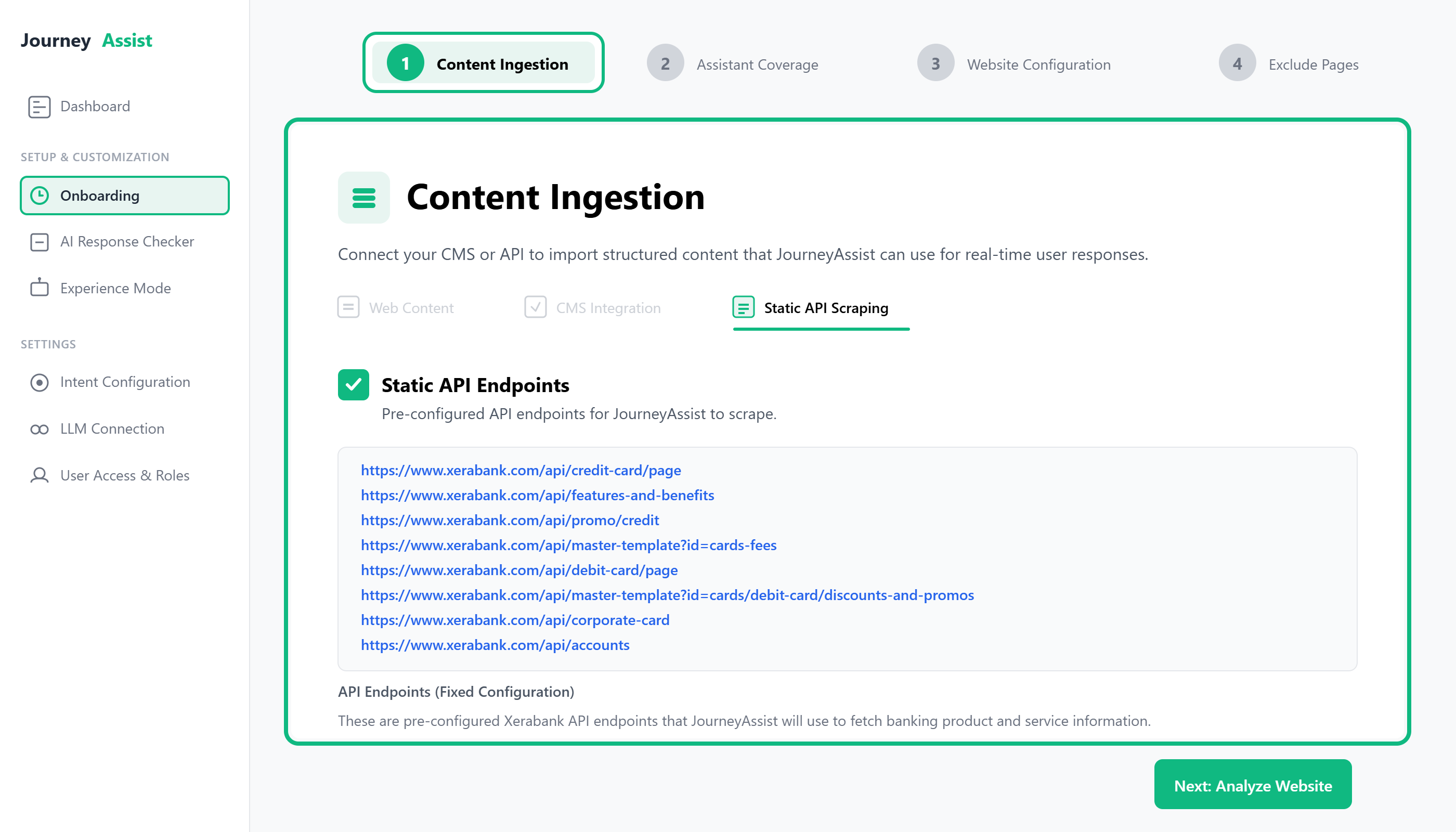
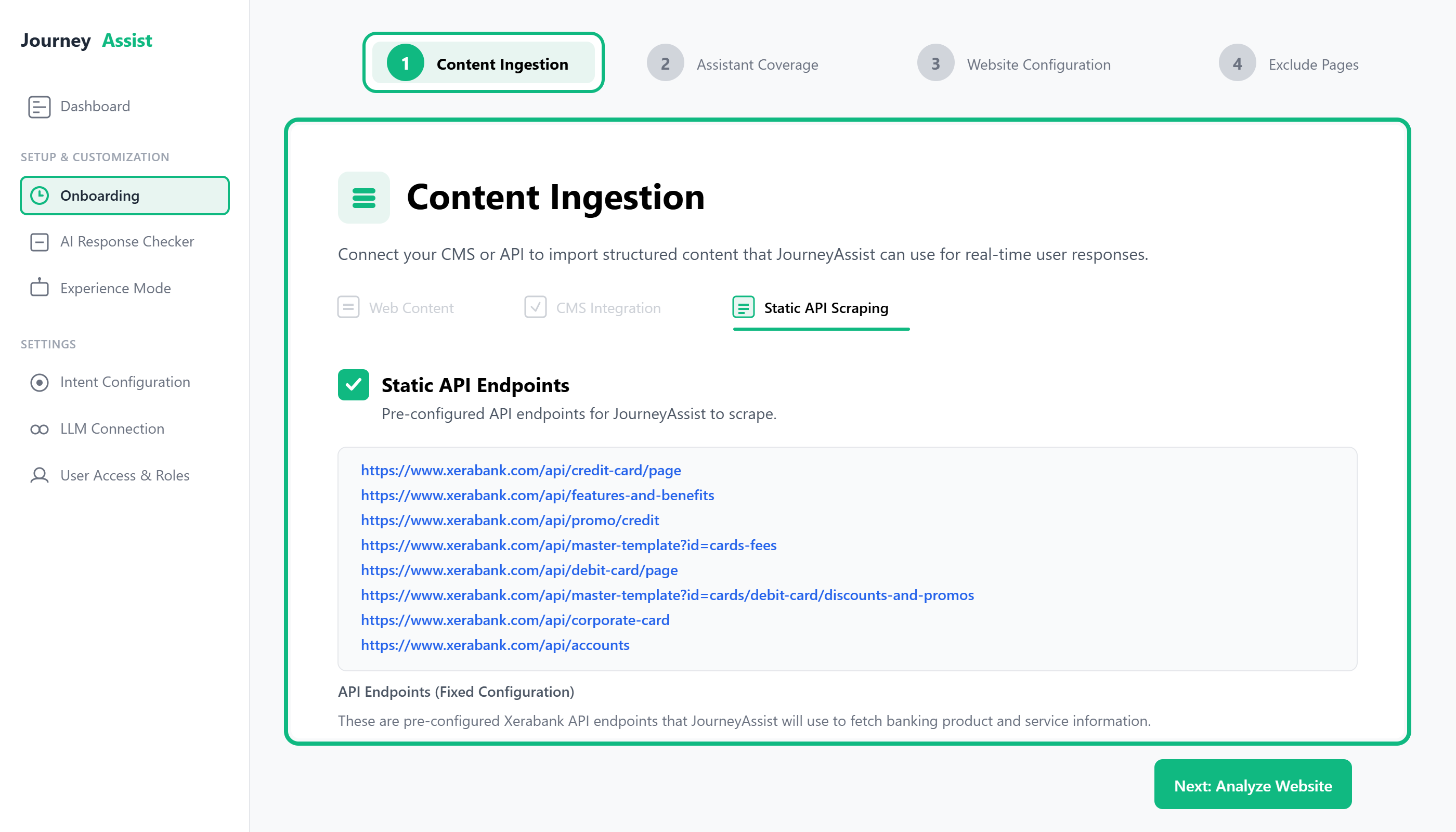
Path: Onboarding > Content Ingestion > API Connector
Note: Scraping is optional and used only in non-API environments.
Step 2: Define Assistant Coverage
Purpose: Classify the ingested content into segments relevant to user journeys and JourneyAssist's response model.
Common segments include:
- Product Information
- Pricing & Eligibility
- Application Workflows
- Support & FAQs
- Legal Disclosures
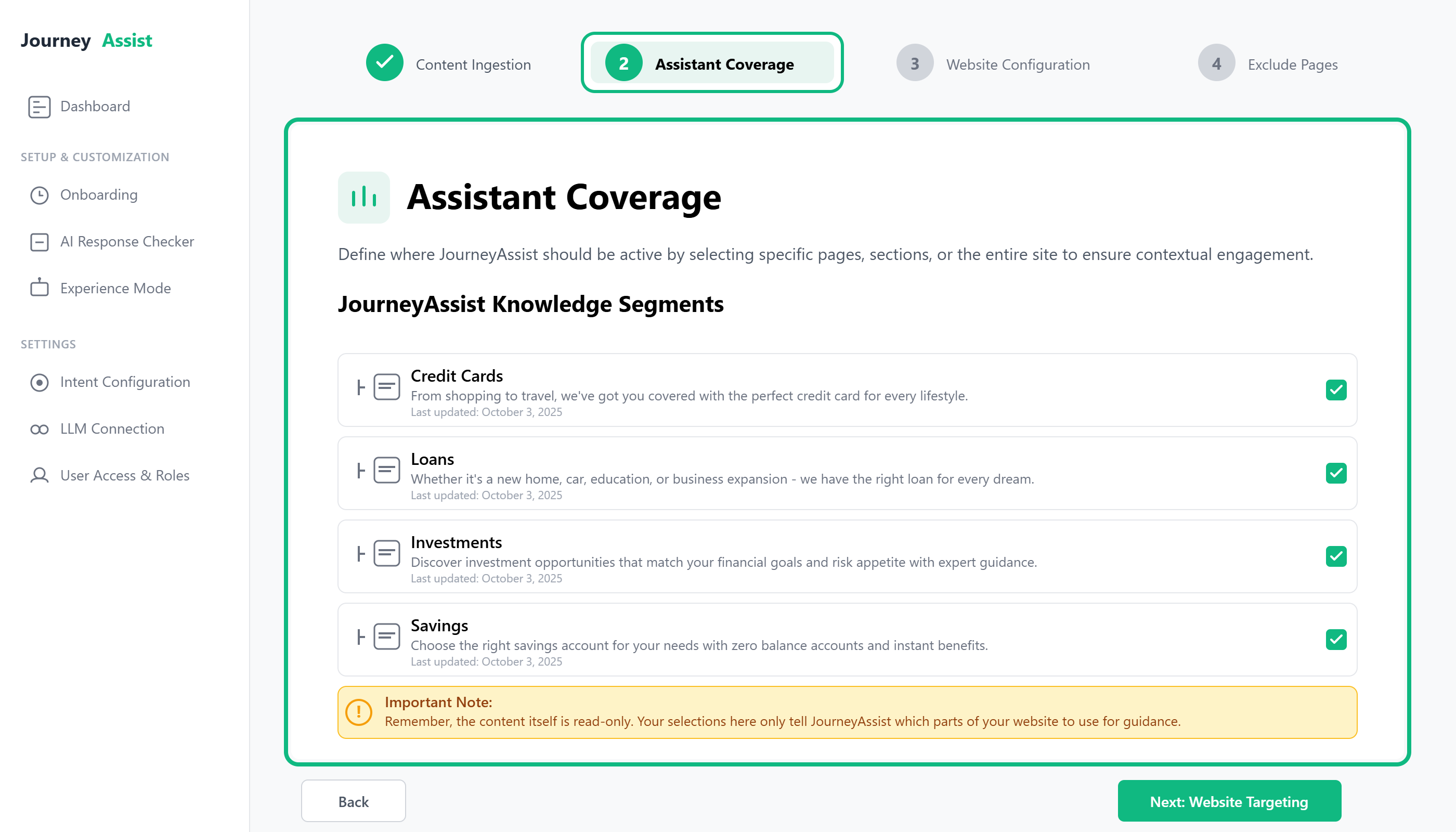
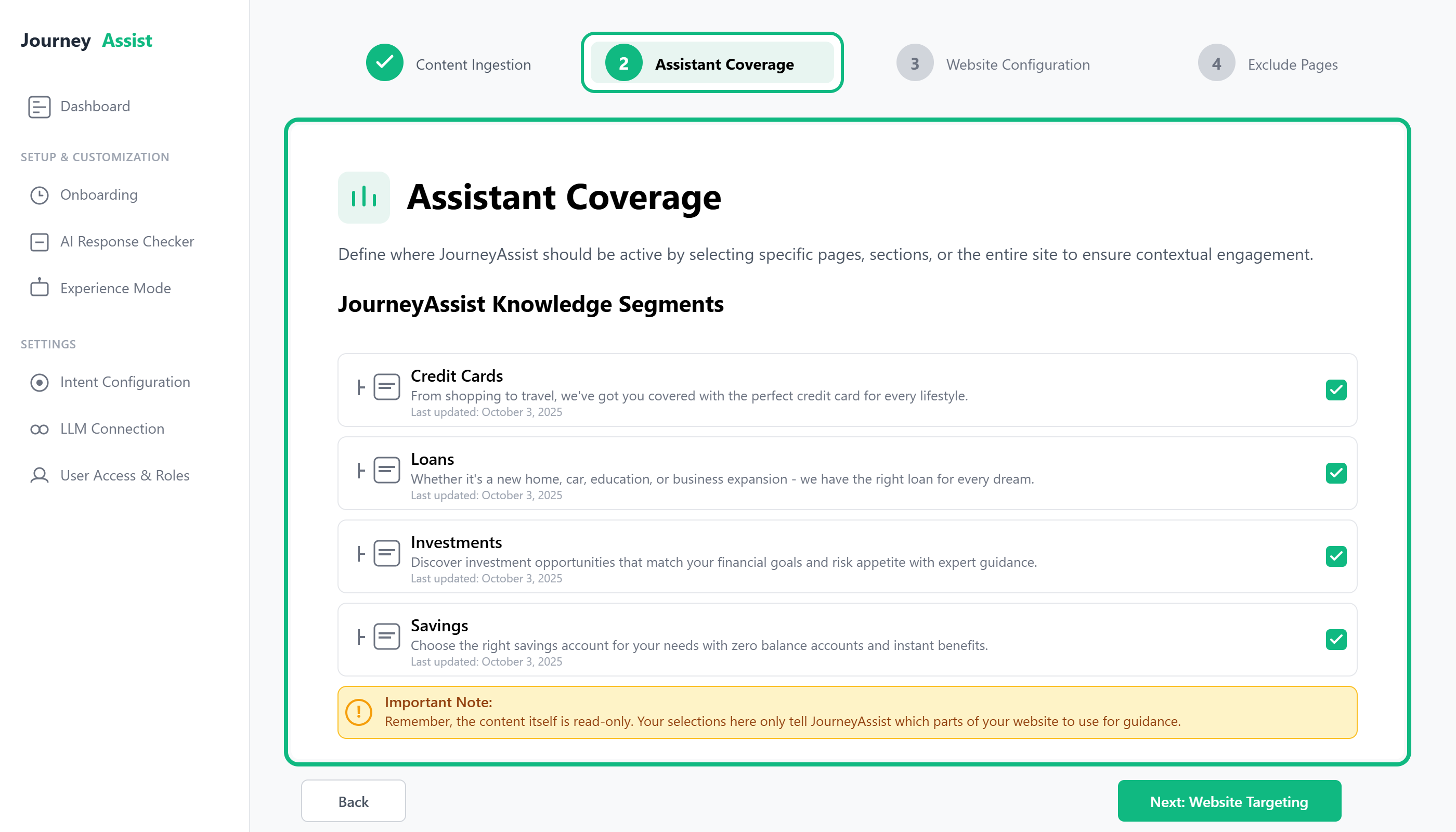
Path: Onboarding > Assistant Coverage
Step 3: Configure Website Targeting
Purpose: Define where, when, and how JourneyAssist should activate across your website.
Target by:
- URL rules (e.g., contains /apply, equals /home)
- Page types (home, product, checkout, support)
- User behavior (scroll %, time on page, inactivity, exit intent)
Customize:
- Widget position (bottom left or right)
- Activation triggers (automatic, on-click, time delay)
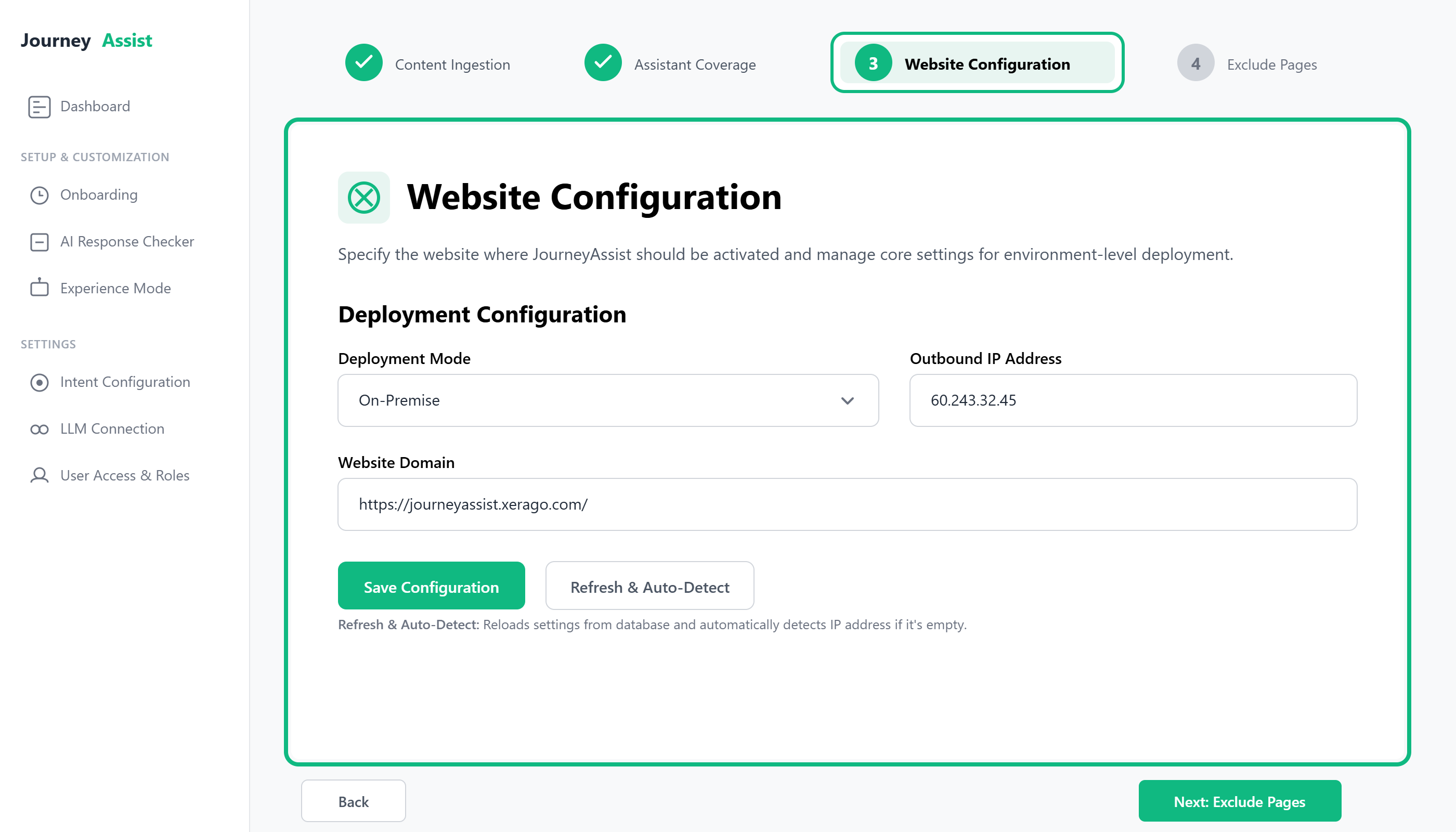
Path: Onboarding > Website Configuration
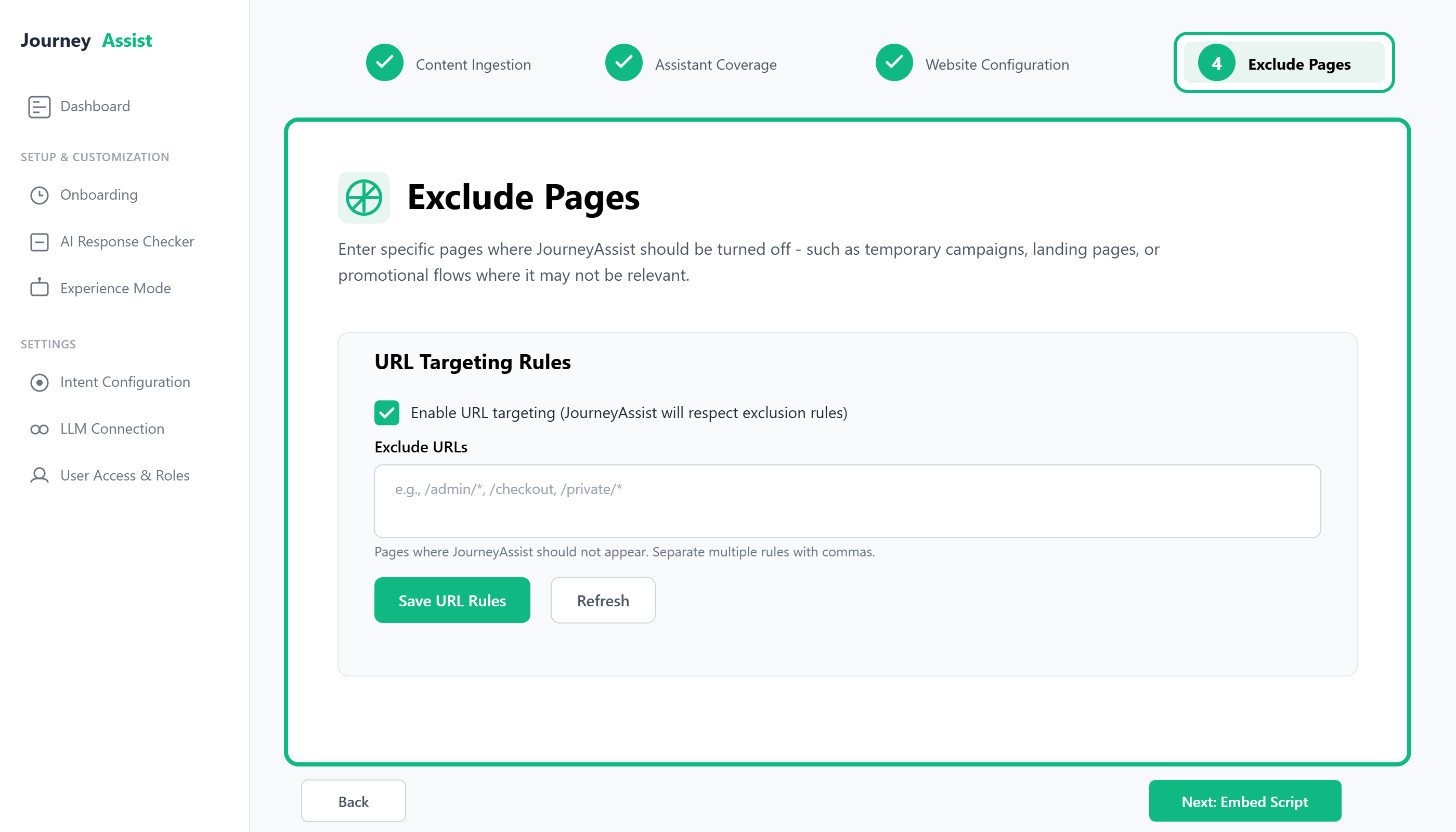
Step 4: Exclude Pages
Purpose: Enter specific pages where JourneyAssist should be turned off - such as temporary campaigns, landing pages, or promotional flows where it may not be relevant.
Step 5: Embed JourneyAssist Script
Purpose: Deploy JourneyAssist on your live website by embedding a lightweight JavaScript snippet.
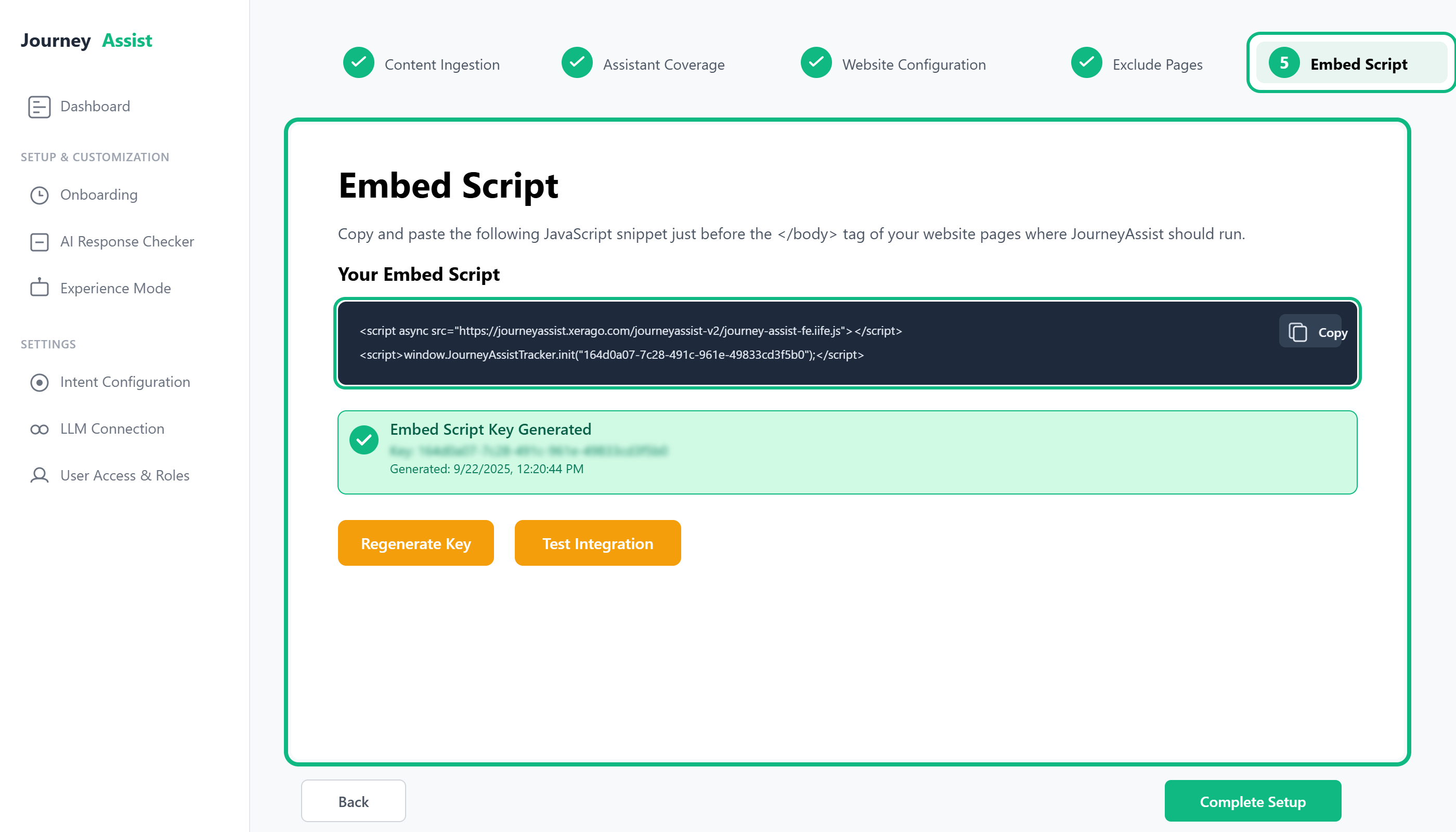
After completing targeting and content setup, you will receive a script like:
<script src="https://cdn.journeyassist.ai/init.js" data-token="your-site-token"></script>
Paste the script into your site’s <head> section or deploy via a tag manager (e.g., GTM, Tealium).
Path: Onboarding > Installation > Generate Embed Script
Section 2: Post-Onboarding Configuration
Once onboarding is complete, configure the following elements to fully enable JourneyAssist functionality.
UI Mode Setup
Choose your preferred assistant interface:
- Chatbot Mode – Full conversational experience
- Floater Mode – Lightweight contextual prompts
- Voice Mode (optional) – Enables voice interaction on supported devices

Customize branding, icons, positioning, and interaction rules via the Admin Console.
LLM Integration
JourneyAssist supports a range of large language model (LLM) connections:
- Public Cloud LLMs – Connect via API to providers like OpenAI, Claude, Perplexity
- Self-Hosted / Private LLMs – Deploy models such as Mistral, Qwen, LLaMA2 within your infrastructure
- Custom LLMs – Plug in proprietary, fine-tuned models via the LLM Router
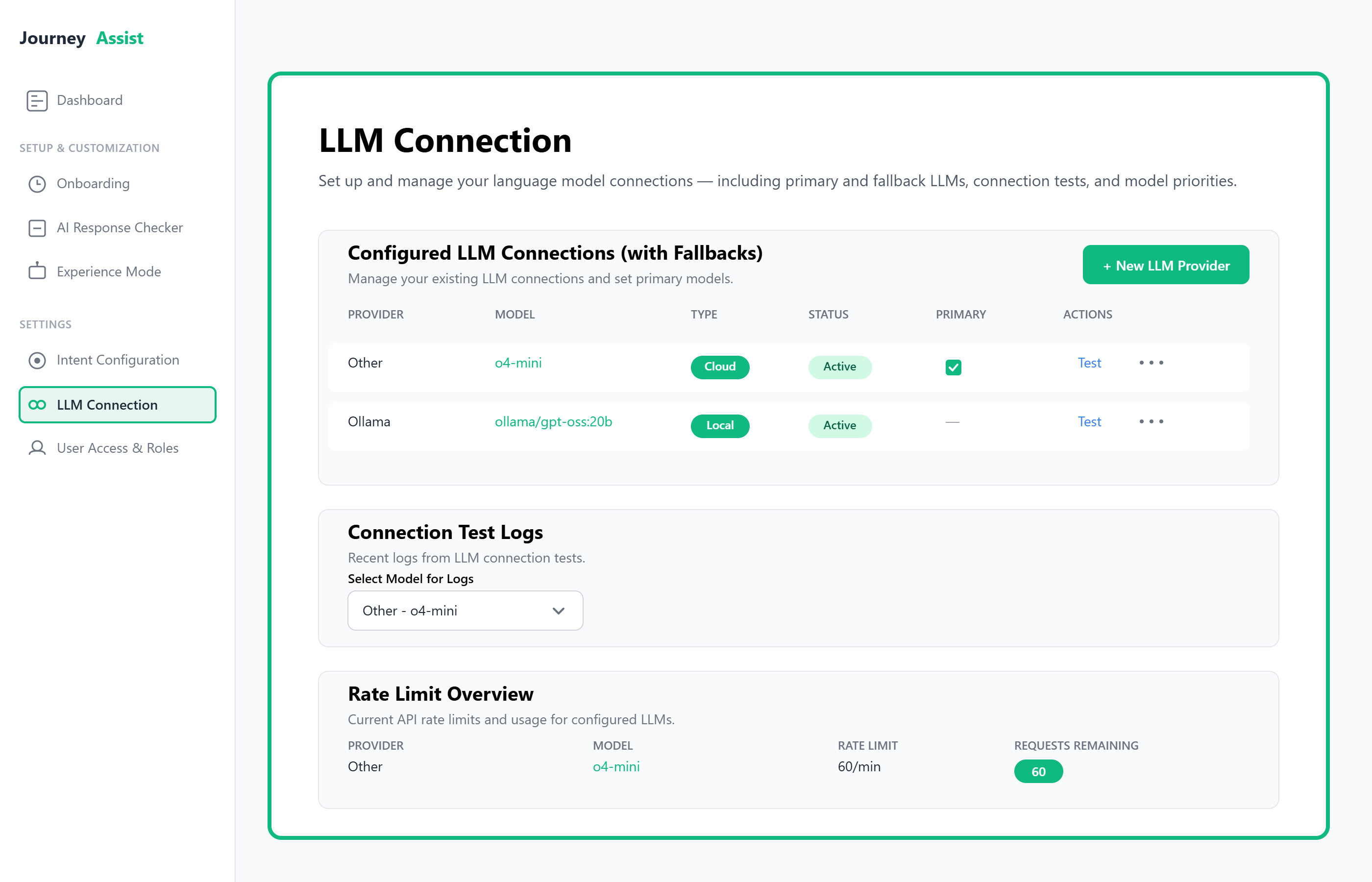
Path: LLM Router > Add Connection
Content Intelligence Center
Manage all ingested content:
- Validate segments
- Configure update schedules
- Apply content filtering rules
Accessible via: Content Intelligence > Manage Content
Team Access
Define user roles and permissions:
| Role | Capabilities |
|---|---|
| Admin | Full control over configuration and connections |
| Editor | Manage content, UI, and campaigns |
| Viewer | View analytics and reports only |
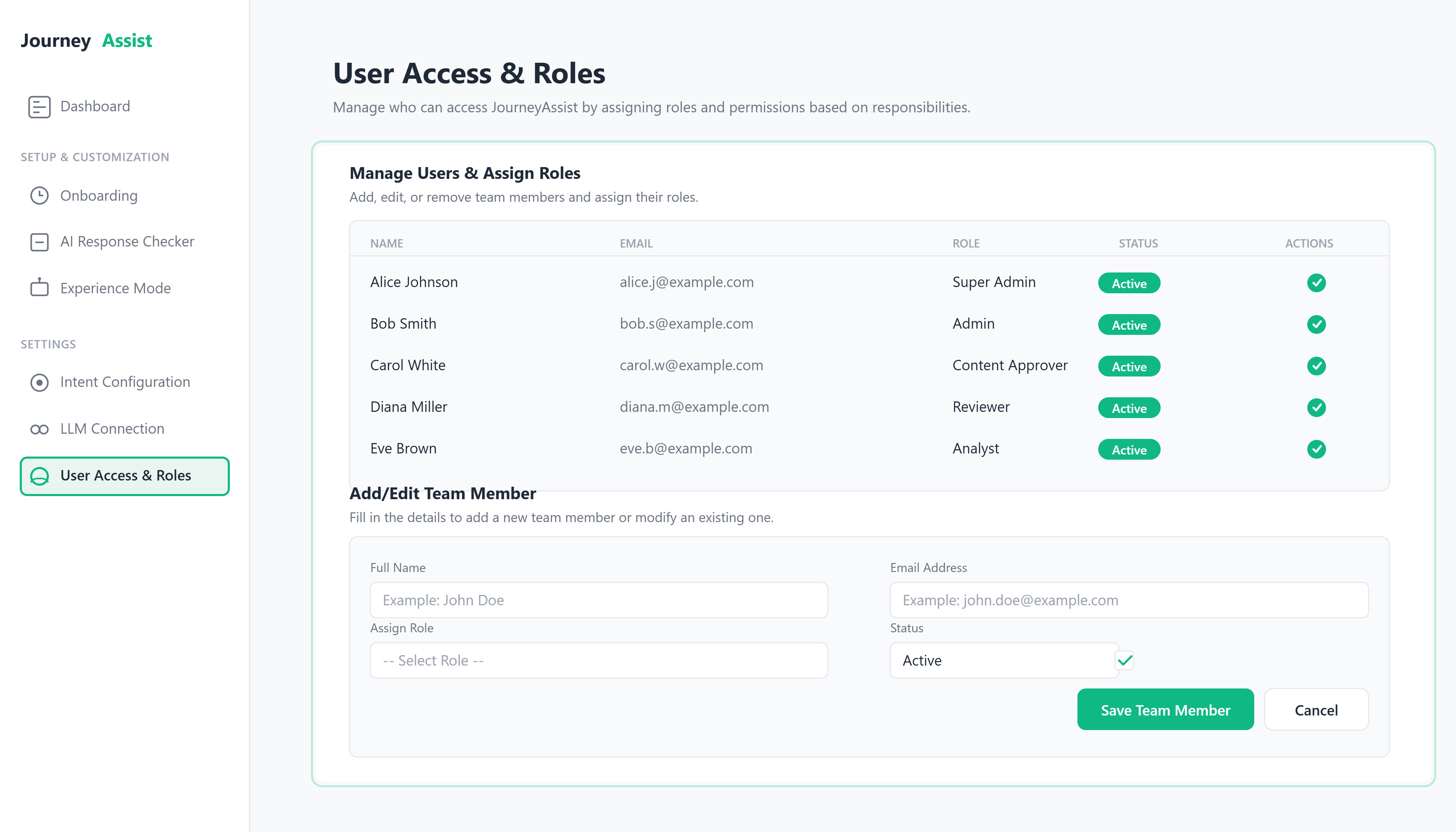
Path: Admin Console > Team Access
Real-Time Intent Recognition
Enable JourneyAssist to interpret user behavior and respond intelligently:
- Configure session tracking
- Map behavioral signals to defined intents
- Define actions: FAQs, smart nudges, escalation, product recommendations
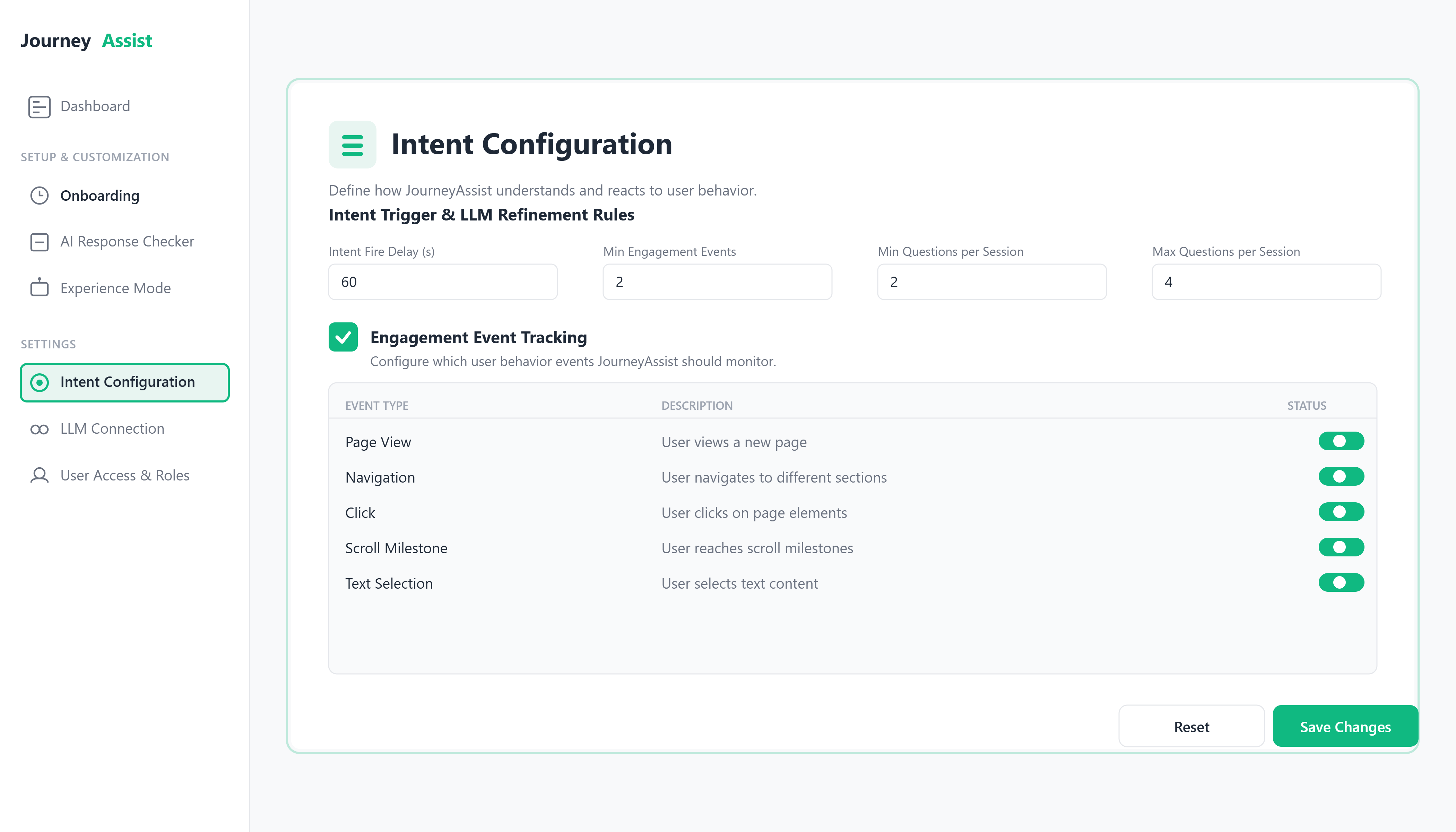
Path: JourneyAssist Realtime > Intent Engine
Use Cases Enabled
| Use Case | Description |
|---|---|
| Product Discovery Chatbot | Helps users explore services or product catalogs through guided queries and dynamic filters. |
| Support Q&A Assistant | Surfaces help content instantly using LLM/NLU-powered resolution across FAQs, documents, and support tickets. |
| Journey-Based Onboarding | Automates contextual user onboarding flows for first-time users, existing customers, or based on roles/goals. |
| Trigger-Based Campaigns | Launches real-time nudges, banners, or CTAs based on event-driven user behavior or specific page conditions. |
| Transactional Query Handling | Supports real-time response to user queries tied to transactions (e.g., order status, policy details, ticket ID). |
| Search Result Optimization | Enhances in-site search by re-ranking or auto-resolving queries using LLM-based semantic understanding. |
| Multi-Site LLM Management | Enables admins to configure, monitor, and route LLM responses differently across multiple web properties/domains. |
| Role-Based Experience Customization | Dynamically changes prompt flows, UI components, and allowed actions based on user role/type. |
| Smart Suggest & Auto-fill | Predicts and pre-fills responses, filters, or forms based on previous inputs and user history. |
| Intent Routing to APIs | Detects user intent and dynamically routes it to internal APIs, backend services, or external systems for execution. |
| Fallback to Human Agent | Provides controlled escalation paths to live support agents or ticketing systems when confidence is low. |
Remember: These use cases can be combined or customized further depending on your business goals and integration strategy.
Roadmap
Stay informed about upcoming improvements, feature rollouts, and platform enhancements planned for InfraCentral.
Version 1.0.0 – Platform Foundation
Oct 15, 2025
InfraCentral establishes its core capabilities as a unified infrastructure control platform.
Version 1.1.0 – Control & Governance
Nov 20, 2025
This milestone strengthens control, access management, and operational governance.
Version 1.2.0 – Operational Visibility & Automation
Dec 18, 2025
InfraCentral expands from visibility into proactive operations.
Version 1.3.0 – Optimization & Experience Enhancements
Jan 25, 2026
This release focuses on refining the user experience and decision support.
Future Vision – Unified Infrastructure Intelligence
Jan 31, 2026
Beyond January 2026, InfraCentral continues evolving toward:
Date: October 15, 2025
InfraCentral establishes its core capabilities as a unified infrastructure control platform.
Key Highlights
- Unified dashboard for on-premise and cloud infrastructure
- Guided onboarding wizard for platform setup
- Core modules enabled: Compute, Storage, Networking, Security, Compliance
- Role-based access control with Admin, Operator, and Read-only roles
- Centralized audit logging for all actions
This release focuses on stability, visibility, and safe day-to-day operations.
Date: November 20, 2025
This milestone strengthens control, access management, and operational governance.
What’s New
- Enhanced user and access management with finer permission boundaries
- Provider-level and credential-level access controls
- Improved audit logs and exportable reports
- Stronger validation during onboarding and configuration
- Clearer visibility into who can access what and why
This release is designed to support enterprise governance and compliance needs.
Date: December 18, 2025
InfraCentral expands from visibility into proactive operations.
Key Enhancements
- Automation workflows for routine operational tasks
- Scheduled actions for maintenance and housekeeping
- Improved dashboards with trend visibility
- Early AI-driven insights for operational optimization
- Better tracking of long-running tasks and outcomes
This version helps teams reduce manual effort and operational fatigue.
Date: January 25, 2026
This release focuses on refining the user experience and decision support.
Focus Areas
- Smarter AI Insights for identifying risks and inefficiencies
- Improved navigation and usability across modules
- Clearer recommendations for optimization (advisory only)
- Faster access to frequently used actions
- Improved reporting clarity for management and audits
This milestone enhances ease of use, clarity, and decision confidence.
Beyond January 2026, InfraCentral continues evolving toward:
- Deeper automation across infrastructure workflows
- Stronger predictive insights and recommendations
- Expanded support for additional platforms and environments
- Enhanced compliance and audit readiness capabilities
- Greater scalability for large, multi-team organizations
Looking Ahead
InfraCentral’s roadmap is shaped by real operational needs, customer feedback, and the goal of making infrastructure management simpler, safer, and more predictable.
Release notes
Unified onboarding wizard for connecting on-premise and cloud platforms in a guided flow
Role-based access control with Admin, Operator, and Read-only roles
Centralized audit logs capturing all infrastructure actions across providers
Credential management with controlled access and validation
Overall platform stability and consistency for day-to-day infrastructure operations
Unified dashboard for managing cloud and on-premise infrastructure from one interface
Core infrastructure modules enabled:
- Compute
- Storage
- Networking
- Security
- Compliance
Guided workflows to help users perform common infrastructure actions safely
Initial monitoring and visibility for connected platforms
InfraCentral Platform Foundation — core infrastructure control capabilities released
Overview
This section explains how InfraCentral is designed and how it works at a system level. It focuses on how InfraCentral:
- Connects to multiple infrastructure platforms
- Provides a single, consistent control experience
- Guides users through safe infrastructure operations
- Scales across teams, environments, and providers
- Enforces access control, auditability, and compliance
The architecture is intentionally modular so organizations can manage cloud, on-premise, or hybrid infrastructure without changing how they operate.
Purpose
This section is intended for:
- Infrastructure managers
- Platform owners
- Solution architects
- Security and compliance teams
It helps them understand how InfraCentral:
- Unifies different infrastructure providers under one control plane
- Maintains consistency across environments
- Prevents operational errors through guided workflows
- Supports audit, governance, and enterprise controls
This overview explains how InfraCentral works, not how it is built internally.
High-Level Architecture
InfraCentral is built around a central management backbone that coordinates all infrastructure actions, data visibility, and governance from one place.
At a high level, the platform consists of three business-facing layers:
1. User Control Layer (What Users Interact With)
This is the InfraCentral web console used by administrators and operators to:
- View infrastructure across environments
- Perform operational tasks through guided steps
- Monitor status, usage, and activity
- Access reports, audits, and insights
The interface automatically adapts based on:
- User role
- Connected infrastructure platforms
- Enabled capabilities
Users do not need to switch tools or learn different systems.
2. Central Management Backbone
This is the decision-making and coordination layer of InfraCentral.
Its role is to:
- Understand what the user wants to do
- Ensure the action is allowed and safe
- Coordinate the execution across the right infrastructure platform
- Track progress and results
- Record the action for audit and reporting
In simple terms, this backend:
- Acts as a single brain for all infrastructure operations
- Applies the same rules, terminology, and safety checks everywhere
- Keeps infrastructure behavior consistent across providers
Important
No infrastructure action is executed directly from the screen. Every action is reviewed, validated, and controlled by this central layer first.
3. Platform Connection Layer (Infrastructure Integrations)
This layer connects InfraCentral to:
- Cloud platforms
- On-premise systems
- Storage, network, and security services
Its responsibility is to:
- Communicate with each platform in its native way
- Translate actions from InfraCentral into platform-specific operations
- Return results and status back to the central system
Looking Ahead
Even though platforms work differently behind the scenes, InfraCentral ensures they behave the same way from the user’s point of view.
How These Layers Work Together
- A user performs an action in the InfraCentral console
- The central management backbone:
- Checks permissions
- Validates inputs
- Confirms safety
- The action is routed to the appropriate platform
- Progress and results are tracked centrally
- The system updates inventory, dashboards, and audit logs
All of this happens transparently, without the user needing to understand backend complexity.
Data Flow Overview
Infrastructure Operation Lifecycle
- User Action
A user initiates an action from the InfraCentral console. - Validation & Guidance
The system validates permissions, inputs, and dependencies. - Execution
The action is routed to the appropriate infrastructure platform. - Status Tracking
Progress and results are tracked and displayed in real time. - Audit Logging
Every step is recorded for traceability and compliance. - Inventory Update
Resource state is updated across the platform.
Architecture Diagram
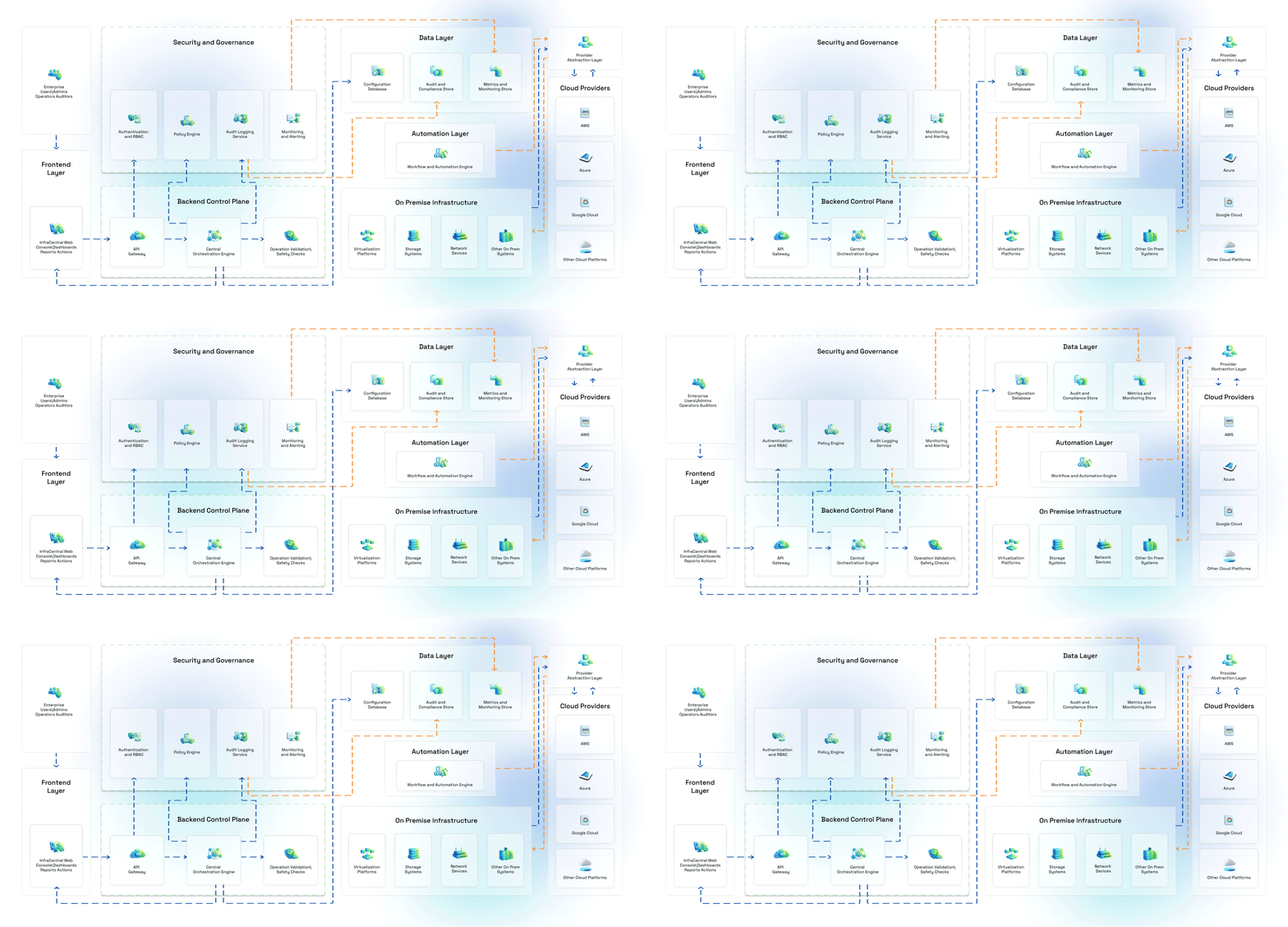
Deployment & Environment Flexibility
InfraCentral Environment Support
InfraCentral is designed to support:
- Cloud environments
- On-premise data centers
- Hybrid and multi-cloud setups
It can be used across:
- Development environments
- Staging environments
- Production environments
Each environment remains logically separated while using the same platf
Security & Compliance
InfraCentral Security and Compliance
InfraCentral is built with security and compliance as foundational principles.
Security Controls
- Secure communication between systems
- Encrypted handling of credentials
- Strict access control by role
- Confirmation steps for sensitive actions
Compliance Capabilities
- Immutable audit logs
- Exportable reports
- Clear traceability of user actions
- Support for compliance audits and reviews
InfraCentral does not perform actions automatically without user approval.
Scalability & Reliability
InfraCentral Scalability and Reliability
InfraCentral is designed to scale as infrastructure and teams grow.
Scalability
- Supports multiple teams and users
- Handles increasing infrastructure size
- Adds new platforms without redesign
Reliability
- Long-running operations show progress
- Temporary failures are handled gracefully
- Platform continues operating even if one provider is unavailable
Observability & Monitoring
InfraCentral provides visibility into:
- Platform health
- Integration status
- Operation success and failure patterns
Administrators can:
- Track usage trends
- Identify operational bottlenecks
- Detect recurring issues early
Integration Patterns
Enterprise Ecosystem Integration
InfraCentral integrates with enterprise ecosystems through:
- Infrastructure platform connections
- Identity and access systems
- Monitoring and reporting tools
This ensures InfraCentral fits into existing operational models rather than replacing them.
This section outlines the hardware, software, network, and access prerequisites required to successfully deploy and operate InfraCentral.
It helps organizations prepare their environments in advance and ensures a smooth onboarding, stable operations, and secure usage.
InfraCentral is a control and governance platform. It does not host customer workloads and does not replace existing infrastructure tools.
1. Supported Deployment Models
InfraCentral supports multiple deployment options depending on enterprise security and compliance needs:
- Cloud (InfraCentral-hosted)
- Single-Tenant Cloud
- Private Cloud (Customer Cloud Account)
- On-Premise (Customer Data Center)
System requirements vary slightly by deployment type and are outlined below.
2. End-User Requirements (Admin Console Access)
These requirements apply to users accessing InfraCentral through the web console.
Supported Browsers
- Google Chrome (latest 2 versions)
- Microsoft Edge (latest 2 versions)
- Mozilla Firefox (latest 2 versions)
Internet Explorer is not supported.
Client Machine Requirements
| Component | Minimum Requirement |
|---|---|
| CPU | Dual-core processor |
| RAM | 8 GB |
| Storage | 2 GB free disk space |
| Display | 1280 × 800 resolution or higher |
| Network | Stable broadband connection |
For large environments or heavy audit usage, 16 GB RAM is recommended for administrators.
3. InfraCentral Platform Requirements (Server / Deployment)
Minimum Platform Resources
| Component | Minimum | Recommended |
|---|---|---|
| CPU | 4 vCPU | 8 vCPU |
| RAM | 16 GB | 32 GB |
| Storage | 100 GB SSD | 200 GB SSD |
| OS | Linux (64-bit) | Linux (64-bit) |
Storage requirements may increase based on audit log retention and automation usage.
Supported Operating Systems
- Ubuntu LTS (20.04 or later)
- RHEL / Rocky Linux (8.x or later)
- Amazon Linux 2
Desktop operating systems are not supported for server deployments.
4. Network & Connectivity Requirements
InfraCentral requires outbound connectivity to interact with infrastructure providers.
Required Network Access
- HTTPS (TCP 443) outbound access
- DNS resolution enabled
- Access to provider APIs (cloud, storage, network platforms)
Optional (Enterprise Environments)
- Static outbound IP allow-listing
- Proxy support (where required)
- Internal DNS integration
No inbound access to customer infrastructure is required unless explicitly configured.
5. Infrastructure Provider Prerequisites
Before onboarding providers, ensure:
- Valid API credentials with required permissions
- Network access from InfraCentral to provider endpoints
- Read/write permissions for intended operations
- Separate credentials for production and non-production environments (recommended)
Use least-privilege credentials and rotate them periodically.
6. Automation & Workflow Requirements
For automation-heavy usage:
| Component | Requirement |
|---|---|
| CPU | +2 vCPU |
| RAM | +8 GB |
| Storage | +50 GB |
| Network | Low-latency connectivity |
Automation does not run inside customer workloads. It orchestrates actions via providers.
7. Security & Access Prerequisites
- Role-Based Access Control (RBAC) enabled
- Administrative users identified before onboarding
- Multi-factor authentication (if enforced by organization)
- Audit retention policies defined
InfraCentral assumes customers manage identity governance for their users.
8. Data & Log Retention Considerations
Storage sizing should consider:
- Audit log volume
- Automation execution history
- Compliance retention periods
Typical guidance:
- Small environments: 100–150 GB
- Large enterprises: 200–500 GB (depending on retention)
9. High Availability & Scaling
For high-availability deployments:
- Multiple InfraCentral instances
- Load balancing
- Shared or replicated storage
- Regular backups
HA setup depends on deployment model and enterprise policies.
Overview
This section provides clear and structured guidance for configuring InfraCentral for production use. It helps administrators and platform owners:
- Configure infrastructure providers and environments
- Manage user roles and access controls
- Define operational boundaries and safeguards
- Set system-wide behavior and visibility rules
- Enable automation, monitoring, and governance
InfraCentral configuration ensures infrastructure operations remain secure, consistent, auditable, and aligned with enterprise governance requirements.
General Configuration Guidelines
- InfraCentral can be enabled or disabled per environment
- Configuration changes take effect immediately after saving
- Only authorized users can modify global or environment-level settings
- All configuration changes are logged for audit and traceability
- Configuration can be updated incrementally without downtime
Changes to access rules, credentials, or automation settings may directly affect live infrastructure operations. Review carefully before saving.
Core Configuration Areas
1. Provider & Platform Configuration
This section controls how InfraCentral connects to infrastructure platforms.
Provider Setup
Administrators can:
- Add cloud platforms (e.g., public cloud accounts)
- Add on-premise platforms (e.g., virtualization, storage, network systems)
- Assign friendly names to providers for easy identification
- Validate access before activating the provider
Provider Status Management
- Enable or disable providers without removing them
- View connection health and last validation time
- Temporarily disable a provider during maintenance
Disable a provider instead of deleting it when performing platform maintenance to preserve configuration history.
2. Credential & Access Configuration
Controls how credentials are stored, validated, and used.
Credential Management
- Add multiple credentials per provider
- Assign credentials to specific users or roles
- Activate or deactivate credentials without deletion
- Test credentials before applying them
Disabling an active credential can interrupt running operations.
3. Team Access Management
Controls who can access InfraCentral and what actions they can perform.
Add / Edit Team Members
- Full Name
- Email Address
- Assigned Role
- Account Status (Active / Inactive)
| Role | Capabilities |
|---|---|
| Super Admin | Full platform access and configuration control |
| Admin | Provider configuration, resource management |
| Operator | Day-to-day infrastructure operations |
| Read-Only | View-only access to dashboards and reports |
Access is enforced across the platform and during execution, not just at the UI level.
4. Environment & Scope Configuration
Defines how InfraCentral operates across environments.
Environment Management
Administrators can:
- Create logical environments (e.g., Dev, Staging, Production)
- Assign providers to specific environments
- Restrict user access by environment
Operational Scope Controls
- Limit which actions can be performed in sensitive environments
- Apply stricter confirmation rules for production systems
Production environments should always have stricter confirmation and access controls enabled.
5. Workflow & Safety Controls
Controls how infrastructure actions are executed.
Guided Operations
- All actions follow step-by-step guided flows
- Inputs are validated before execution
- Dependencies are checked automatically
Confirmation Rules
- Mandatory confirmation for destructive actions
- Clear explanation of impact before execution
- Optional dry-run previews where supported
6. Automation Configuration
Controls automated and scheduled operations.
Automation Setup
Administrators can:
- Create scheduled workflows
- Define multi-step operational sequences
- Monitor automation execution status
Automation Safeguards
- Automation follows the same permission rules as manual actions
- Failures are logged and visible
- Manual intervention is always possible
Automation does not bypass governance or safety checks.
7. Monitoring & Visibility Settings
Controls how infrastructure health and activity are displayed.
Monitoring Configuration
- Enable or disable monitoring per provider
- Control visibility of metrics and status indicators
- Configure alert visibility thresholds
Activity Tracking
- Track completed and in-progress operations
- View historical activity by user, provider, or environment
8. Audit & Compliance Configuration
Ensures traceability and governance.
Audit Logging
- All actions are logged automatically
- Logs include user, time, action, and result
- Logs cannot be altered
Report Configuration
- Export audit and activity reports
- Filter by time range, user, or environment
- Support compliance and internal reviews
9. System Preferences
Controls overall platform behavior.
Platform Settings
- Default language and timezone
- Session timeout behavior
- Visibility of advanced actions
- Notification preferences
Notification Settings
- Platform health notifications
- Automation failures
- Access and permission changes
Prerequisites
Before configuring InfraCentral, ensure:
- Role: Super Admin or Admin
- Access to infrastructure platforms being connected
- Approval to manage credentials and access rules
Best Practices
- Complete onboarding before enabling automation
- Test changes in non-production environments first
- Limit Super Admin access to a small group
- Review audit logs regularly
- Document configuration changes internally
Troubleshooting
Configuration Not Saving
- Verify your role permissions
- Check session validity
- Retry after refreshing the page
Provider Connection Failing
- Re-validate credentials
- Confirm network reachability
- Check provider status
Actions Not Visible
- Verify environment access
- Confirm role permissions
Automation Not Running
- Ensure automation is enabled
- Review execution logs
- Confirm provider availability
Overview
Implementing InfraCentral involves setting up the platform so it can securely connect to your infrastructure environments and be used reliably by your teams.
This guide provides step-by-step instructions to deploy InfraCentral into production and make it operational for day-to-day infrastructure management.
It helps implementation teams:
- Prepare InfraCentral for enterprise use
- Connect cloud and on-premise infrastructure platforms
- Validate access, safety, and visibility
- Roll out InfraCentral to teams in a controlled manner
InfraCentral does not replace your infrastructure platforms. It acts as a unified control layer that works alongside them.
Implementation Methods
InfraCentral supports the following implementation approaches. These can be done independently or in sequence, depending on your organization’s needs.
Supported Implementation Methods
- Platform Deployment & Access Setup
- Infrastructure Provider Integration
- User & Role Rollout
- Operational Validation & Go-Live
For faster go-live, start with a limited set of providers and users, then expand gradually.
Step-by-Step Implementation
Step 1: Admin Console Access & Environment Check
Action
- Log in to the InfraCentral Admin Console using Admin or Super Admin credentials
- On login, review the Dashboard to confirm:
- Platform is reachable
- No system warnings are shown
- Default environment is available
If you are working in a staging or non-production environment, this will be clearly indicated.
Staging environments are safe for testing provider connections and workflows.
Step 2: Define Environments
Purpose
Create logical boundaries for how InfraCentral will be used.
Common Environment Examples
- Development
- Staging
- Production
Actions
- Create required environments
- Assign environment names and descriptions
- Decide which users can access each environment
Production environments should always be created with stricter access and confirmation rules.
Step 3: Infrastructure Provider Integration
Purpose
Connect InfraCentral to your infrastructure platforms.
Prerequisites
| Requirement | Description |
|---|---|
| Platform Access | Valid access to cloud or on-premise systems |
| Credentials | Credentials with required permissions |
| Network Access | Connectivity between InfraCentral and providers |
Configuration Steps
- Navigate to Providers / Integrations
- Select the platform type
- Enter connection details and credentials
- Run the connection validation
- Activate the provider after successful validation
Validation Checkpoints
- Provider status shows Connected
- No validation errors are displayed
- Provider resources appear in inventory view
Integrate one provider at a time to simplify validation and troubleshooting.
Step 4: Credential Assignment & Scope Control
Purpose
Control how credentials are used across users and environments.
Actions
- Assign credentials to specific environments
- Restrict which roles can use which credentials
- Disable unused credentials instead of deleting them
Changing credential access can immediately impact active operations.
Step 5: User & Role Rollout
Purpose
Enable teams to start using InfraCentral safely.
Steps
- Add users to InfraCentral
- Assign appropriate roles:
- Super Admin
- Admin
- Operator
- Read-Only
- Restrict access by environment where required
Operators can perform actions only within the limits defined by their role and environment.
Step 6: Operational Validation
Purpose
Confirm InfraCentral is functioning correctly before full rollout.
Validation Activities
- View infrastructure inventory across providers
- Perform non-destructive actions (view, list, status checks)
- Test guided workflows in staging or non-production environments
- Confirm audit logs capture actions correctly
Validate at least one workflow per provider before moving to production usage.
Step 7: Automation
Purpose
Enable automated operational workflows where required.
Actions
- Configure scheduled or multi-step workflows
- Validate automation in non-production environments
- Monitor execution results
Automation follows the same safety and permission rules as manual actions.
Step 8: Monitoring & Visibility Setup
Purpose
Ensure teams have clear visibility into operations.
Steps
- Enable monitoring for connected providers
- Review dashboards for health and activity
- Confirm alerts and status indicators are visible
Step 9: Production Go-Live
Go-Live Checklist
- Admin Console accessible
- Environments defined correctly
- Providers connected and validated
- Credentials scoped appropriately
- Roles assigned to users
- Audit logging verified
- Initial workflows tested
Do not enable destructive operations for all users immediately. Gradually expand access based on experience.
Operations & Support (After Go-Live)
Ongoing Activities
- Monitor dashboards daily during initial rollout
- Review audit logs regularly
- Adjust access and scopes as teams grow
- Add providers incrementally
Continuous Improvement
- Refine workflows based on usage
- Expand automation carefully
- Periodically review credentials and roles
Troubleshooting
Provider Not Connecting
- Re-validate credentials
- Confirm network access
- Check provider availability
Users Cannot See Resources
- Verify environment access
- Check role permissions
Actions Not Executing
- Review confirmation steps
- Check audit logs for validation errors
Manage Users and Roles
InfraCentral uses role-based access control (RBAC) to ensure users can only view or perform actions appropriate to their responsibilities.
Administrators can onboard users, assign roles, and control access at the platform, environment, and operation level.
Access control is designed to:
- Prevent accidental or unauthorized infrastructure changes
- Enforce operational separation between teams
- Support audit, compliance, and accountability requirements
All access decisions are enforced during execution, not just at the interface level.
Role Management
Role Creation Steps
To create a custom role:
- Navigate to Users & Access in the InfraCentral Admin Console
- Click Add Role
- Enter a role name and description
- Select the required permissions
- Save the role and assign it to users
Grant only the minimum permissions required. Over-permissioning increases operational risk.
Assigning Roles
- Roles can be assigned during user onboarding
- Roles can be updated at any time by an Admin or Super Admin
- Users may have different roles across environments (e.g., Admin in Staging, Operator in Production)
Use environment-based role assignment to restrict sensitive actions in production systems.
Built-in Roles
InfraCentral provides predefined roles that cover most operational needs.
| Role Name | Permissions Summary |
|---|---|
| Super Admin | Full platform access including system configuration, provider setup, credential management, and audit logs |
| Admin | Manage providers, environments, users, roles, and perform infrastructure operations |
| Operator | Perform day-to-day infrastructure actions within assigned environments |
| Read-Only | View dashboards, inventory, and reports without making changes |
Built-in roles cannot be deleted, but access can be restricted by environment.
Permission Categories
Permissions in InfraCentral are grouped by functional responsibility rather than technical components.
User & Access Management
| Permission | Description |
|---|---|
| manage_users | Add, modify, or deactivate user accounts |
| manage_roles | Create or modify roles and permissions |
| assign_roles | Assign roles to users |
| view_audit_logs | View audit and activity history |
Provider & Credential Management
| Permission | Description |
|---|---|
| manage_providers | Add, update, enable, or disable infrastructure providers |
| manage_credentials | Add, update, activate, or deactivate provider credentials |
| view_provider_status | View provider health and connection status |
Credential permissions directly affect live infrastructure access.
Infrastructure Operations
| Permission | Description |
|---|---|
| view_resources | View infrastructure inventory and status |
| perform_operations | Execute standard infrastructure actions |
| perform_destructive_actions | Execute high-impact actions such as delete, restore, or failover |
| approve_operations | Approve restricted or sensitive actions where applicable |
Environment Management
| Permission | Description |
|---|---|
| manage_environments | Create or modify environments |
| assign_environment_access | Control which users can access which environments |
| restrict_production_actions | Enforce stricter rules for production environments |
Automation & Workflows
| Permission | Description |
|---|---|
| manage_automation | Create, edit, or delete automation workflows |
| run_automation | Execute approved automation workflows |
| view_automation_logs | View automation execution history |
Monitoring, Reporting & Compliance
| Permission | Description |
|---|---|
| view_dashboards | View monitoring dashboards and health indicators |
| view_reports | View and export reports |
| export_audit_data | Export audit logs and compliance reports |
Security & Governance Controls
- All role and permission changes are logged
- Permission checks occur before every operation
- Sensitive actions require explicit confirmation
- Access can be revoked instantly without deleting users
InfraCentral does not allow bypassing access controls through automation or workflows.
Best Practices
- Limit Super Admin access to a small group
- Separate Admin and Operator responsibilities
- Apply stricter permissions in production environments
- Review roles and permissions periodically
- Monitor audit logs for unusual access patterns
Troubleshooting Access Issues
User Cannot See Resources
- Check assigned role
- Verify environment access
User Cannot Perform an Action
- Confirm required permission is enabled
- Check if the action is restricted in production
Changes Not Taking Effect
- Refresh the session
- Verify role assignment was saved successfully
InfraCentral is committed to protecting customer and user privacy while ensuring transparency in how data is handled across the platform.
This Privacy Policy explains how InfraCentral collects, uses, stores, and protects data, with a strong emphasis on privacy-by-design, enterprise security, and regulatory compliance.
1. Scope of This Policy
This policy applies to all usage of the InfraCentral platform, including:
- Access to the InfraCentral web console
- Configuration and management of infrastructure providers
- Execution of infrastructure operations and workflows
- Audit logging, reporting, and compliance activities
This policy covers data processed on behalf of InfraCentral customers and their authorized users.
2. Privacy-by-Design Commitments
InfraCentral embeds privacy and security into every layer of the platform.
Our core privacy commitments are to:
- Use data strictly for stated and legitimate operational purposes
- Minimize data collection to what is required for platform functionality
- Enforce strict access control and accountability
- Maintain transparency in data handling and retention
Compliance Framework Alignment
InfraCentral aligns its privacy and security practices with recognized enterprise standards, including:
- GDPR (General Data Protection Regulation)
- SOC 2 Type II principles for security, availability, and confidentiality
- NIST SP 800-30 for risk assessment and management
These frameworks guide InfraCentral’s data handling, access controls, audit practices, and risk governance.
InfraCentral continuously reviews regulatory changes and updates internal controls to maintain alignment with evolving compliance requirements.
3. Data Collection & Use
Types of Data Collected
InfraCentral collects only the data necessary to operate the platform effectively.
Account & Identity Data
- User name
- Email address
- Organization and role information
Operational & Activity Data
- Login and access timestamps
- Infrastructure actions performed
- Environment and provider associations
System & Usage Data
- Platform usage logs
- Operation status and execution metadata
- Error and diagnostic information
InfraCentral does not collect application-level customer data, workload data, or end-user content hosted on customer infrastructure.
Purpose of Data Use
Collected data is used solely for:
- Delivering and operating the InfraCentral platform
- Enforcing access control and security
- Troubleshooting and platform reliability
- Audit logging and compliance reporting
InfraCentral does not sell, rent, or monetize personal data under any circumstances.
4. Consent Management
InfraCentral operates as an enterprise-controlled platform.
- Access is granted only to users explicitly onboarded by the customer
- All actions are governed by role-based access control (RBAC)
- Customers control who can access InfraCentral and what actions they can perform
There are no consumer-facing consent prompts or behavioral tracking mechanisms.
5. Data Retention & Erasure
Retention Policy
- Data retention periods are configurable based on organizational and regulatory needs
- Audit logs and compliance records may be retained longer for legal or regulatory reasons
- Retention policies are applied consistently across the platform
Data Erasure
- Upon a valid data deletion request, identifiable user data is removed within 7 business days, unless retention is legally required
- Deleted data is securely removed and cannot be reconstructed
Retention and recovery practices align with disaster recovery and business continuity requirements.
6. Cross-Border Data Transfers
InfraCentral may process data across regions depending on deployment and customer configuration:
- All data transfers occur over encrypted channels
- Subprocessors, where applicable, are vetted and audited
- Transfers comply with GDPR safeguards and enterprise security principles
Customers may choose deployment regions based on data residency requirements.
7. Automated Decision-Making
InfraCentral does not perform automated decision-making that produces legal or significant effects without user involvement:
- Infrastructure actions are initiated and confirmed by authorized users
- Advisory insights, where provided, do not execute actions automatically
- Final decisions always remain under human control
8. Data Subject Rights
InfraCentral supports applicable data subject rights in accordance with GDPR and similar regulations. Supported rights include:
- Access – Request a copy of personal data
- Correction – Rectify inaccurate or incomplete information
- Deletion – Request erasure of personal data
- Portability – Receive data in a structured, machine-readable format
Request Channels
- Through customer administrators
- Via supported administrative or API mechanisms
All valid requests are processed within 7 business days.
9. Audit Logging
InfraCentral maintains immutable audit logs for accountability and compliance.
Logged Events Include
- User login and logout
- Infrastructure operations and changes
- Configuration and access control updates
- Administrative actions
Audit logs are:
- Tamper-resistant
- Time-stamped and user-attributed
- Exportable in standard formats
- Retained per configured policy
10. Security Practices
InfraCentral applies enterprise-grade security controls, including:
- Encrypted data in transit and at rest
- Role-based access control (RBAC)
- Strict credential handling and isolation
- Continuous monitoring for anomalies
- Periodic security assessments and audits
Security controls are designed to support compliance with GDPR, SOC 2 Type II, and NIST SP 800-30 requirements.
Policy Updates
This Privacy Policy is reviewed periodically and updated to reflect:
- Platform changes
- Regulatory developments
- Evolving enterprise security needs
Continued use of InfraCentral constitutes acceptance of the latest version of this policy.
What’s New & What’s Next: The JourneyAssist Milestone Journey
JourneyAssist is on a mission to evolve digital experiences — from passive interfaces to intelligent, conversion-first journeys. Below is a transparent view of our phased milestones, tracking how the platform is expanding to meet enterprise needs.
InfraCentral is designed with enterprise-grade security to protect infrastructure access, operational data, credentials, and audit records across all environments.
Built on zero-trust principles, InfraCentral enforces strong access controls, encryption, continuous monitoring, and governance to ensure secure and responsible infrastructure operations.
1. Data Security & Privacy Controls
Encryption in Transit and at Rest
- All data transmitted between users, InfraCentral, and connected infrastructure platforms is encrypted in transit using TLS 1.2 or higher
- Sensitive data such as credentials, configuration details, and audit logs are encrypted at rest
- Encryption keys are securely managed and rotated using centralized key management mechanisms
InfraCentral never stores customer workload data or application data hosted on managed infrastructure.
Data Classification & Handling
InfraCentral applies tiered data handling controls based on sensitivity:
- Public – Platform metadata with no security risk
- Internal – Operational logs and system metrics
- Confidential – User identity data and configuration data
- Restricted – Credentials, access tokens, and security-sensitive records
Restricted data is encrypted, access-controlled, and fully audited.
2. Credential & Secret Protection
InfraCentral treats infrastructure credentials as highly sensitive assets.
Credential Handling
- Credentials are stored in encrypted form
- Access is restricted by role and environment
- Credentials can be activated or deactivated without deletion
- Credential usage is logged for traceability
Credential access directly controls live infrastructure. Limit access strictly to authorized roles.
3. Application & Network Security
Application Security
- Secure development practices with controlled releases
- Strict input validation and request verification
- Confirmation steps for high-impact actions
- Protection against common web threats such as injection and misuse
Network Security
- Logical isolation between platform components
- Controlled access to administrative interfaces
- Secure communication paths between InfraCentral and infrastructure platforms
4. Identity & Access Management
InfraCentral enforces strong identity governance through role-based access control (RBAC).
Access Controls
- Clearly defined roles (Super Admin, Admin, Operator, Read-only)
- Environment-level access restrictions
- Permission checks enforced before every action
- Immediate revocation of access when required
Access control is enforced during execution, not only at the user interface.
5. Operational Safety Controls
InfraCentral includes built-in safeguards to prevent accidental or unsafe actions.
Safety Measures
- Guided, step-by-step workflows
- Mandatory confirmation for destructive operations
- Optional previews or validations before execution
- Clear explanations of operational impact
High-impact actions such as deletion, restore, or failover always require explicit confirmation.
6. Monitoring, Logging & Incident Response
Monitoring & Alerts
InfraCentral continuously monitors:
- Platform health
- Provider connectivity
- Operation success and failure patterns
Alerts are generated for abnormal behavior or system issues.
Audit Logging
InfraCentral maintains immutable audit logs capturing:
- User login and logout
- Infrastructure operations
- Configuration and access changes
- Automation execution
Audit logs are:
- Time-stamped
- User-attributed
- Tamper-resistant
- Exportable for compliance and review
Incident Response
- Defined escalation paths for operational issues
- Rapid containment and investigation procedures
- Full audit trail available for forensic analysis
Audit logs support internal reviews, compliance audits, and security investigations.
7. Data Sharing & Retention Governance
- InfraCentral does not share customer data with third parties without authorization
- Data retention policies are configurable based on enterprise and regulatory needs
- Identifiable user data can be removed upon valid request, subject to legal obligations
8. Deployment Security Options
InfraCentral supports multiple deployment models to meet security and regulatory needs:
| Deployment Model | Description |
|---|---|
| Cloud (Multi-Tenant) | Logical isolation with strict access controls |
| Single-Tenant Cloud | Dedicated environment for an organization |
| Private Cloud | Deployed within customer-managed cloud accounts |
| On-Premise | Installed within customer data centers for regulated environments |
Deployment choice should align with regulatory, data residency, and operational requirements.
9. Compliance Alignment
InfraCentral aligns its security controls and governance practices with recognized enterprise standards:
| Compliance Area | Alignment |
|---|---|
| GDPR | Data minimization, access control, auditability |
| SOC 2 Type II | Security, availability, confidentiality principles |
| NIST SP 800-30 | Risk assessment and management methodology |
| OWASP | Secure development and operational protections |
10. Architecture-Level Security
Application Layer Security
- Encrypted communication
- Role-aware access enforcement
- Controlled execution of operations
Infrastructure-Level Security
- Zero-trust design principles
- Segregated access for administrative operations
- Continuous monitoring and logging
InfraCentral provides built-in monitoring and alerting capabilities that help administrators and operations teams:
- Maintain platform and infrastructure visibility
- Track operational health across environments
- Detect failures, misconfigurations, or abnormal behavior early
- Respond quickly to incidents and operational risks
- Maintain auditability and compliance readiness
Monitoring and alerts are accessible from the InfraCentral Admin Console > Monitoring section.
InfraCentral focuses on operational and infrastructure monitoring, not application-level or end-user analytics.
Monitoring Capabilities
InfraCentral monitoring is designed around platform health, provider connectivity, infrastructure operations, and governance visibility.
Monitoring Tools
| Tool Name | What It Tracks |
|---|---|
| System Dashboard | Platform availability, request load, response times, background job status |
| Provider Health Monitor | Connection status, validation results, and availability of connected providers |
| Infrastructure Inventory Monitor | Resource counts, state changes, and dependency visibility across environments |
| Operation Tracker | Status of running, completed, or failed infrastructure operations |
| Automation Monitor | Workflow execution status, failures, retries, and completion times |
| Audit View | User actions, configuration changes, access events |
| Team Activity Dashboard | User logins, role usage, and access patterns |
| Environment Monitor | Activity and operational behavior by environment (Dev, Staging, Production) |
What you see depends on your role and environment access.
Alert Setup
InfraCentral supports both threshold-based and event-based alerts to ensure timely awareness of issues.
Threshold-Based Alerts
Administrators can configure alerts for conditions such as:
- High operation failure rates over a defined time window
- Prolonged operation duration beyond expected limits
- Provider connectivity degradation
- Automation workflow failures
- Sustained platform latency
Thresholds should be tuned per environment. Production environments typically require stricter thresholds.
Event-Based Alerts
Alerts can be triggered immediately for events such as:
- Provider disconnection or authentication failure
- Failed credential validation
- Repeated operation failures
- Unauthorized access attempts
- Role or permission changes
- Automation execution errors
Alert Notifications
Notification Rules
InfraCentral allows administrators to define:
- Who gets notified (based on role or team)
- Which events trigger notifications
- Severity levels (Info, Warning, Critical)
Delivery Channels
Alerts can be delivered through:
- Enterprise messaging tools (if configured)
- Custom webhooks for external monitoring systems
Route critical production alerts to a limited on-call group to reduce alert fatigue.
Alert Management
- Alerts can be acknowledged, resolved, or escalated
- Related alerts are grouped where possible
- Historical alerts remain available for review and audits
Alert acknowledgements and resolutions are logged for traceability.
Dashboard & Visibility
Unified Monitoring Dashboard
InfraCentral provides a single view to:
- Monitor system and provider health
- Track active and recent operations
- Review alert status
- Identify recurring issues
Custom Views
Administrators can:
- Focus dashboards by environment
- Filter views by provider or operation type
- Review historical trends
Compliance & Audit Monitoring
Monitoring in InfraCentral also supports governance and compliance needs.
Audit Visibility
- All configuration changes are logged
- User access and role changes are tracked
- Infrastructure actions are time-stamped and user-attributed
Compliance Reporting
- Export audit and activity data
- Review operational history during audits
- Validate adherence to internal policies
Scalability & Reliability
InfraCentral’s monitoring and alerting capabilities are designed to scale as:
- The number of providers increases
- Infrastructure size grows
- More teams and environments are added
Monitoring remains consistent regardless of deployment model (cloud, private cloud, or on-premise).
Best Practices
- Enable alerts before onboarding production providers
- Review alert thresholds quarterly
- Monitor automation workflows closely during early rollout
- Regularly review audit and activity dashboards
- Use environment-specific alerting policies
Troubleshooting Common Issues
Alerts Triggering Too Frequently
- Review thresholds
- Check for noisy environments or test activity
Missing Alerts
- Verify notification routing
- Confirm alert rules are enabled
Incomplete Monitoring Data
- Check provider connectivity
- Re-validate credentials
InfraCentral applies enterprise-grade data governance practices to ensure that all platform data is handled with integrity, traceability, and accountability.
Governance controls are enforced across the full data lifecycle—from creation and access to export and retention—so organizations can confidently meet security, audit, and compliance requirements.
Data Classification Guidelines
InfraCentral classifies platform data based on sensitivity, access risk, and regulatory impact.
Classification determines how data is stored, protected, accessed, and exported.
Classification Tiers
| Tier | Description |
|---|---|
| Public | Non-sensitive platform metadata with no security or privacy risk |
| Internal | Operational metadata and system logs used for platform functioning |
| Confidential | User identity data, configuration data, environment mappings |
| Restricted | Credentials, access tokens, security-sensitive records, audit evidence |
Restricted data is never exposed to non-authorized users and is excluded from general exports.
Labeling & Enforcement Mechanism
Each data element within InfraCentral is governed by its classification, which determines:
- Encryption requirements
- Visibility in dashboards and reports
- Export eligibility
- Role-based access restrictions
This ensures governance rules are applied automatically and consistently, not manually.
Classification rules remain enforced even during troubleshooting or support activities.
Data Handling by Classification
Protection Rules
- Confidential and Restricted data is encrypted in transit and at rest
- Restricted data is accessible only to explicitly authorized roles
- Internal data is visible only to platform administrators or compliance users
Operational Safeguards
- Sensitive fields are masked where visibility is not required
- Access to security-critical records is logged and reviewed
Access Auditing & Logging
InfraCentral enforces full auditability for all data access and governance actions.
Logged Activities Include
- User authentication events
- Role and permission changes
- Configuration updates
- Infrastructure operations
- Data access and export events
Each audit record includes:
- User identity
- Role at time of action
- Timestamp
- Action performed
- Affected object or scope
Audit logs are immutable and cannot be altered or deleted by users.
Audit Reports & Alerts
Audit Reporting
Administrators can:
- Filter audit data by user, role, environment, or time range
- Export audit records for internal or external reviews
- Support compliance assessments and investigations
Governance Alerts
Alerts may be triggered for:
- Unusual access patterns
- Repeated failed access attempts
- Mass export activity
- Unauthorized permission changes
Governance alerts should always be reviewed promptly to prevent escalation of risk.
Third-Party & API Access Controls
InfraCentral applies strict governance controls when interacting with external systems:
API & Integration Controls
- Scoped access keys with limited permissions
- Access restricted to approved operations only
- Rate limits to prevent misuse
- Immediate revocation capability
InfraCentral does not expose credentials or restricted data through integrations.
Data Sharing & Export Controls
Export Restrictions
- Data exports respect classification rules automatically
- Restricted data requires elevated permissions
- Sensitive exports can be limited to specific roles or environments
Approval & Safeguards
- Export activity is logged and auditable
- Organizations may enforce internal approval workflows
- Exports can be restricted in production environments
Use environment-based controls to allow exports in non-production while restricting them in production.
Retention & Lifecycle Governance
InfraCentral supports configurable data retention policies:
Retention Controls
- Retention periods defined by organizational policy
- Audit and compliance records retained as required
- Secure deletion of expired data
Retention policies help ensure:
- Regulatory compliance
- Reduced data exposure
- Predictable storage behavior
Governance at Scale
InfraCentral’s data governance framework is designed to:
- Scale across multiple teams and environments
- Support hybrid and multi-cloud deployments
- Meet global regulatory expectations
- Maintain clear accountability through traceable data flows
Governance remains consistent regardless of deployment model or infrastructure size.
This guide provides practical resolutions for common issues encountered while setting up, operating, and scaling InfraCentral.
It helps administrators and operations teams quickly identify root causes and apply corrective actions, ensuring minimal disruption and stable infrastructure operations.
Common Issues
Possible Causes
- Incorrect credentials or expired session
- User account disabled or role removed
- Identity provider (SSO) configuration issue
Resolution Steps
- Verify username and password or SSO login
- Confirm the user account is active
- Ask an Admin to reassign roles if required
- Retry login using a private/incognito browser window
Repeated failed login attempts may temporarily restrict access.
Possible Causes
- Incorrect credentials or expired session
- User account disabled or role removed
- Identity provider (SSO) configuration issue
Resolution Steps
- Verify username and password or SSO login
- Confirm the user account is active
- Ask an Admin to reassign roles if required
- Retry login using a private/incognito browser window
Provider validation errors are logged and visible in the Monitoring section.
Possible Causes
- Insufficient permissions
- Provider temporarily unavailable
- Operation restricted in the current environment
Resolution Steps
- Confirm the user has permission to perform the operation
- Verify provider health status
- Check whether the environment (e.g., Production) restricts the action
- Retry the operation after confirmation
Some operations require explicit confirmation and cannot be retried automatically.
Possible Causes
- Invalid input parameters
- Provider error during execution
- Dependency failure within the workflow
Resolution Steps
- Review workflow execution logs
- Identify the step where the failure occurred
- Validate provider availability
- Correct inputs and re-run the workflow
Test automation workflows in non-production environments before enabling them in production.
Possible Causes
- Provider sync delay
- Temporary provider API issues
- Credential validation failure
Resolution Steps
- Wait a few minutes and refresh the inventory view
- Verify provider connectivity
- Re-run inventory sync if available
- Check Monitoring for sync-related alerts
Possible Causes
- Incorrect date or environment filter
- User lacks permission to view logs
Resolution Steps
- Adjust filters in the Audit view
- Verify role includes audit access
- Refresh the page and retry
Audit logs are immutable and cannot be deleted or edited.
Possible Causes
- Notification rules not configured
- Incorrect recipient details
- Alerts acknowledged or resolved automatically
Resolution Steps
- Review alert rules in Monitoring & Alerting
- Confirm notification recipients
- Check alert history for recent events
Possible Causes
- Role does not include required permission
- Environment-level restrictions
Resolution Steps
- Review assigned role and permissions
- Confirm access to the selected environment
- Request an Admin to update permissions if needed
Escalation Criteria
Escalate the issue if it:
- Persists after applying the above steps
- Impacts production environments
- Involves credential compromise or security concerns
For persistent or undocumented issues, InfraCentral Support can be reached via the Admin Console > Help tab or directly through your enterprise support portal.
Access comprehensive guides, documentation, and materials to maximize your InfraCentral implementation.
All Resources (0 resources)

Why InfraCentral
A concise overview of InfraCentral’s purpose, core capabilities, and the business value it delivers. This document explains how InfraCentral simplifies infrastructure operations by providing centralized visibility, controlled execution, and enterprise-grade governance across environments and providers.
InfraCentral Security Overview
An executive-friendly overview of InfraCentral’s security architecture and controls. This document explains how InfraCentral protects credentials, enforces access control, safeguards infrastructure operations, and maintains a strong security posture across deployments.
InfraCentral Compliance & Governance
A summary of InfraCentral’s governance and compliance alignment, designed to support procurement reviews, audits, and regulatory assessments. This document explains how InfraCentral enables traceability, accountability, and policy enforcement without adding operational complexity.
This glossary defines key terms, modules, and governance concepts used within the InfraCentral platform.
All entries correspond to actual platform behavior, controls, or user-facing features.
A
Access Control
The mechanism that restricts what users can see or do within InfraCentral based on assigned roles and permissions.
Audit Logs
Immutable records that capture user actions, configuration changes, infrastructure operations, and access events for compliance and traceability.
C
Credentials
Secure authentication details used by InfraCentral to connect to infrastructure providers. Credentials are encrypted, access-controlled, and auditable.
Configuration Management
The process of defining and maintaining platform settings, provider connections, environments, and operational rules.
D
Data Classification
A governance framework that categorizes platform data based on sensitivity (Public, Internal, Confidential, Restricted) to control access, encryption, and export.
Deployment Model
The way InfraCentral is deployed, such as cloud-hosted, single-tenant, private cloud, or on-premise.
E
Environment
A logical grouping of infrastructure resources such as Development, Staging, or Production, each with its own access rules and safeguards.
Execution Confirmation
A mandatory user confirmation step required before performing high-impact or destructive infrastructure actions.
G
Governance Controls
Policies and safeguards that enforce access rules, auditability, data handling, and operational accountability across InfraCentral.
I
Infrastructure Inventory
A consolidated view of connected infrastructure resources, their states, and relationships across environments.
Infrastructure Operations
Actions performed through InfraCentral to manage infrastructure, such as provisioning, modification, backup, restore, or decommissioning.
M
Monitoring
The continuous observation of platform health, provider connectivity, operation outcomes, and system behavior.
O
Operator
A user role responsible for executing approved infrastructure operations within assigned environments.
P
Provider
An external infrastructure platform (cloud, storage, network, or compute system) connected to InfraCentral for centralized management.
Provider Health
The real-time status of a connected provider, indicating availability, authentication validity, and connectivity.
R
RBAC (Role-Based Access Control)
A security model that restricts platform access and actions based on predefined user roles.
Restricted Data
Highly sensitive information such as credentials or security artifacts that require strict access control and encryption.
S
Super Admin
A role with full control over InfraCentral, including system configuration, provider setup, credential management, and governance controls.
System Dashboard
The primary view that displays platform health, alerts, recent operations, and provider status.
T
Troubleshooting
The process of diagnosing and resolving platform, provider, or operational issues using logs, alerts, and monitoring tools.
U
User Role
A predefined set of permissions that determines what actions a user can perform within InfraCentral.
W
Workflow Automation
A predefined sequence of infrastructure actions executed in a controlled and repeatable manner.