


 ClickInsights
|
Support Portal
ClickInsights
|
Support Portal
 Getting Started


 Technical Documentation


 Security & Compliance


 Support & Resources


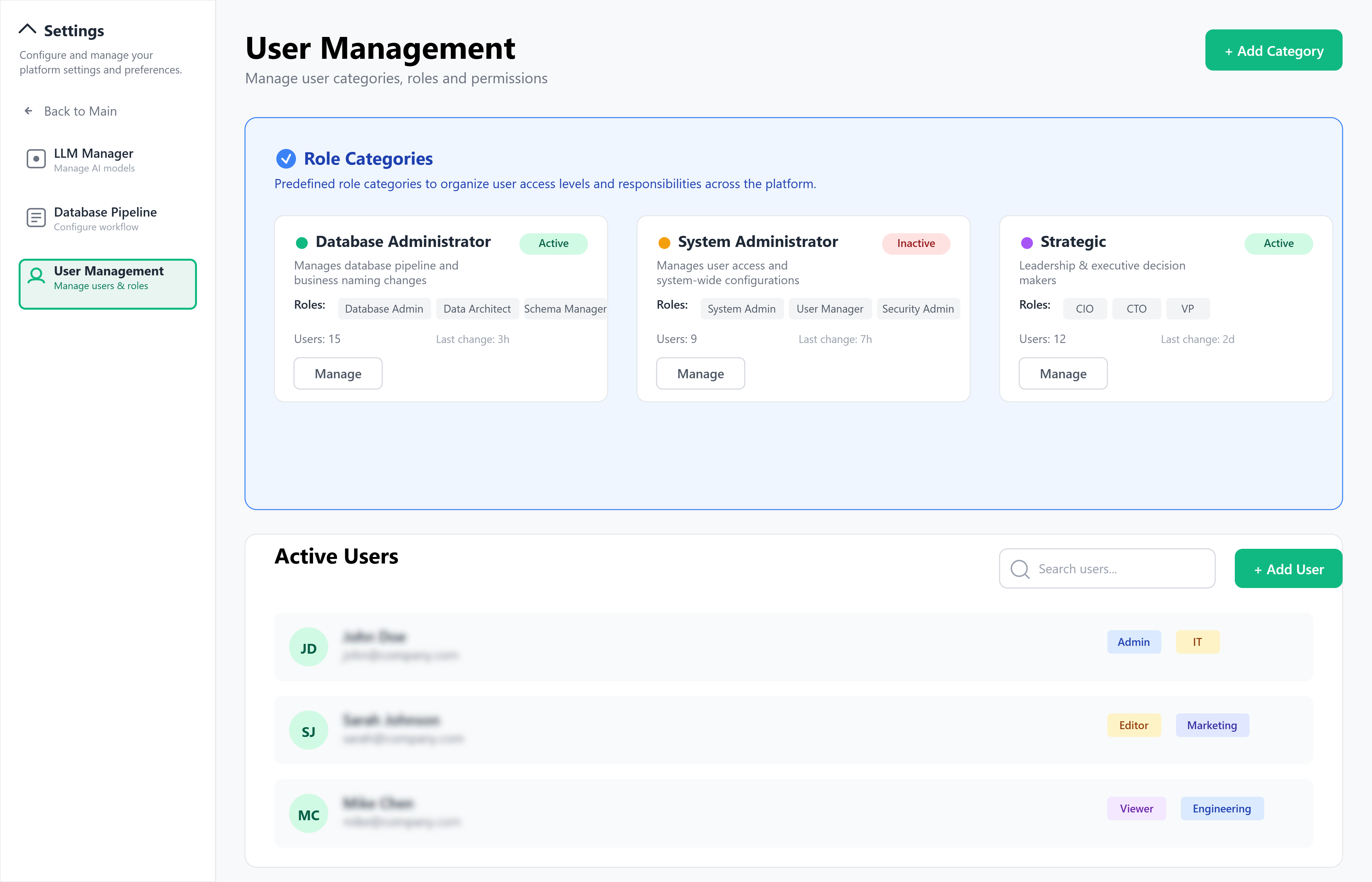
Manage Users and Roles
ClickInsights offers fine-grained, role-based access controls for governed analytics. Admins can onboard users, assign roles, and manage feature-level permissions in Admin Portal → Users & Roles.
Role Creation Steps
- Go to Users & Roles in the Admin Portal.
- Click Add New User, fill user details, and assign role categories (see below).
- Configure the Role Permissions Matrix (e.g., report creation, data access, workflow actions).
- Define Row-Level Access Rules as needed.
- Save and activate the assignment.
Assigning Roles
- Assign during onboarding via the User Directory.
- Map roles using SSO in Settings.
- Users may have multiple categories based on responsibility.
- Last Login and User Activity History provide usage visibility.
Role Categories & Roles
- Strategic — Executives & leaders (e.g., CEO, VP, CFO) who consume governed insights.
- Analytics — Business/Data Analysts who explore data and create dashboards/reports.
- Operational — Line managers & ops teams who track live KPIs with predefined views.
- Governance & Security — Compliance, audit, and risk teams who approve publishing, manage policies, and review logs.
- Platform Admin — Platform owners/admins who manage sources, the Semantic Layer, workflows, users, and settings.

Customer-Facing — External-sharing scenarios with strictly scoped, read-only access.
Built-in Roles (examples)
| Role Name | Permissions Summary |
|---|---|
| Data Admin | Full access to Data Sources, Semantic Layer, Automation Console, and Users & Roles. |
| Business Analyst | Create/manage reports and dashboards, run queries in the conversational interface, use Exploration Workspace and Wireframe Builder. |
| Data Engineer | Configure Data Sources, manage Data Transformation layer and Semantic Layer, optimize pipelines. |
| Executive User | View strategic, curated dashboards and Scheduled Reports (limited configuration). |
| Analytics Viewer | Read-only access to approved dashboards, Conversation History, and Performance Analytics. |
| Governance Manager | Manage Approvals & Governance, configure Row-Level Access Rules, review Audit Logs. |
Built-in Permissions
| Permission | Description |
|---|---|
| create_dashboards | Build and save dashboards via Wireframe Builder and templates. |
| manage_data_sources | Add/edit/remove connections in Data Sources and configure Connection Health. |
| access_automation_console | View Workflows & Health, Last Execution Log, and Run Now. |
| configure_semantic_layer | Edit Data Transformation models, Semantic Layer definitions, and Business Metrics & Dimensions. |
| approve_workflows | Access Pending Approvals, Change Review, and Impact Analysis. |
| manage_users | Provision users, assign roles, and configure the Role Permissions Matrix. |
| access_monitoring | View System Health, Query Latency, and error logs in Monitoring & Logs. |
| configure_llm_integration | Configure language model providers, test connections, and set fallback logic. |
| export_data | Export governed data via Export Options (CSV, Excel, PDF) per policy. |
| manage_schema_governance | Control Schema Explorer access, business-friendly names, and Semantic Version History. |
| access_conversation_history | View/manage Conversation History, Pinned Questions, and Bookmarks. |
| configure_notifications | Set Scheduled Reports, Triggered Alerts, Approval Notifications, and Schema Change Alerts. |
| manage_data_governance | Configure Row-Level Access Rules, data classification, and audit policies. |
| access_wireframe_builder | Design layouts, manage widgets, and convert to live dashboards. |
| view_system_logs | Access Monitoring & Logs, system metrics, and centralized log views. |
| manage_automation_workflows | Configure workflows, orchestration settings, and human-in-the-loop approvals. |
| configure_data_retention | Manage Data Retention & Backup, multi-tenant settings, and token expiry. |
| access_exploratory_analysis | Use Exploration Workspace, ad-hoc builders, and Saved Explorations. |
| manage_semantic_versioning | Track and manage changes via Semantic Version History and schema gap requests. |
| configure_integration_settings | Set collaboration-tool integrations, API quotas, and external connections. |
Notes
- Apply least-privilege: grant only what’s required for the role.
- Exports are policy-bound and respect classification and row-level rules.
Overview
This section explains how ClickInsights works at a high level its automation workflows, real-time processing, AI assistance, deployment flexibility, scalability, and data governance. ClickInsights is database-agnostic and connects to any enterprise database or data warehouse approved by your IT and governance teams.
Purpose
For technical and solution leads who need a clear view of how ClickInsights:
- Orchestrates multi-step analytical workflows
- Connects securely to enterprise data platforms
- Scales to serve many users concurrently
- Enforces governance, privacy, and compliance
High-Level Architecture
Core Components (business view)
- User Experience Layer — Unified Dashboard to view the overview of the product and settings to configure and connect DB (for Admin only), BI Workspace(Interactive Dashboards, Exploratory analysis, Ad-hoc visualisation).
- Automation Orchestrator — Runs and coordinates workflows across data sources, transformations, approvals, and visual output.
- Language Processing Gateway — Interprets natural-language requests and routes them for the best response.
- Data Transformation layer — Prepares clean, analysis-ready data models.
- Semantic Layer — Maintains shared business definitions, metrics, and dimensions for consistent results.
- Conversational Chat — Guided Q&A with conversation history and actionable follow-ups.
- Enterprise Data Connectivity — Secure connectors to approved internal data platforms (DB-agnostic).
- Automated Report Builder — Creates visual outputs from approved layouts, with optional human review.
- Admin Portal — Configure connections, manage access, and monitor health and usage.
- Analytics & Monitoring — Performance, usage, and system health for continuous improvement.
- Agentic Workflow Layer — A coordination layer that runs autonomous AI agents responsible for intent disambiguation, schema introspection, semantic gap handling, dashboard composition, approval routing, and drift monitoring.
Architecture Diagram
Data Flow Overview
- Database/Warehouse Connection
ClickInsights securely connects to approved enterprise databases or data warehouses. - Data Transformation Layer
Raw data is prepared and organized into analysis-ready business models. - Semantic Layer
Business-friendly definitions, metrics, and rules are applied to keep results consistent with organizational terms. - User Interaction
A user asks a question in the conversational interface or works directly in the analysis workspace. - Automation Orchestrator
The system detects the intent and context of the request.
The Automation Orchestrator operates as an agentic decision engine, dynamically branching workflows based on intent clarity, semantic availability, governance rules, and user feedback. - Language Processing Gateway
The natural-language request is interpreted and refined for precision. - Automated Report Builder
Based on the user’s request, approved visuals and reports are generated. - Insights Delivery
Results are returned to the user, logged for monitoring, and the session context is preserved for continuity.
LLM Deployment & Integration Models
- Public LLMs via API — Fast setup for natural-language analytics.
- Private/Enterprise LLMs — Run in your environment for maximum control and governance.
- Bring-Your-Own (BYOL) — Use domain-tuned models for specialized analysis.

ClickInsights automatically selects and routes across model options based on query needs, data sensitivity, and performance policies.
Security & Compliance
Security Controls
- Data masking for PII and sensitive fields
- Role-based access control with granular permissions
- Audit trails for queries and administrative actions
- Schema-change detection with human review before updates go live
Compliance Features
- Single Sign-On (SSO) & enterprise identity integration
- Data governance & lineage with automated reporting
- Query auditing including approvals and change history.
- Data residency controls are configurable per tenant/region.
Scalability & Reliability
| Feature | Description |
|---|---|
| Service-oriented design | Independent services scale based on demand. |
| Semantic Layer optimization | Accelerates repeat queries and improves consistency. |
| Stateless workflow services | Fast autoscaling and high availability with failover. |
| Schema-change handling | Automatic detection; updates require human approval. |
Business Layers
| Layer | What it does |
|---|---|
| Experience | Unified UI for navigation, workspace analysis, and chat. |
| Conversation & Language | Interprets questions and maintains context. |
| Automation Orchestration | Coordinates multi-step analysis and approvals. |
| Semantic Layer | Shared metrics, dimensions, and business logic. |
| Data Transformation layer | Prepares clean, analysis-ready data models. |
| Enterprise Data Connectivity | Secure links to approved data platforms (DB-agnostic). |
| Security & Governance | SSO, RBAC, auditing, masking, compliance, residency. |
| Monitoring & Analytics | Performance, usage, alerts, and health checks. |
Integration Patterns
- Event-driven updates: React to data changes and refresh approved visuals.
- Enterprise connectors: Native connectivity to approved data sources.
- Schema management: Automated ingestion and adaptation with human review.
- Human-in-the-loop: Approvals for complex analytical tasks and published outputs.
Observability & Monitoring
| Capability | Implementation (business view) |
|---|---|
| Centralized logging | Unified logs across workflow components. |
| Real-time metrics | Track model usage, query times, workflow durations, and user engagement. |
| Data pipeline monitoring | Status of Data Transformation refreshes, Semantic Layer availability, and data-source connectivity. |
| Performance analytics | Time to generate outputs, optimization insights, interaction patterns. |
| Alerts | Configurable notifications for data quality, performance, and accuracy thresholds. |
Note: ClickInsights is DB-agnostic, connecting to any database or data warehouse approved by your organization, with governance and security applied consistently across all deployments.
Overview
Use this guide to configure ClickInsights for production. You will:
- Fine-tune automation workflows and data processing behavior
- Set up roles, permissions, and data access
- Define Semantic Layer standards and approved visual templates
- Configure environment and monitoring settings
All changes are audited for governance and compliance. ClickInsights is DB-agnostic and connects to any approved database or data warehouse.
Purpose
Enable administrators to:
- Configure all analytical modules safely and consistently
- Enforce governance and privacy policies
- Support role-based access and least-privilege permissions
- Personalize user experience without risking stability
General Configuration Guidelines
- Use feature toggles to enable/disable capabilities for end users.
- Use Preview mode to test automation workflows before publishing.
- Only Platform Admin or Data Admin roles can modify global settings.
All configuration changes are logged and auditable.
Core Configuration Areas
1) Feature Flags & Workflow Controls
Toggle platform behavior without code changes.
| Feature Toggle | Description | Default |
|---|---|---|
| enableAgentWorkflows | Orchestrate multi-step analysis and responses | ON |
| enableHumanApproval | Require approval before publishing definitions/outputs | ON |
| enableSchemaDriftDetection | Monitor and alert on data-structure changes | ON |
| enableAutoVisualization | Auto-create charts from natural-language requests | ON |
| enableConversationHistory | Preserve chat context across sessions | ON |
2) Environment & System Settings
Parameters that affect performance and diagnostics:
- Data Source Connections: Connect to approved relational, cloud, analytical/OLAP, document/search, and other enterprise engines
- Workflow Timeouts: Max runtime for automation steps
- Logging Levels: Depth of query and workflow logs
- Telemetry: Performance and usage analytics collection
- Session Persistence: Configure chat and workspace state retention
3) Data Source Configuration
- Manage credentials for approved sources
- Set connection pooling limits and retry logic
- Tune query performance and caching preferences
- Apply governance: masking rules and access restrictions
4) Role-Based Access Control (RBAC)
Assign roles from the standard categories and apply least-privilege access.
Role Categories & Typical Roles
- Strategic: Executives & leaders (e.g., CEO, VP, CFO) — view governed insights, subscribe to reports
- Analytics: Business/Data Analysts — explore data, build and propose dashboards/reports
- Operational: Line managers & ops teams — consume operational views, filter and track KPIs
- Governance & Security: Compliance, audit, risk — approve publishing, manage policies, review logs
- Platform Admin: Platform owners/admins — manage sources, Semantic Layer, workflows, users
The privileges are solely based on the roles assigned to you. Contact the admin for any changes in the role based access.
5) LLM Configuration
Set up language model options for natural-language analytics:
- Connect public providers (via API), or use private/enterprise models
- Bring-Your-Own domain models if required
- Define routing & fallback order
- Set confidence thresholds for responses
6) Semantic & Data Transformation Configuration
Keep definitions consistent and business-friendly:
- Data Transformation layer: Configure pipelines and business models (facts, dimensions, cleansing)
- Semantic Layer: Define metrics, dimensions, relationships, and naming standards
- Semantic Caching: Enable result caching where appropriate
- Lineage & Documentation: Auto-document transformations and changes
Semantic Gap Handling
When user queries require undefined metrics or dimensions, ClickInsights automatically detects the gap and generates a governed request for administrators. These requests include suggested definitions, source mappings, and transformation logic for review and approval before becoming available to users.
7) Automation Workflow Configuration
- Define execution policies, approvals, and human-in-the-loop steps
- Use workflow templates for repeatable processes
- Tune timeouts and resource allocation
- Configure error handling (fallbacks and retries)
8) Visualization & Report Settings
- Set default chart types by pattern (trend, comparison, distribution, etc.)
- Apply layout templates and branding
- Enable interactive controls (drill-down, filters, exploration)
- Configure export & sharing (CSV, Excel, PDF) with permissions and watermarks where needed
9) Integration & API Settings
- Configure SSO with your enterprise identity provider
- Manage API credentials and rotation
- Set webhook endpoints with retry policies
- Connect to existing data-pipeline workflows as required
10) Data Governance & Compliance
- Define data masking rules for PII and sensitive fields
- Enable audit logging for queries, definitions, and access events
- Set data retention windows per policy
- Review access-control and change logs regularly
11) Performance & Monitoring
- Query alerts for slow/failed queries
- Workflow execution monitoring (success/fail, durations)
- Data source health (connectivity, response times)
- User engagement analytics for adoption/usage
- System resources (memory, CPU, storage)
12) Notifications & Alerting
- In-app/email alerts for workflow failures, connectivity issues, or degraded performance
- Webhook or collaboration-tool notifications for ops teams
- Data-quality alerts for schema drift and definition inconsistencies
- User session timeout notices before expiry
Setup Order
- Connect Data Sources (governed, approved)
- Configure Data Transformation models
- Define Semantic Layer metrics & business terms
- Enable Automation Workflows and Approvals
- Set RBAC and data policies
- Configure Monitoring & Alerts
- Roll out to users (Strategic → Operational → Analytics), then iterate
Validation Checklist (Go-Live)
- Data sources connected and tested
- Semantic definitions approved (metrics, dimensions, names)
- Role mappings active via SSO
- Alerts configured for queries, workflows, and data drift
- Exports respect classification and row-level policies
- Audit logs enabled and reviewed
ClickInsights applies enterprise-grade governance so analytical data is collected, processed, and shared with integrity, traceability, and accountability. Governance spans the full lifecycle from data-source connection to report export using clear classification, access controls, approvals, and auditability across automation workflows.

ClickInsights is DB-agnostic and does not copy or persist your source dataset contents; governed logs and configuration artifacts are retained per your policy.
Data Classification Guidelines
ClickInsights labels analytical data and outputs by sensitivity and permitted use. These labels drive access, approvals, visibility, and export controls.
Classification Tiers
| Tier | Description |
|---|---|
| Public | Non-sensitive, aggregated analytics (e.g., anonymized usage statistics, public KPI summaries). |
| Internal | Operational metadata, schema information, and system performance metrics not exposed to end users. |
| Confidential | Conversation metadata, analytical query patterns, report templates, and automation-generated insights. |
| Restricted | High-sensitivity items such as customer-specific analytics, financial results, or regulated records (treatment per enterprise policy). |
Labeling Mechanism
Labels are applied to fields, models, and outputs across the Data Transformation layer, Semantic Layer, and reports. Labels determine:
- Row-Level Access Rules enforcement and visibility
- Where content appears in reports and analytical views
- Export restrictions and API access scopes governed by the Semantic Layer
- Workflow permissions within the Automation Console
Handling of Restricted data follows your enterprise policy. This governance section does not prescribe masking/redaction or encryption steps.
Data Handling by Classification
- Restricted: Visible only to authorized roles as defined in Users & Roles and Row-Level Access Rules. Publishing and sharing require approval.
- Confidential: Accessible to permitted roles; excluded from exports unless explicitly approved.
- Internal: Accessible to platform administrators and relevant operators; not shown to general end users.
- Public: May be shared broadly when marked as approved.
ClickInsights processes data in place on connected sources; saved assets (e.g., reports, wireframes, configuration) follow your retention and sharing policies.
Access Auditing & Logging
All access and key actions—by users, workflows, or automated systems—are logged with context in Monitoring & Logs for traceability.
Logged activities include:
- Authentication & roles: sign-ins, category/role assignments, changes in Users & Roles
- Semantic access: lookups, definition changes, and Schema Explorer usage
- Workflow execution: automation runs, query executions, report generation/publishing
- Conversation activity: conversational interactions and viewing/sharing of approved outputs
- Approvals: decisions in Approvals & Governance, including schema/change reviews
Each log records timestamp, IP, user role category, action type, and relevant data-source or asset context.
Audit reports & alerts:
- Filterable by classification, role category (Strategic, Analytics, Operational, Governance & Security, Platform Admin), or data source
- Suspicious patterns (e.g., mass exports, rapid deletions, unauthorized definition changes) trigger Notifications
- Full trails support compliance reviews (e.g., GDPR/SOC 2 as applicable to your organization)
- Schema Change Alerts require review before updates are published
Third-Party & API Access Controls
ClickInsights enforces strict boundaries for external integrations:
- Periodic reviews of data-source connections via Connection Health
- Access expiry and activity-based revocation via Settings
- LLM Integration limited to authorized, minimal query context per your policy
Data Sharing Controls
Export Restrictions
- Exports from reports and exploration can be limited by classification and governance tags
- Exports may require additional approval for Confidential or Restricted items
- Saved Explorations follow the same rules as live queries
API Throttling & Rate Limits
- Query Latency tracking helps tune performance within governance boundaries
- Rate limits apply to the conversational interface to prevent data enumeration
Partner Data Filters
When sharing with third-party systems:
- Only pre-approved fields and metrics are exposed via the Semantic Layer
- Restricted elements can be excluded from shared outputs and API responses
- Row-Level Access Rules ensure partners see only their authorized segment
- Business Metrics & Dimensions policies govern exactly what can be shared
Governance at Scale
Click Insight’s governance model is built to:
- Scale across many data sources, teams, and regions (US & APAC)
- Enforce policy automatically across orchestration, definitions, and exports
- Provide clear auditability via Monitoring & Logs and Audit Logs
- Maintain analytical accuracy via the Semantic Layer and Automation Console
- Enable self-service analytics with role-based guardrails
- Support enterprise operations with Multi-Tenant Management and Data Retention & Backup (configured in Settings)
Bottom line: Whether users interact through the UI, create reports, or review automation outputs, every action is governed and auditable, with access and sharing controlled by your organization’s classifications, roles, and approvals without persisting your source dataset contents in ClickInsights.
Overview
This section helps new users, administrators, and implementation teams onboard and start using ClickInsights efficiently. It covers:
- How to access the platform
- Prerequisites for initial setup
- Key configurations and usage patterns
ClickInsights lets users ask questions in natural language and get instant answers with charts and graphs. It also supports drag-and-drop exploratory analysis and guided report creation. All activity runs through automation workflows with secure, role-based access and a Semantic Layer for consistent business definitions. ClickInsights is database-agnostic and connects to any relational database or data warehouse.
Prerequisites
System Requirements
- Modern web browser: Chrome, Firefox, Safari, or Edge (JavaScript enabled)
- Stable internet connection (cloud) or network access (on-premises)
- Enterprise deployment environment
- Connectivity to your approved enterprise data sources
Access Credentials
- Single Sign-On (SSO)
- Admin privileges for Semantic Layer configuration and user access management
- Data-source connection credentials (from your IT team)
Supported Data Sources
- Relational data platforms
- Cloud data platforms
- Analytical/OLAP platforms
- Document/search platforms
- Other enterprise query engines
Infrastructure
- Enterprise environment for production and testing
Step-by-Step Instructions
1) Accessing ClickInsights
For End Users
- Go to the platform URL provided by your administrator.
- Sign in using SSO.
- Use the UI to search, ask questions in natural language, and explore results.
For Administrators
- Open the Admin Portal with elevated privileges.
- Use Monitoring & Logs to check workflow status, system health, and recent activity.
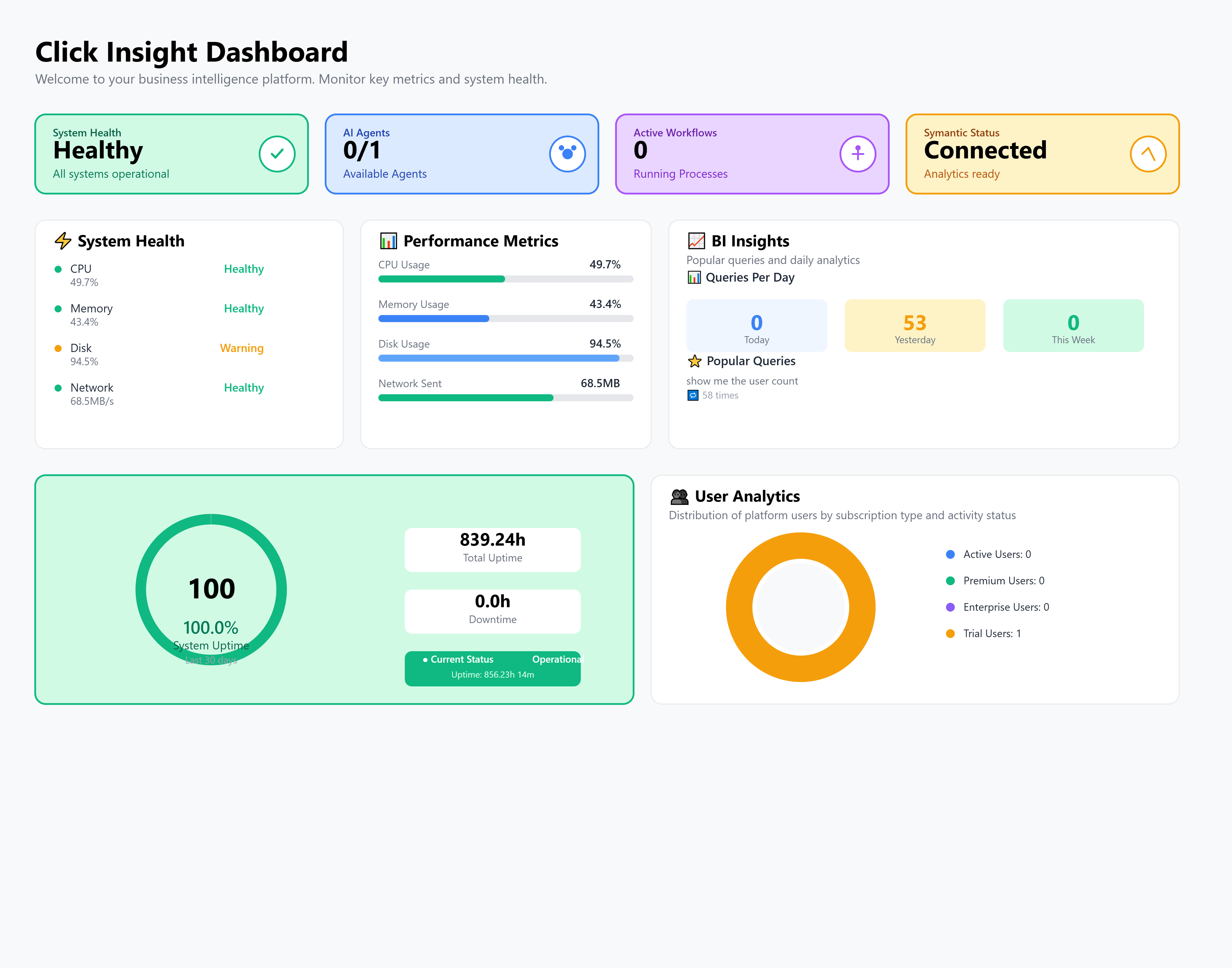
Platform Interface Overview (What Users See)
Workspace
Interactive dashboards, exploratory analysis, ad-hoc charts/tables, and a Wireframe Builder for layout design.
Conversational Interface
Business chat experience with conversation history, context, and interactive actions for guided report creation.
Admin Portal Modules (What Admins Control)
| Module | Description |
|---|---|
| Schema Configuration Dashboard | Start schema understanding, set business-friendly mappings, view table metadata |
| Human-in-the-Loop Approval | Review and approve outputs from the Data Transformation layer and Semantic Layer with impact awareness |
| Automation Workflow Management | Monitor automation workflows (schema understanding, transformation setup, approvals, drift checks, orchestration) |
| Data Transformation Layer Management | Track transformation health, lineage, execution status, and documentation |
| Semantic Layer Administration | Manage business definitions, metric rules, usage optimization, and performance insights |
| Monitoring Dashboard | Track workflow status, system metrics, recent activity, and performance indicators |
Initial Platform Setup (Admin)
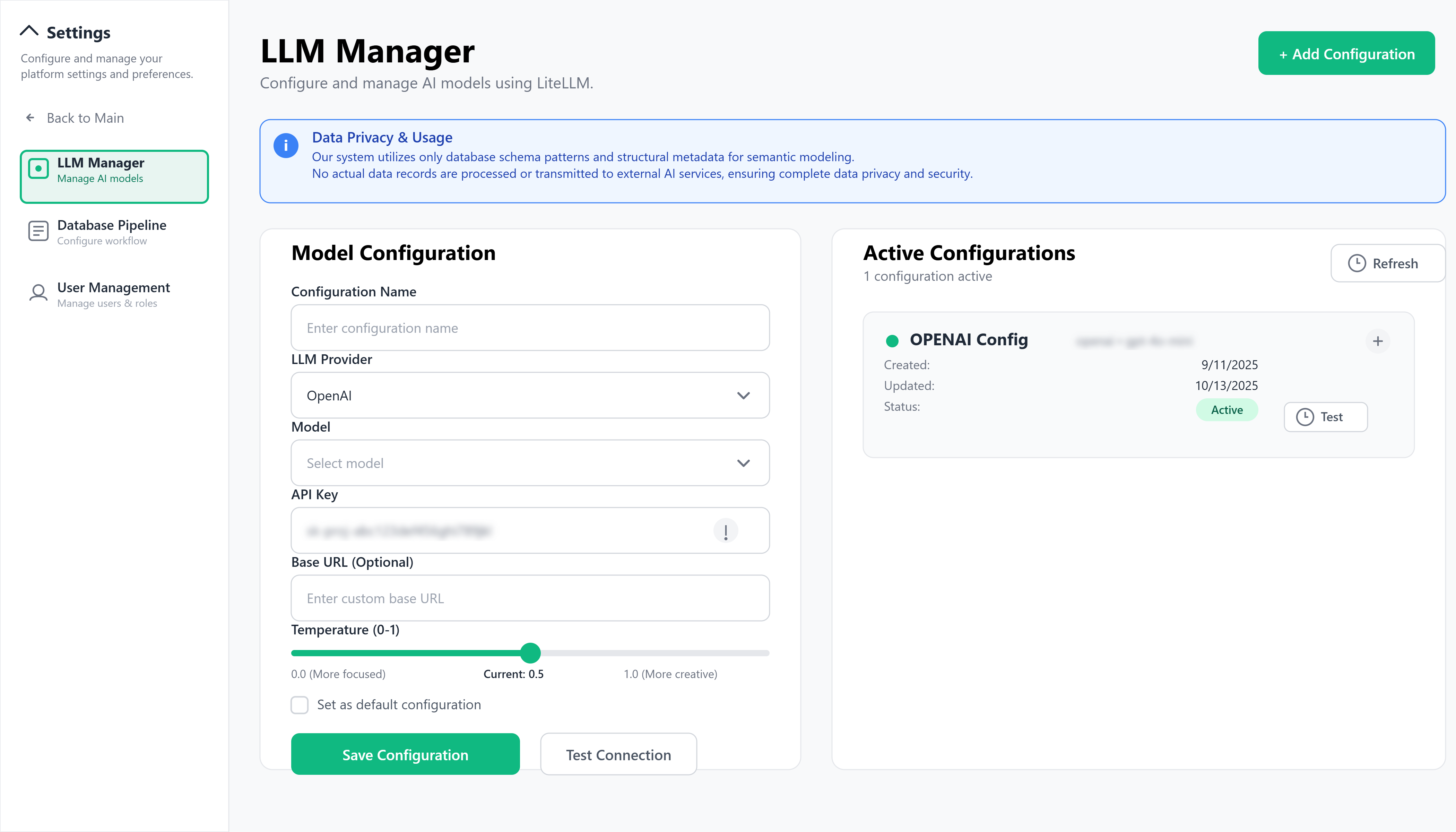
Step 1: LLM Configuration
- Configure and Connect with the LLM
- Select your desired LLM type and add the credentials
- Set the temperature between 0 and 1 to get answers more focussed or more creative.
- Enter details and test connectivity
Step 2: Data Source Integration
- Open Schema Configuration Dashboard
- Select your data-source type from your enterprise catalog
- Enter connection details and test connectivity
- Run schema understanding to load structures in business terms
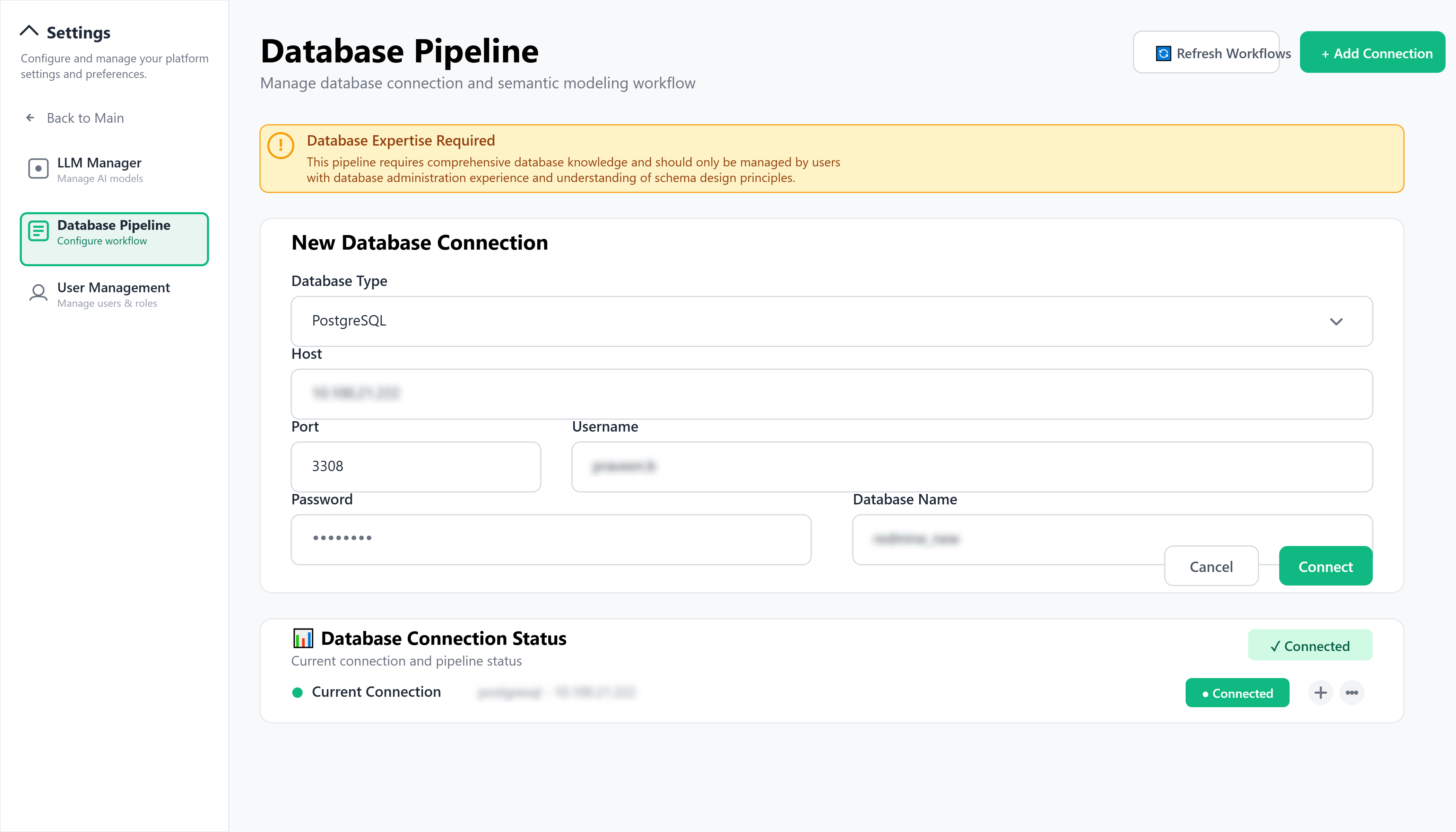
This pipeline requires comprehensive database knowledge and should only be managed by users with database administration experience and understanding of schema design principles.
Step 3: Semantic Layer Configuration
- In the Data Transformation layer, create business-ready models (facts, dimensions, staging/cleaning)
- Configure the Semantic Layer with business-friendly names, metrics, and relationships
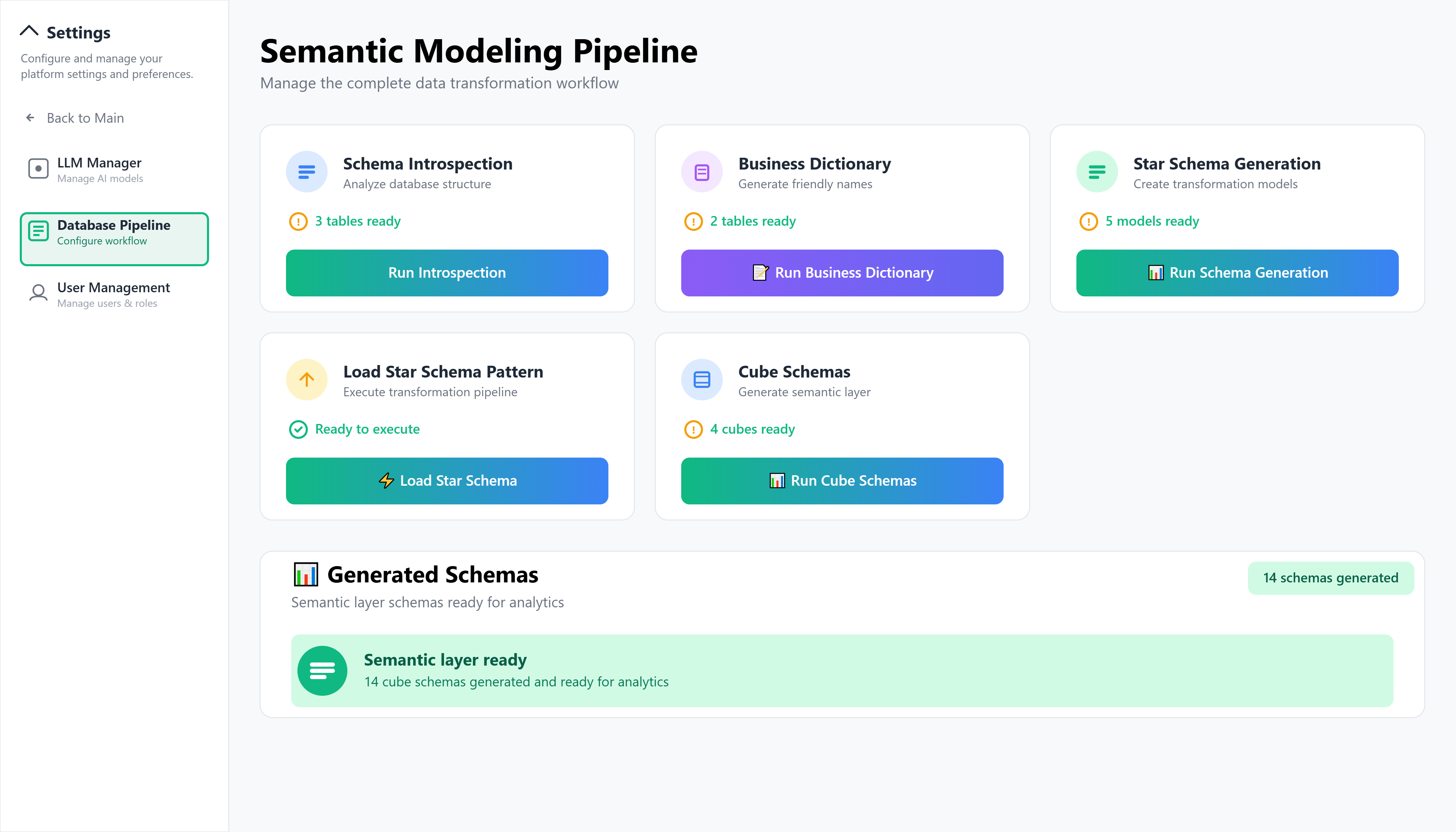
Our system utilizes only database schema patterns and structural metadata for semantic modeling.
Step 4: Workflow Configuration
- In Automation Workflow Management, enable workflows for:
- Schema understanding
- Model creation (Data Transformation layer)
- Approval flow (human-in-the-loop)
- Semantic Layer setup
- Drift detection (continuous monitoring)
- Orchestration (overall coordination)
Step 5: Access Control Setup
- Configure role-based permissions for different Role categories.
- Set row-level security and governance policies
- Enable approvals for changes to business definitions
Step 6: User Experience Deployment
Enable the conversational interface and workspace for users
Validate end-to-end: natural-language question → previewed layout → saved report
Using the Platform (End Users)
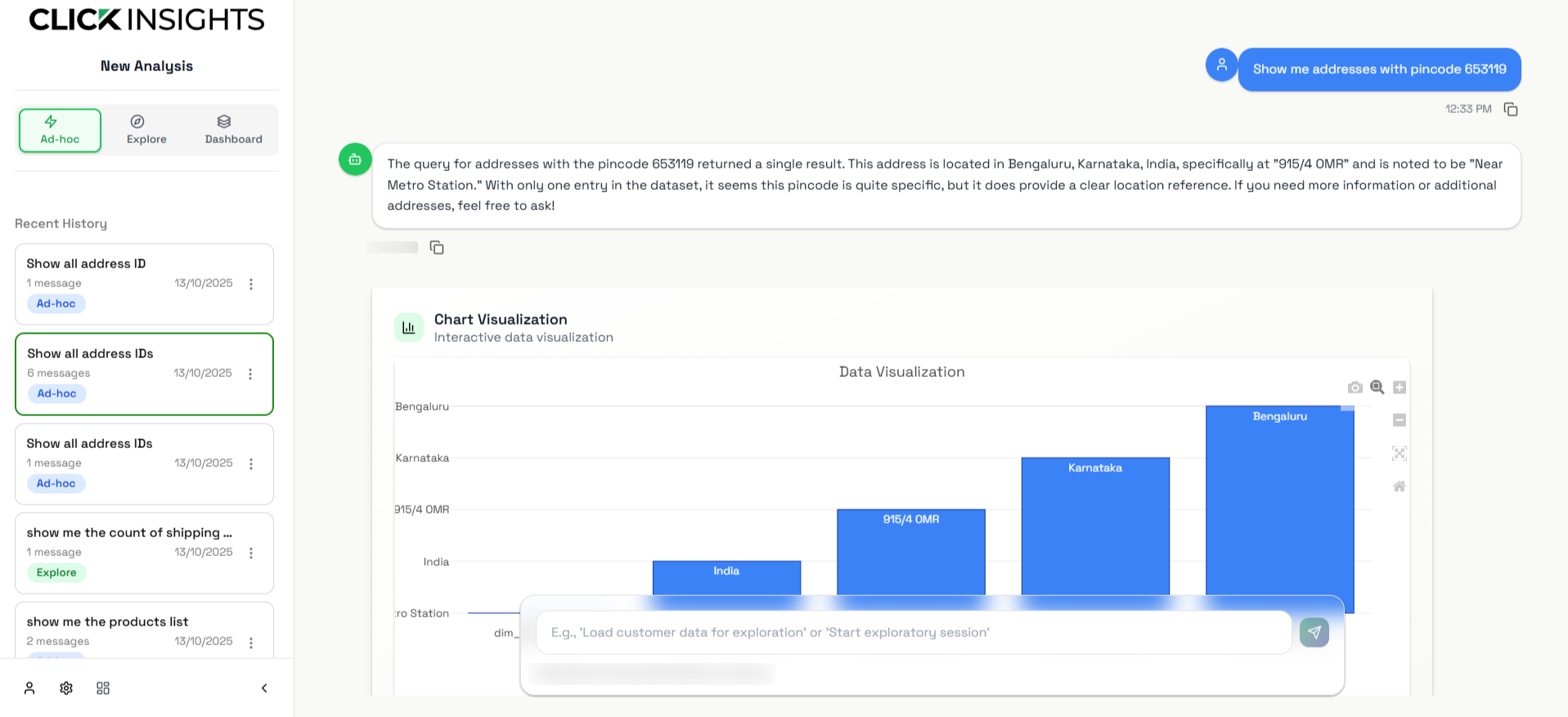
Natural-Language Questions
- Ask in plain English (e.g., “Show me sales trends for the last 6 months by region.”)
- Results are returned with charts/tables, using the Semantic Layer for consistent definitions
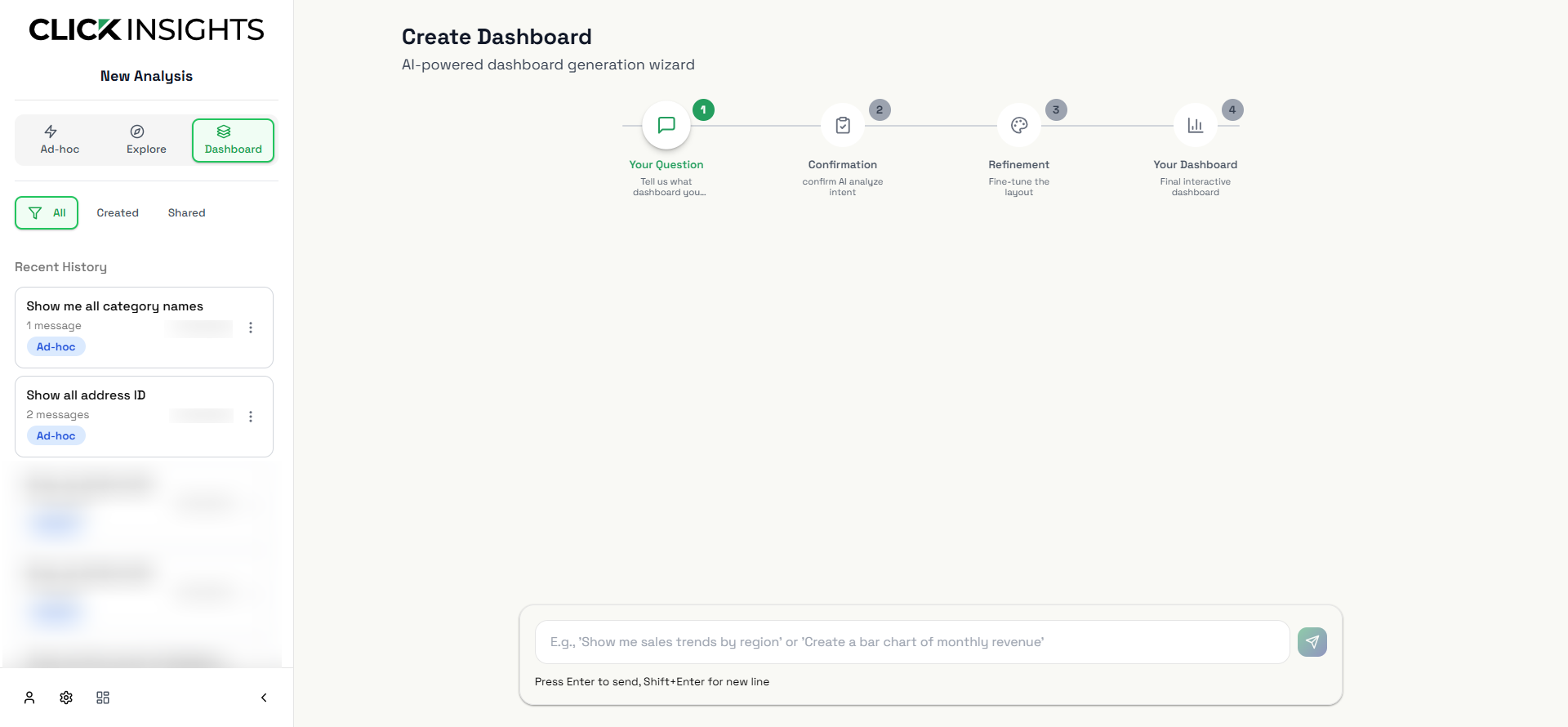
Interactive Report/Dashboard Creation
- Request: “Create a marketing performance dashboard.”
- The system proposes wireframes and previews; approve or edit and save as a canned report
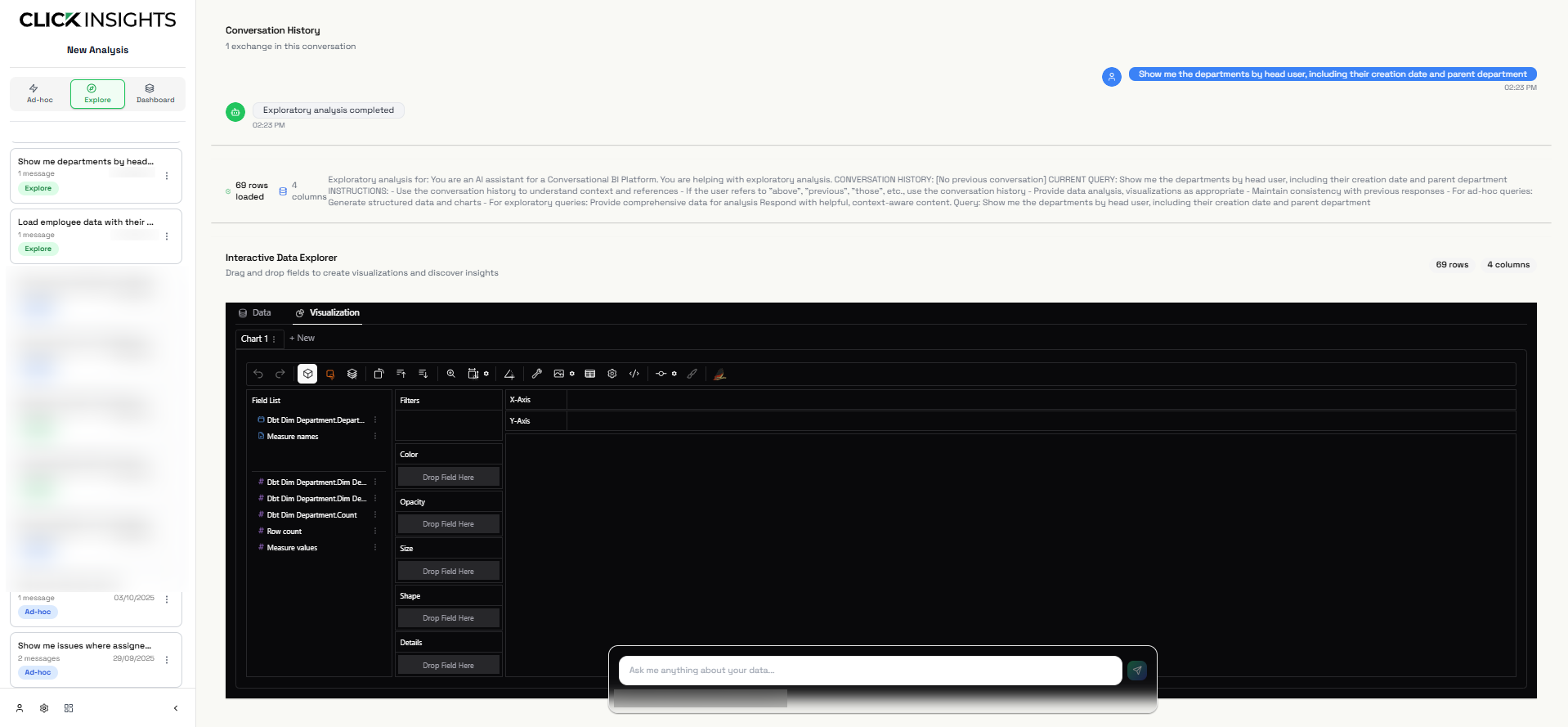
Exploratory Data Analysis
- Use the exploration workspace to drag and drop fields, build ad-hoc charts/tables, and refine with filters and breakdowns
Platform Capabilities
Core Features
- Ad-hoc Querying: Ask in plain language—no SQL required
- Exploratory Analysis: Drill down, filter, and follow up conversationally
- Guided Creation: Build dashboards step-by-step with wireframe guidance
- Report Management: Access and share canned reports with permissions
Visualization (business-level)
- Interactive charts and tables within the workspace and chat
Governance & Security
- Human-in-the-Loop Approval: Changes to Data Transformation or Semantic Layer require admin approval
- Schema Drift Detection: Automatic monitoring of upstream changes with impact highlights
- Row-Level Security: Enforced by platform policies with user context
- Audit Trail: Logging for queries, approvals, and modifications
Next Steps
Role Categories in ClickInsights
- Strategic: Executives and leadership (e.g., CEO, VP, CFO) for high-level insights.
- Analytics: Business and data analysts for exploration, querying, and dashboard creation.
- Operational: Line managers and ops teams for daily performance tracking.
- Governance & Security: Compliance, audit, and risk teams for approvals, policies, and monitoring.
- Platform Admin: Owners and administrators for managing sources, access, and workflows.
ClickInsights is DB-agnostic and connects to any database or data warehouse approved by your organization’s IT and governance policies.
Release notes
Data Transformation Layer for standardized, reusable analytical models
Semantic Layer unifying business metrics and shared terminology across teams
Granular Access Controls including role-based and row-level permissions
Automated Change Detection to monitor and alert on data-source structure changes
Governance, consistency, and enterprise control to ensure analytics remain aligned with business definitions
Multi-Data Source Connectivity for seamless integration across databases, warehouses, and document stores
Automated Intelligence System for schema discovery, model setup, and orchestration
Conversational Analytics Interface enabling natural-language insights and visual answers
Smart Dashboard & Wireframe Builder for no-code, guided layout creation
Single Sign-On (SSO) for enterprise-grade authentication and secure access
ClickInsights Minimal Viable Product launched.
Overview
Implement ClickInsights across your enterprise by integrating data sources, configuring the Semantic Layer and Data Transformation layer, enabling automation workflows, and rolling out the UI. This guide provides a clear, step-by-step path to deliver real-time conversational analytics and guided report creation. ClickInsights is DB-agnostic and connects to any approved database or data warehouse.
Implementation Methods
You can implement modules independently or together:
- Data Base/Data Warehouse Integration.
- Data Transformation and Semantic Layer Integration.
- Governance & User Management Integration.
For fastest go-live, start with LLM Configuration, Data Infrastructure Integration, then add Semantic & Automation, followed by Workspace testing.
Step-by-Step Instructions
Step 1: Admin Portal Access & Initial Setup
- Sign in to the Admin Portal with admin credentials.
- Open Settings to configure environment parameters (org name, regions).
- Check Monitoring & Logs to confirm component health.
Step 2: Data Base/Data Warehouse Integration
Prerequisites
- Database/warehouse credentials for target sources
- Network access from ClickInsights to your data platforms
- Confirmation that sources are approved by governance
Configuration
- Go to Data Sources → Add New Sources.
- Select source type (relational, analytical/OLAP, cloud, document/search, or enterprise engine).
- Enter connection details and authentication.
- Enable Connection Health monitoring.
- Test Connection and verify Last Sync Status.
- Load Data Source Metadata for schema understanding.
Validation
- Connection Health: Connected
- No connection errors in logs
- Schema understanding completes
- Metadata populated and searchable
Step 3: Data Transformation and Semantic Layer Configuration
Prerequisites
- Data Transformation layer structure available
- Access to configure Semantic Layer
- Rights to define Business Metrics & Dimensions
Configuration
- Open Semantic Layer and Schema Explorer to review source structures.
- Configure the Data Transformation layer:
- Build business models (facts, dimensions, cleansing).
- Define transformation/business rules.
- Schedule transformations as needed.
- Configure the Semantic Layer:
- Define Business Metrics & Dimensions and relationships.
- Apply business-friendly names.
- Set Row-Level Access Rules.
- Track changes in Semantic Version History.
Validation
- Transformations run successfully
- Semantic definitions validate
- Metrics visible in Schema Explorer
- Row-level policies enforce expected visibility
Step 4: Automation Workflow & Orchestration Setup
Prerequisites
- Automation orchestration enabled
- LLM Integration configured (credentials, routing, fallback)
- Human reviewers assigned for approvals
Configuration
- Open Automation Console → Workflows & Health and configure:
- Schema Understanding (automated discovery)
- Transformation Creation (assist model building)
- Drift Detection (watch schema changes)
- Semantic Update (maintain definitions)
- Approval (human-in-the-loop)
- Orchestration (dependencies & order)
- Open Approvals & Governance:
- Set publishing approvals for definitions/outputs
- Enable Change Review and Impact Analysis
- Test each workflow with Run Now.
Validation
- Workflows show Healthy in Workflows & Health
- Last Execution Log shows successful runs
- Approvals appear in Pending Approvals
- Schema gap requests are processed
Step 5: Result (Functional Readiness)
- Users access the app based on role categories.
- The UI and conversational experience are live and consistent.
- Databases and warehouses connect smoothly.
- Conversational queries produce accurate insights and suggested layouts.
- Drag-and-drop tools refine visuals from the conversational flow.
- Monitoring and alerting provide operational visibility.
Step 6: User Management & Governance Setup
Prerequisites
- SSO access to your enterprise IdP
- Role categories and scope defined
Configuration
- Go to Users & Roles.
- Integrate directory via SSO in Settings.
- Assign Categories and roles using the model below:
- Strategic: Executives & leaders (CEO, VP, CFO) — view governed insights, subscribe to reports.
- Analytics: Business/Data Analysts — explore, create, and propose dashboards/reports.
- Operational: Line managers & ops teams — consume operational views, filter KPIs.
- Governance & Security: Compliance, audit, risk — approve publishing, manage policies, review logs.
- Platform Admin: Platform owners/admins — manage sources, Semantic Layer, workflows, users.
- Configure Row-Level Access Rules.
- Set Notifications: Scheduled Reports, Triggered Alerts, Approval Notifications, Schema Change Alerts.
Customer-Facing — scoped, read-only sharing for external audiences if required.
Validation
- SSO login works
- Role-based access behaves as designed
- Users see modules appropriate to their category
- Notifications deliver as expected
Step 7: Monitoring & Operational Setup
Prerequisites
- Enterprise monitoring/logging destinations (if integrating)
- Defined alert thresholds and routing
Configuration
- Open Monitoring & Logs:
- Enable System Health views
- Configure Query Latency tracking
- Confirm Real-time Connection Status
- Integrate metrics into your enterprise monitoring (optional).
- Configure centralized logs with error filters.
- Enable schema drift detection and alerts.
- Create operational dashboards for administrators.
Validation
- Health and latency views show live data
- Alerts trigger and route correctly
- Logs aggregate and filter as expected
- Resource and availability metrics are accurate
Summary
| Integration Method | Best For | Deployment Time | Dependencies |
|---|---|---|---|
| Data Infrastructure Integration | Connecting enterprise databases/warehouses | Low | Credentials, network access |
| Semantic Layer Integration | Consistent business logic and metrics | Moderate | Data Transformation layer, Semantic access |
| Automation Orchestration Integration | Automated workflows and approvals | High | Orchestration enabled, LLM Integration, reviewers |
| Governance Integration | User management, approvals, compliance | Moderate | SSO, role categories, approval design |
Recommended Sequence
LLM Configuration → Data Infrastructure → Semantic Layer → Automation Orchestration → User Management → UI workflow → Monitoring & Governance
Post-Implementation Validation
- Sections visible per role category
- UI functions smoothly across workflows
- Conversational interface returns accurate insights and approved layouts
- Approvals and governance controls operate correctly
- Monitoring and alerting provide operational visibility
ClickInsights provides built-in monitoring and alerting to help administrators:
- Maintain platform uptime and performance
- Ensure healthy data pipelines and automation workflows
- Detect and resolve data-quality issues and anomalies proactively
Monitoring spans automation workflows, Data Transformation layer, Semantic Layer, data sources, and user interactions—all accessible via Admin Portal → Monitoring & Logs.
Monitoring Tools
| Tool Name | Metrics Tracked |
|---|---|
| System Health Dashboard | CPU/memory usage, query throughput, active sessions, response latency |
| Workflow Execution Monitor | Automation workflow status, success/failure rates, execution times, approval queue depth |
| Data Transformation layer | Transformation run status, Semantic Layer refresh health, schema-drift events, transformation errors |
| Query Performance Monitor | Database query latency, Semantic Layer response times, visualization generation speed |
| User Engagement Analytics | Conversation counts, report/dashboard creation rates, query patterns, user retention |
| Data Source Health | Connectivity status, pool utilization, timeout/error events |
| LLM Integration Monitor | Model response times, token usage, fallback activations, confidence indicators |
All tools support:
- Real-time and historical graphing with enterprise monitoring visuals
- Trend analysis and correlation
- Metrics integration for advanced monitoring
- Centralized log viewer with error filters
- Exports for compliance and operational reporting
Alert Setup
Configure rules for failures, performance degradation, or data-quality anomalies using thresholds, events, and webhook/collaboration integrations.
Threshold-Based Alerts
- High query latency: > 30s average over 5-minute windows
- Pipeline degradation: Data Transformation failures or Semantic Layer refresh delays
- Schema drift events: Unexpected source changes requiring approval
Event-Based Alerts
- Data source outages: Connectivity/authentication failures
- Data-quality anomalies: Semantic Layer inconsistencies or transformation validation failures
- LLM issues: Provider errors or confidence breaches
- Report generation failures: Visualization errors or human-approval bottlenecks
Schema Change Alerts
- Drift detection alerts: Automatic notifications for structure changes in sources
- Semantic inconsistencies: Transformation compile failures or semantic validation errors
- Governance violations: Row-Level Access Rules breaches or unauthorized access attempts
Notification Rules
Alert Groups
- Platform Admin: System health, resource utilization, security events
- Governance & Security: Approvals, policy violations, sensitive exports, schema changes
- Analytics: Report generation failures, query performance issues
- Operational: Operational dashboard availability and KPI data freshness.
Scalable & Transparent
- Real-time observability: Live monitoring of automation workflows, Data Transformation, Semantic Layer, and user interactions
- Rapid root-cause analysis: Correlated logging across the Automation Console, Semantic Layer, and Data Sources
- Full analytical transparency: Visibility into query paths, approvals, and data lineage
- Governance compliance: Complete audit trails for access, approvals, and system changes
Whether you’re running a single department or an enterprise-wide deployment, Monitoring & Logs keeps ClickInsights reliable, performant, and well-governed.
ClickInsights is committed to protecting enterprise data privacy and providing transparency across our analytical practices. This policy explains how we collect, use, store, and safeguard information in support of conversational analytics and governed reporting. ClickInsights is DB-agnostic and connects to any enterprise database or data warehouse approved by your organization.
1) Scope
This policy applies to all interactions with ClickInsights services, including the conversational experience, workspace, Admin Portal, and data-source integrations.
2) Privacy-by-Design
We embed privacy at every step and align to recognized frameworks: GDPR, SOC 2 Type II, and NIST SP 800-30 (risk assessment methodology alignment).
Core goals
- Use analytical data only for stated business-intelligence purposes.
- Give enterprises control over access and retention.
- Maintain clear transparency about collection and processing.
- Support evolving obligations with configurable controls.
Our system utilizes only database schema patterns and structural metadata for semantic modeling. No actual data records are processed or transmitted to external AI services, ensuring complete data privacy and security.
3) What We Collect & How We Use It
We do not store your source data contents. ClickInsights does not copy or persist customer dataset contents from your databases or warehouses. Data is processed in place; outputs are rendered to users and are not retained by default beyond enterprise-configured settings.
Information we may process/store (configurable)
- Account & directory info: name, email, organization, role/category (via Users & Roles) to authenticate and authorize access.
- Conversational/session metadata: timestamps, query text, interaction events, chosen filters, and Conversation History (if enabled by your admin) to deliver results and preserve context.
- Operational telemetry: system performance metrics, Automation Console workflow status, and data-source connectivity health for reliability and troubleshooting.
- Semantic/Transformation activity: changes to Data Transformation and the Semantic Layer (e.g., Business Metrics & Dimensions) for governance and auditability.
Purposes
- Deliver conversational analytics and guided report creation (e.g., Wireframe Builder suggestions).
- Operate and secure the service (monitoring, troubleshooting, fraud/abuse prevention).
- Enforce governance (approvals, access policies, retention).
- Provide compliance evidence (audit logs and reports).
We do not sell enterprise data. We do not train foundation models on your data. LLM providers receive only the minimal, authorized context required, with masking where configured.
4) Consent Management
Touchpoints: platform sign-in, data-source linking, conversation logging, and exports.
Controls: configurable consent banners (Settings), category-based flows, and versioned policy notices (Semantic Version History).
Opt-out: managed through Users & Roles and admin request workflows. Retention windows are enterprise-configurable.
Data Subject Rights (DSRs): Access (get a copy), Deletion (erase data), Correction (fix inaccuracies), Portability (receive data in a usable format). Requests are handled via Admin Portal/API within 7 business days.
5) Cross-Border Processing
Analytics may be processed outside a user’s region to meet enterprise needs. Transfers use encrypted channels, audited sub-processors, and safeguards aligned with GDPR.
6) Automated Decision-Making (AI)
We use AI to:
- Recommend report layouts and visualizations.
- Trigger alerts/notifications for anomalies or drift.
- Generate structured natural-language answers with LLM Integration.
Human-in-the-loop approvals (Approvals & Governance) are required before material definition changes or sensitive outputs are published. Manual review is available on request.
7) Audit Logging
We maintain immutable Audit Logs for accountability.
Events captured (examples)
- Session: conversational interactions, report access, sign-in/out.
- Workflow Activity: Automation Console runs and approvals.
- Admin Activity: data-source configuration, Semantic Layer updates, Users & Roles changes.
- Data Access: Row-Level Access Rules enforcement, Schema Explorer usage, export actions.
Log handling
- Cryptographically protected and access-controlled.
- Exportable in standard formats via Monitoring & Logs.
- Retained per Data Retention & Backup settings defined by your organization.
8) Security Practices
- Encryption in transit and at rest (TLS 1.2+ / AES-256).
- RBAC via Users & Roles with least-privilege access.
- Real-time monitoring (System Health, Query Latency, drift detection).
- Regular security reviews of Data Sources, Automation Console, and LLM Integration.
- Schema-drift monitoring with approvals before definitions go live.
- Compliance aligned with GDPR, SOC 2 Type II, and NIST SP 800-30 (risk assessment methodology alignment).
9) Roles & Access (business categories)
- Strategic: view governed insights, subscribe to reports.
- Analytics: explore, create, and propose reports/dashboards.
- Operational: consume operational views and KPIs.
- Governance & Security: approve publishing, manage policies, review logs.
- Platform Admin: manage sources, Semantic Layer, workflows, users.
Access is enforced with Row-Level Access Rules, classification tags, and approval workflows.
10) Data Retention & Deletion
Retention windows for logs, conversation history, and configuration artifacts are admin-controlled. Exports and saved assets follow classification and policy rules. Upon contract end or per policy, data is deleted or returned according to the enterprise agreement.
11) Sub-Processors
Where sub-processors are used (e.g., hosting, logging, alerting), they are audited, contractually bound, and limited to the minimum necessary scope. A current list is available upon request or via your enterprise agreement.
12) Changes to this Policy
We review this policy periodically to reflect platform updates and legal changes. The Admin Portal → Settings displays the effective date and version. Continued use of ClickInsights constitutes acceptance of the latest version.
Overview
ClickInsights is an AI-powered business intelligence platform that turns natural-language questions into instant answers with charts and graphs.
ClickInsights is an agentic, conversational Business Intelligence platform that enables business users to interact with enterprise data using natural language while enforcing governed, semantic-driven analytics.
Unlike traditional BI tools, ClickInsights uses autonomous AI agents to interpret intent, manage data semantics, generate analytical workflows, and produce dashboards through guided conversations—without requiring SQL or manual modeling from end users.
The platform combines a conversational interface, an enterprise-grade Semantic Layer, automated workflow orchestration, and human-in-the-loop governance to deliver accurate, explainable, and auditable insights at scale.

1. What is ClickInsights?
ClickInsights is a comprehensive analytics platform that:
- Processes natural-language questions and returns accurate, business-ready answers in a chat experience.
- Supports exploratory analysis so users can drill down, filter, and pivot conversationally.
- Creates interactive dashboards and reports through guided steps with prompts and wireframes.
- Saves and manages dashboards as “canned reports” for easy sharing and reuse.
- Connects to any approved enterprise data source (DB-agnostic).
- Provides a Semantic Layer that maps business terms to data for precise, business-friendly query translation.
- Agentic Workflow Orchestration: Autonomous AI agents coordinate schema understanding, query planning, dashboard composition, approvals, and drift handling without manual intervention.
- Wireframe-First Dashboard Generation: Dashboards are created through multi-step conversational flows with visual wireframe previews before deployment.
- Semantic Gap Detection & Resolution: Automatically detects missing metrics or dimensions and routes them through governed approval workflows.
- Conversational Context Awareness: Supports multi-turn conversations with reference resolution (e.g., “this chart”, “current dashboard”, “previous query”).
- Human-in-the-Loop Governance: All structural changes to business logic, metrics, and dashboards require explicit approval before going live.
- Orchestrates automation workflows for schema understanding, Data Transformation layer setup, and semantic management.
- Enforces strong governance with role-based and row-level security.
Designed for teams across industries that need secure, governed analytics with a modern conversational experience.
2. Target Personas
Role Categories in ClickInsights
- Strategic: Executives and leadership (e.g., CEO, VP, CFO) for high-level insights.
- Analytics: Business and data analysts for exploration, querying, and dashboard creation.
- Operational: Line managers and ops teams for daily performance tracking.
- Governance & Security: Compliance, audit, and risk teams for approvals, policies, and monitoring.
- Platform Admin: Owners and administrators for managing sources, access, and workflows.
3. End User Experience (What Users See)
a) User Interface
- Navigation Home: Recent queries, Global filters, business areas, User Analytics, System health and BI Insights.
- Workspace: Interactive dashboards, Ad-hoc visualisation and Exploratory analysis.
- Chat Interface: Quick chat with Data that has conversation history and interactive actions.
b) Modes of Interaction
- Chat Interface: Ask questions in natural language to get quick and visually appealing insights.
- BI Workspace: Interact directly to create live dashboards, charts, and exploration tools to drill down on data and generate insights.
c) What ClickInsights Can Do for Users
- Ad-hoc Querying: Ask spontaneous questions in natural language (no SQL needed) and get quick answers with charts/graphs.
- Exploratory Analysis: Drill, filter, and follow up to explore results with different fields.
- Interactive Dashboard Generation: Build live dashboards step-by-step with prompts and wireframes.
- Visualization Options: View results as tables, charts, and graphs in chat or the workspace.
- Export: Export results and reports to CSV, Excel, or PDF.
- Context Preservation: Keep conversation history and analysis context across sessions.
d) Conversational Intelligence Model
ClickInsights supports multi-turn analytical conversations where context is preserved across queries and sessions.
Key capabilities include:
- Context carryover across questions and dashboards
- Reference resolution for existing visuals and reports
- Conversational clarification when intent or data requirements are ambiguous
- Blended interaction model where chat actions and workspace actions remain synchronized
4. Admin Interface (What Teams Control)
The ClickInsights Admin Portal — Your command center
Core Admin Features
| Feature | What You Can Control |
|---|---|
| Schema Configuration Dashboard | Start schema understanding, set business-friendly mappings, manage data connections |
| Human-in-the-Loop Approval | Review and approve Data Transformation layer outputs and Semantic Layer definitions with impact awareness |
| Automation Workflow Management | Monitor automation workflows (schema understanding, transformation creation, approvals, drift checks, orchestration) |
| Data Transformation Layer Management | Track transformation health, lineage, and execution status |
| Semantic Layer Administration | Manage business definitions, usage optimization, and query performance insights |
| User Access Management | Configure role-based permissions, row-level security, and governance policies |
| Monitoring Dashboard | Track workflow status, system health, recent activity, and performance indicators |
Agent & Workflow Governance (Admin Only)
ClickInsights administrators have full visibility and control over autonomous analytical workflows.
Capabilities include:
- Agent Workflow Monitoring: View real-time status of schema discovery, query planning, dashboard generation, and drift detection agents.
- Approval Queues: Review and approve changes related to Semantic Layer definitions, new metrics, transformations, and dashboard templates.
- Schema Drift Detection: Automatic identification of upstream schema changes with impact analysis before applying updates.
- Execution Logs & Audit Trails: Complete traceability for agent actions, approvals, and user-triggered workflows.
Onboarding & Setup Steps
| Step | Function | Purpose |
|---|---|---|
| Step 1 | Connect Data Sources | Integrate with your enterprise data platforms via built-in connectors(DB Agnostic) |
| Step 2 | Configure Semantic & Transformation Layers | Set up the Data Transformation layer and the Semantic Layer using guided workflows |
| Step 3 | Test Workflows | Preview how automation workflows respond to queries and generate visualizations with approvals |
| Step 4 | Define Access Controls | Configure role-based permissions, row-level security, and governance |
| Step 5 | Deploy to Users | Launch ClickInsights for teams with role-based access and governance applied |
5. How It Works
Data Flow:
Source Data → Data Transformation layer → Semantic Layer → Automated Workflows → User Experience
- Works with common enterprise data platforms (DB-agnostic).
- Single sign-on and enterprise security with audit logging and governance.
- Human-in-the-loop approvals for controlled changes to business definitions.
Security & Governance
- Authentication: Single sign-on with enterprise identity providers.
- Authorization: Role-based access with row-level security.
- Data Privacy: Encrypted in transit, audit logs, and compliance controls.
- Governance: Approval workflows for changes to data definitions.
6. Key Benefits
Simplified Analytics
- No SQL Required: Ask in plain English; the Semantic Layer handles business-term translation.
- Automated Dashboard/Report Creation: Guided wireframes help produce the right layout fast.
- Consistent Business Definitions: The Semantic Layer keeps metrics and terms uniform.
DB Agnostic connection
- Agnostic connection : Connects across different DBs and Data warehouses.
Enterprise-Grade Governance
- Approval Workflows: Human review before changes go live.
- Schema Drift Detection: Automatic checks for upstream changes.
- Audit Trail: Logging for queries, changes, and approvals.
Multi-Modal Experience
- Interactive dashboards and visual exploration tools for analysis.
- Conversational interface with context awareness to speed decisions.
7. Deployment Versatility
- DB-Agnostic, Multi-Source Support: Connect to any major database or data warehouse.
- Scalable for Growth: Designed to support high user volumes.
- Cloud or On-Premises: Deploy in the environment that fits your policy.
- Timely Updates: Near real-time refresh, where configured.
What’s New & What’s Next: The JourneyAssist Milestone Journey
JourneyAssist is on a mission to evolve digital experiences — from passive interfaces to intelligent, conversion-first journeys. Below is a transparent view of our phased milestones, tracking how the platform is expanding to meet enterprise needs.
ClickInsights is engineered with enterprise-grade security and compliance to protect analytical data, conversational interactions, and AI-generated insights. Built on zero-trust principles, ClickInsights applies industry-standard encryption, identity governance, real-time monitoring, and AI-aware controls. It is DB-agnostic and connects to any approved database or data warehouse.
ClickInsights does not copy or persist your source dataset contents; governed logs and configuration artifacts are retained according to your policy.
1) Data Security & Privacy Controls
Data classification & handling
- Public: anonymized, aggregated analytics with no business risk.
- Internal: System Health metrics, Monitoring & Logs, and other operational metadata (not exposed to end users).
- Confidential: conversation metadata, report templates, Wireframe Builder layouts, and user identifiers.
- Restricted: PII and financial or customer-specific data; encrypted, governed by Row-Level Access Rules, and fully audited.
ClickInsights processes data in place on your approved sources. Outputs are rendered to users and retained only as configured by your administrators.
2) PII Handling in Conversations
Real-time protection
Inputs are screened by the LLM Integration gateway. Configured PII masking/redaction occurs before models receive context. Row-Level Access Rules apply masking and filtering at the Semantic Layer for unauthorized viewers. Drift Detection flags newly introduced sensitive fields for review and classification.
Access control
Access is role-restricted (Users & Roles) and fully logged (IP, timestamp, role metadata). Workflow isolation ensures models and automations do not retain or learn from sensitive data.
3) Application & Network Security
Application security
We follow a secure development lifecycle with reviews, static analysis, and runtime checks. Strict input validation prevents XSS and injection in queries and parameters.
Network security
Segmented networks and firewall policies isolate data sources and Semantic Layer components. Internal services for automation workflows are policy-scoped and isolated.
Identity & access management
SSO is provided through your enterprise identity provider, with fine-grained RBAC for analytical tasks. MFA is required for Data Admin tasks and Approvals & Governance access. Role categories include Strategic, Analytics, Operational, Governance & Security, and Platform Admin.
4) AI Security & Responsible Use
Principles
- Transparency: documented LLM Integration usage and performance guidelines.
- Fairness: tested behavior across diverse datasets and user categories.
- Governance: pre-deployment checklists and Approvals & Governance for sensitive changes.
Model lifecycle governance
Version control is applied to prompts, Semantic Layer definitions, and Data Transformation updates. Deployment audits use version hashes via Semantic Version History.
5) Monitoring, Logging & Incident Response
Monitoring & alerts
We provide 24/7 visibility through System Health (throughput, latency, availability). Built-in alerts cover query latency thresholds, workflow failures, source connectivity/authentication, and resource saturation.
Logging & auditing
Audit logs include timestamp, IP, role, action, and data-source context. There is full traceability for Semantic Layer access, report changes, Automation Console activity, and Row-Level Access Rules enforcement. Anomaly signals are raised for mass exports or unusual Schema Explorer activity.
Incident response
Runbooks guide escalation and recovery. Session replay is available via Conversation History.
6) Data Sharing & Consent Management
| Capability | Description |
|---|---|
| Analytical Consent Logging | Records consent for source processing, report generation, and LLM Integration. |
| Self-Service Privacy Tools | Access, download, and delete governed artifacts via Users & Roles and Export Options. |
| Export Controls | Exports from reports and Exploration respect classification and Row-Level Access Rules. |
| Retention Governance | Data Retention & Backup policies aligned with enterprise policy and GDPR. |
7) OWASP Top 10 for LLM/AI Readiness (Mapping)
| Risk | ClickInsights Mitigation |
|---|---|
| Prompt Injection | Input sanitization, filtered prompts, isolated execution. |
| Insecure Output Handling | Output validation/redaction and governance checks. |
| Training Data Poisoning | No public training endpoints; vetted base models only. |
| Model DoS | Quotas and throttling for model requests/workflows. |
| Supply Chain | Reviewed dependencies; no unvetted third-party model uploads. |
| Excessive Agency | Human-in-the-loop approvals for sensitive actions. |
| Model Theft | Hash tracking and secure proxy mediation. |
8) Data Warehouse & Database Security
Connections
All connections are encrypted. Credentials are rotated via Settings, with allow-list/firewall controls. Connection pooling uses timeouts and max-connection limits.
Data lake & warehouse integration
Object encryption and role-based access are enforced. Federated access respects isolation across joined sources. Metadata access is scoped and audited.
9) Conversational Interface Security
Conversation History is isolated across sessions. Permission checks run before executing generated queries, and Row-Level Access Rules are applied to all results.
10) Report & Visualization Security
Report access is controlled via Users & Roles, with safe rendering for embeds. Exports (CSV, Excel, PDF) can apply watermarks and are fully audited. Real-time updates always respect access controls. Wireframe Builder templates and widgets are validated so layouts cannot bypass policies.
11) Multi-Source Protection & Integrations
Sources are isolated, with guarded federation for cross-source joins. Schema-correlation protections mitigate inference risks. Private connectivity supports on-prem sources; zero-trust patterns are applied for cloud links.
12) Performance & Availability Security
Performance protection
Resource quotas, circuit breakers, and guarded caching include access checks. Load balancing and horizontal scaling support peak demand.
BC/DR
Backups cover report configurations and Conversation History (if enabled). Failover preserves access controls. Secure replication supports multi-region deployments with defined RPO/RTO.
Deployment Options
- Cloud-Native (Multi-Tenant): logical isolation with Users & Roles controls.
- Single-Tenant Cloud: dedicated instance and isolated data paths.
- Private Cloud: customer-owned cloud with residency controls.
- On-Premise: customer data center deployment for regulated industries.
Compliance Alignment (Summary)
| Objective | ClickInsights Support |
|---|---|
| GDPR | Access/deletion, consent logs, anonymization & masking |
| SOC 2 Type II | Controls mapped to the Trust Services Criteria |
| NIST SP 800-30 (Methodology Alignment) | Risk assessment and management practices aligned to NIST SP 800-30 guidance |
| OWASP for LLMs | Mitigations across lifecycle and runtime |
Commitment
ClickInsights delivers secure, ethical, and compliant analytical AI. With end-to-end governance across Data Transformation, the Semantic Layer, LLM Integration, and automation workflows, organizations can operate with confidence—gaining real-time, AI-driven insights while keeping data protected and policies enforced.
Roadmap
Version 1.0.0 – Foundation Built
May 25, 2025
ClickInsights officially launched with core capabilities forming the backbone of intelligent, conversational analytics for enterprise data environments.
Version 1.1.0 – Semantic Layer & Governance
Jun 25, 2025
Enhanced governance, consistency, and enterprise control, ensuring analytics remain aligned with business language and definitions.
Version 1.2.0 – Advanced Analytics & Monitoring
Jul 25, 2025
Rolling out advanced analytical capabilities with real-time system visibility and intelligent monitoring.
Version 1.3.0 – Enterprise Integration & User Management
Aug 25, 2025
Next phase focusing on enterprise scalability, user control, and flexible integration to support organizational growth.
Future Vision – Next-Level Innovation
Sep 25, 2025
Strategic innovations to position ClickInsights as the leader in conversational business intelligence and governed AI analytics.
ClickInsights officially launched with core capabilities forming the backbone of intelligent, conversational analytics for enterprise data environments.
Key Highlights
- Multi-Data Source Connectivity: Seamless integration with all enterprise data systems — relational databases, cloud data warehouses, analytical stores, and document data sources.
- Automated Intelligence System: Automated workflows for schema understanding, model setup, and orchestration.
- Conversational Analytics Interface: Natural-language chat experience for instant visual insights.
- Smart Dashboard & Wireframe Builder: No-code dashboard creation using guided layouts, wireframes, and interactive chart templates.
- Single Sign-On (SSO): Enterprise-grade authentication integrated for secure, frictionless user access.
Enhanced governance, consistency, and enterprise control, ensuring analytics remain aligned with business language and definitions.
Key Highlights
- Data Transformation Layer: Structured, reusable data models ensuring standardized analysis.
- Semantic Layer: Unified business metrics and shared terminology across the organization.
- Granular Access Controls: Role-based and row-level policies to manage secure data visibility.
- Automated Change Detection: Continuous monitoring to detect and alert on data-source structure changes.
Rolling out advanced analytical capabilities with real-time system visibility and intelligent monitoring.
Key Highlights
- Multi-Model Intelligence: Enhanced AI engine leveraging multiple language models for accuracy and context.
- Specialized Automation Agents: Intelligent assistants for data validation, transformation, and insight generation.
- Collaborative Analytics: Real-time shared workspaces for team-based exploration and dashboard creation.
- Performance Monitoring: Continuous tracking of system health, security posture, and workflow performance.
Next phase focusing on enterprise scalability, user control, and flexible integration to support organizational growth.
Planned Features
- Advanced Role & User Management: Define permissions and responsibilities through an enterprise-grade matrix.
- Governed Export Framework: Secure and compliant exports to CSV, Excel, PDF, and PNG with audit tracking.
- Extended Dashboard Customization: Enhanced layout templates, theme controls, and reusable design modules.
- Integration Enhancements: Broader ecosystem integrations with enterprise systems and collaboration tools.
Strategic innovations to position ClickInsights as the leader in conversational business intelligence and governed AI analytics.
Upcoming Capabilities
- Predictive & Prescriptive Analytics: AI-driven forecasting, trend analysis, and what-if simulations through conversation.
- Collaborative Workflows: Shared analytical sessions with real-time edits, annotations, and audit trails.
- Autonomous Agents: Intelligent assistants that proactively monitor, clean, and optimize data environments.
- Adaptive AI Models: Domain-tuned intelligence that evolves with enterprise context and usage patterns.
ClickInsights is built to make analytics human, governed, and intelligent — turning data into conversation and insights into business action. Every release strengthens our mission to bring secure, conversational analytics to every enterprise user, with the governance, reliability, and scalability global businesses demand.
Access Click Insight product guides, security briefs, and governance docs to unlock safe, conversational analytics across your enterprise.
All Resources (0 resources)

Why ClickInsights Features
An overview of ClickInsights as an AI-powered conversational BI platform that turns natural-language questions into streaming insights with guided analytics, unified visuals, and proactive intelligence.
ClickInsights Security & Privacy
Explains how Click Insight protects analytical data with zero-trust design, encryption, SSO and RBAC, PII masking, audit logs, and controls that avoid copying source datasets while keeping AI usage governed.
This section describes the hardware, software, and infrastructure prerequisites required to deploy and operate ClickInsights. ClickInsights is a configurable enterprise platform and does not require customers to build custom code or develop internal components.
Deployment Models Supported
ClickInsights can be deployed in the following models based on enterprise policy and compliance needs:
- Cloud (Single-Tenant or Multi-Tenant)
- Private Cloud (Customer-managed cloud environment)
- On-Premise (Customer data center)
Infrastructure Requirements (Application Layer)
The following infrastructure is required to run ClickInsights application services, automation workflows, and agent orchestration.
Minimum Configuration:
- CPU: 8 virtual CPUs
- Memory (RAM): 32 GB
- Storage: 200 GB SSD
- Operating System: Linux (Ubuntu 20.04 or later)
Recommended Configuration for Production:
- CPU: 16 virtual CPUs or higher
- Memory (RAM): 64 GB or higher
- Storage: 500 GB SSD or higher
- Operating System: Linux (Ubuntu 22.04 recommended)
Metadata & Platform Database Requirements
ClickInsights uses a metadata database to store dashboards, wireframes, configuration data, approvals, audit logs, and system metadata.
- Database: PostgreSQL
- Supported Version: PostgreSQL 13 or later
- Minimum Memory: 8 GB RAM
- Recommended Storage: 100 GB SSD
- Usage Scope: Platform metadata only (no customer business data stored)
Cache & Performance Layer
A caching layer is required to support semantic caching, pre-aggregations, and performance optimization.
- Cache Service: Redis
- Minimum Memory: 8 GB RAM
- Recommended Memory: 16 GB RAM
- Purpose: Query acceleration, semantic caching, and workflow state handling
Network & Connectivity Requirements
- Secure network connectivity between ClickInsights and enterprise data sources
- TLS 1.2 or higher enabled for all data-in-transit communication
- Firewall allow-listing for ClickInsights services
- VPN or private network peering for on-premise or private cloud deployments
- Stable internal network latency for query execution and visualization rendering
Supported Data Platforms
ClickInsights can connect to enterprise-approved data platforms, including:
- Relational Databases such as PostgreSQL and MySQL
- Cloud Data Warehouses such as Snowflake, BigQuery, and Redshift
- Analytical and OLAP engines such as ClickHouse, Dremio, and DuckDB
- Enterprise data lakes accessed through approved query engines
Authentication & Identity Requirements
- Enterprise Single Sign-On (SSO) using OIDC-compliant identity providers
- JWT-based session management
- Centralized role-based access control enforced by the platform
End User System Requirements
For business users accessing ClickInsights:
- Modern web browser (Chrome, Edge, Firefox, or Safari)
- JavaScript enabled
- Stable network connectivity to the ClickInsights deployment environment
- No local software installation required
Operational & Scalability Considerations
- Horizontal scaling supported for application services and agent workflows
- High availability recommended for production environments
- Monitoring and alerting integration strongly recommended
- Backup and data retention policies configurable based on enterprise standards
- Suitable for multi-user, enterprise-scale deployments
What Customers Do Not Need to Provide
- No custom SQL development by business users
- No AI model training or tuning
- No frontend or backend application development
- No direct database access for end users
- No manual semantic modeling for standard usage